


TL;DR
- Kubernetes role-based access control (RBAC) works on a deny-by-default model, where permissions can only be added, never inherited beyond what a user already has.
- Four resource types control authorization: Roles, ClusterRoles, RoleBindings, and ClusterRoleBindings—understanding how they combine is key to avoiding over-provisioned access.
- Three “uncommon verbs”—bind, escalate, and impersonate—can quietly bypass Kubernetes’ built-in privilege escalation protections if misused, and the wildcard character deserves extra scrutiny for the same reason.
This article originally appeared on ContainerJournal.com and can be found here. It’s reprinted here with permission.
Kubernetes role-based access control (RBAC) governs who can do what to which resources in a cluster. Four resource types do the work:
- Role—a set of permissions (verbs like
get,list, orcreate) over resources like pods or secrets, scoped to a single namespace. - ClusterRole—the same idea, scoped to the entire cluster instead of one namespace.
- RoleBinding—grants a Role’s permissions to a user, group, or service account inside one namespace. It can also grant a ClusterRole’s permissions, limited to that namespace.
- ClusterRoleBinding—grants a ClusterRole’s permissions across every namespace in the cluster.
The short version: Roles and ClusterRoles define what can be done. RoleBindings and ClusterRoleBindings decide who can do it and where. Access is denied by default and permissions only ever add up—Kubernetes RBAC has no deny rule, so the only way to take access away is to remove the binding that granted it.
“I’m sorry Dave, I’m afraid I can’t do that.”
– HAL 9000, 2001: A Space Odyssey
This iconic quote from 2001: A Space Odyssey is a great place to start if you want to understand authorization in Kubernetes. In the movie, of course, HAL is a rogue artificial intelligence; imagine for a moment that he was instead a simpler, rules-based system responsible for allowing or denying requests. An astronaut might ask HAL to perform a task, like “turn off the lights” or “pressurize the airlock.” HAL, operating in (hopefully) the best interests of the astronauts and their spacecraft, must decide whether the request is reasonable and if the action should be taken. HAL needs to evaluate each request against a set of internal rules that define who is authorized to execute what actions that impact which resources. This is “authorization” in a nutshell: a system of rules designed to determine whether or not something is allowed.
Understanding authorization is critical to understanding how role-based access control (RBAC) works for securing Kubernetes. Whether you’re a security professional starting to learn about Kubernetes or an engineer building with it, it’s important to understand the basic systems and rules that govern Kubernetes.
RBAC in Kubernetes
While Kubernetes technically supports other authorization modes, RBAC tends to be the de facto mode for access control these days. Understanding how it works will help users provision the permissions their teams need and avoid handing them out unnecessarily to those that don’t need them. These concepts are especially useful as security pros think about Kubernetes security and managing risk across a cluster.
Before getting into specifics, there are a few core design principles worth calling out:
- Access is denied by default and permissions can only be added.
- A user cannot grant permission for something they do not have the permission to do themselves. This is a built-in mechanism to prevent privilege escalation.
- Because Kubernetes relies on a trust relationship with an external identity provider—such as an identity and access management (IAM) system—there is no such thing as a “Kubernetes user.” The external identity provider is responsible for managing users, while Kubernetes simply ensures users can prove they are who they claim to be and checks whether they are authorized to perform the desired action.
Resource types for RBAC configuration
As with everything Kubernetes, configuring RBAC policy is just a matter of creating the right resources. In this case, there are four resource types that control authorization: Roles, ClusterRoles, RoleBindings and ClusterRoleBindings. While some of these may sound similar, there are important differences. Roles and RoleBindings grant access within the scope of a single namespace while ClusterRoles and ClusterRoleBindings are generally used to provide access across the entire cluster (though there are exceptions).
Defining roles and role bindings is as simple as whipping up manifests in YAML. The schema for these resources is well documented in the official Kubernetes docs, but it’s important to understand how it works in practice. Below are a few examples to help illustrate the process:
Role and RoleBinding: Granting access to read pods for one namespace
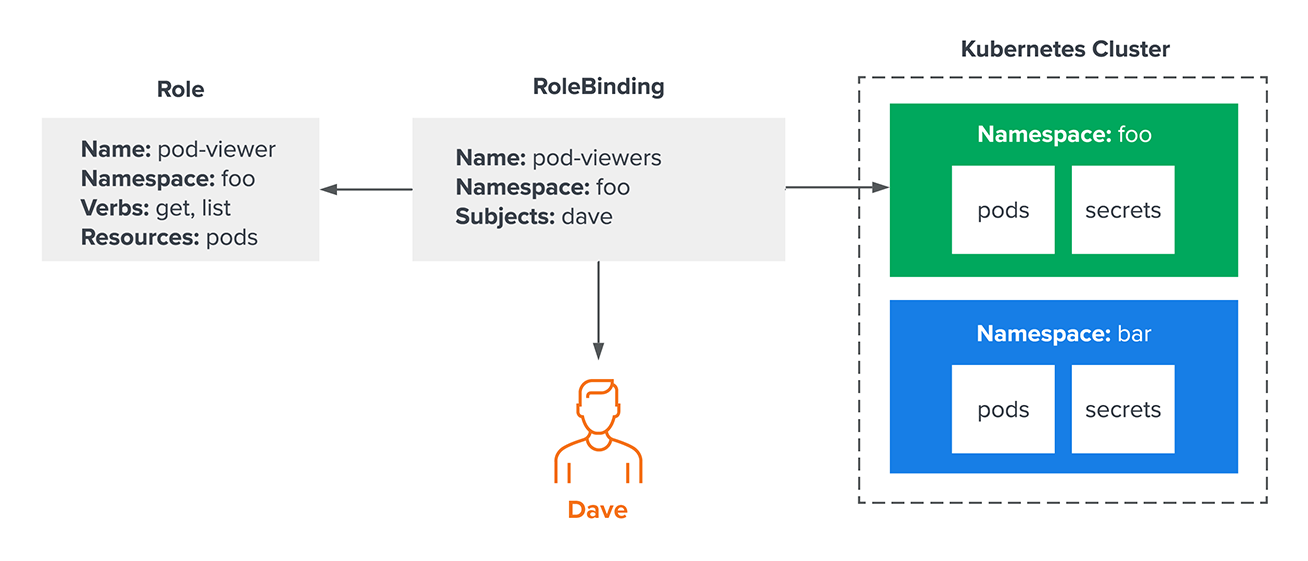
Let’s start with a simple example—an administrator needs to grant “Dave” access to get and list pods in a single namespace. They would start by creating a Role and RoleBinding that look something like this:
kind: Role
metadata:
name: pod-viewer
namespace: foo
rules:
– apiGroups: [“”]
resources: [“pods”]
verbs: [“get”, “list”]
—
apiVersion: rbac.authorization.k8s.io/v1
kind: RoleBinding
metadata:
name: pod-viewers
namespace: foo
subjects:
– kind: User
name: dave
apiGroup: rbac.authorization.k8s.io
roleRef:
kind: Role
name: pod-viewer
apiGroup: rbac.authorization.k8s.io
They’ve created two resources: a Role called pod-viewer and a RoleBinding called pod-viewers. The role defines what actions (aka “verbs”) can be taken against what kinds of “resources.” The RoleBinding is what maps principals (in this case, only Dave) to that role. In this example, Dave can only get and list pods in the “foo” namespace. He will not be able to interact with any resources in the “bar” namespace.
ClusterRole and ClusterRoleBinding: Granting cluster-wide access
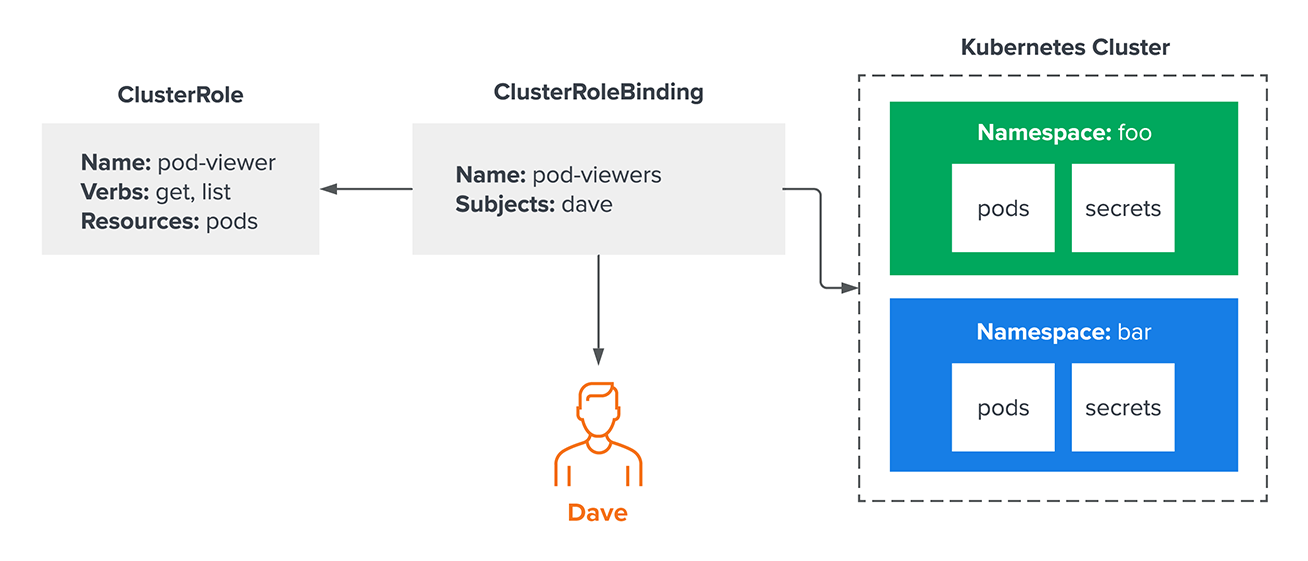
Now imagine the administrator wants Dave to be able to examine all pods in a cluster across all namespaces. One way to accomplish this is with a ClusterRole and ClusterRoleBinding, like so:
kind: ClusterRole
metadata:
name: pod-viewer
rules:
– apiGroups: [“”]
resources: [“pods”]
verbs: [“get”, “list”]
—
apiVersion: rbac.authorization.k8s.io/v1
kind: ClusterRoleBinding
metadata:
name: pod-viewers
subjects:
– kind: User
name: dave
apiGroup: rbac.authorization.k8s.io
roleRef:
kind: ClusterRole
name: pod-viewer
apiGroup: rbac.authorization.k8s.io
At first glance, this may look similar to the previous example, but now Dave’s access isn’t limited to the “foo” namespace. Because this results in broader, less restricted access, security analysts and engineers will correctly note that granting access across the entire cluster is risky. Generally speaking, it’s important to avoid over-provisioning permissions. Given the frequency with which today’s attackers are engaging in identity theft, over-provisioning can cause serious damage if an identity is compromised.
ClusterRole with RoleBinding: Scoping a shared role to one namespace
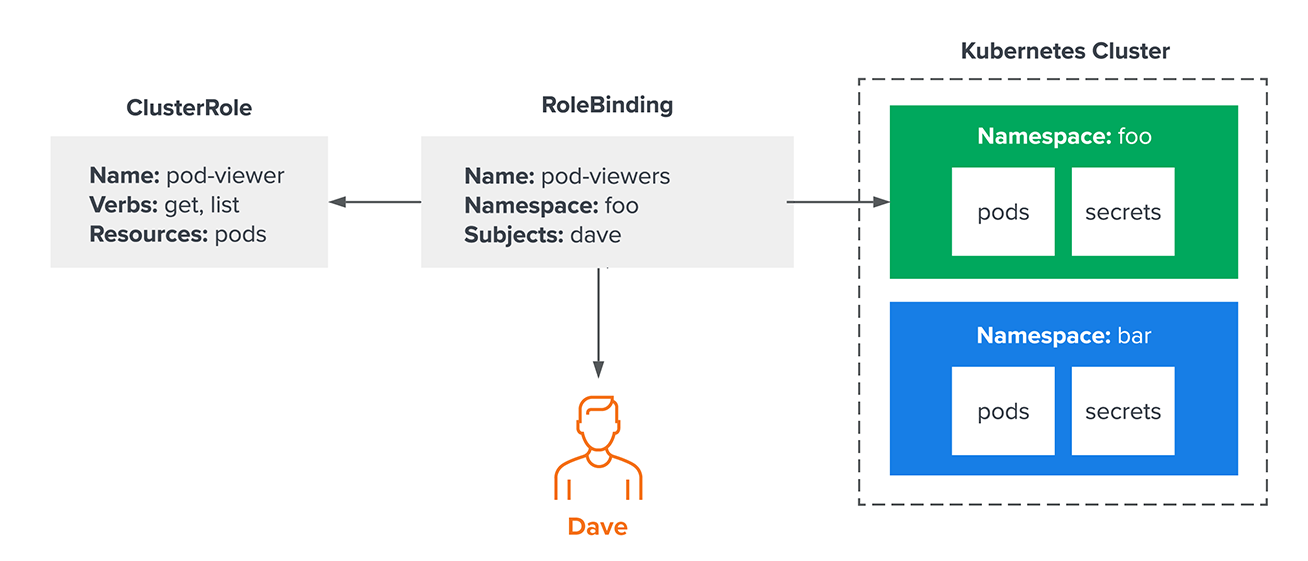
Some organizations have a lot of users and a lot of namespaces. To keep operations moving smoothly, they may want to grant a common set of permissions to users for their individual namespaces. Fortunately, that doesn’t mean they need to create a Role resource for each namespace. In fact, they can bind a ClusterRole to a single namespace with a RoleBinding:
kind: ClusterRole
metadata:
name: pod-viewer
rules:
– apiGroups: [“”]
resources: [“pods”]
verbs: [“get”, “list”]
—
apiVersion: rbac.authorization.k8s.io/v1
kind: RoleBinding
metadata:
name: pod-viewers
namespace: foo
subjects:
– kind: User
name: dave
apiGroup: rbac.authorization.k8s.io
roleRef:
kind: ClusterRole
name: pod-viewer
apiGroup: rbac.authorization.k8s.io
In this example, they have used a namespaced RoleBinding to bind Dave to the pod-viewer role only in the “foo” namespace—which means he won’t be able to access pods in other namespaces. This is functionally equivalent to the first example, the “pod-viewer” role can be reused across multiple namespaces. There is now one centralized place to manage a common set of permissions that can be used across a wide range of namespaces without granting users access to all of them.
Not everything in Kubernetes is intuitive
These basic tips can get users most of the way to understanding permissions in Kubernetes, but there are still a few specific intricacies that security professionals and engineers should understand.
Aggregated ClusterRoles
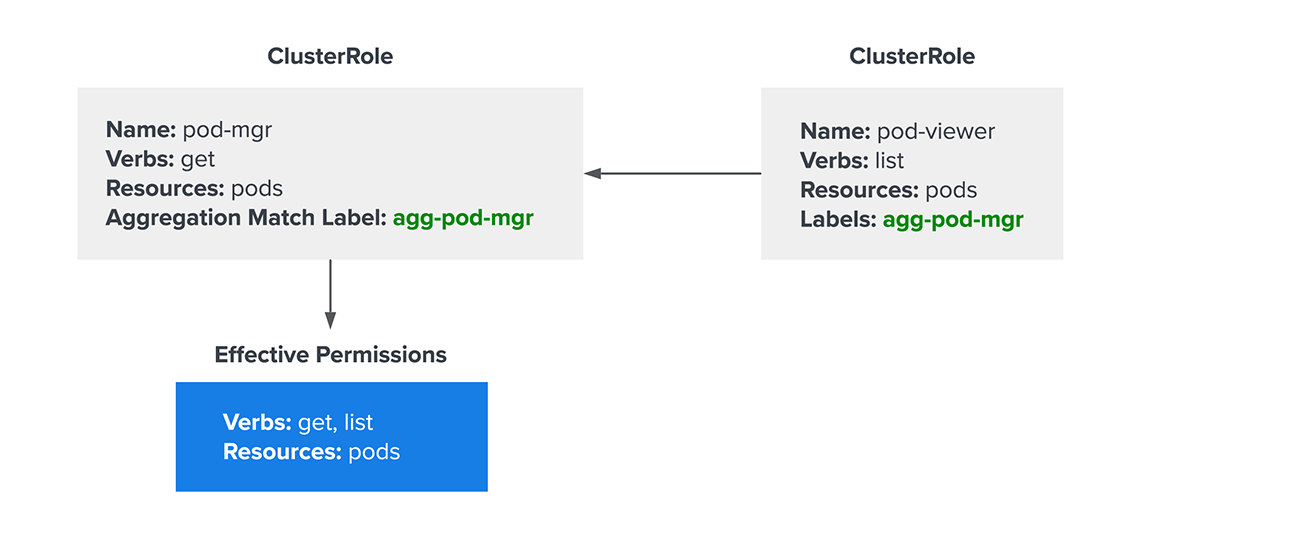
Aggregated ClusterRoles are one such example: Cluster role aggregation lets administrators add permissions to an existing ClusterRole without modifying the role itself. This is primarily used in situations where they need to add permissions to a default ClusterRole (like “view” or “edit”). While modifying the default role technically works, it can become problematic when upgrading clusters. Kubernetes can disrupt default role modifications, sometimes breaking required permissions. Fortunately, this can be avoided by aggregating additional permissions into an existing ClusterRole with a separate ClusterRole definition and a special annotation. While this sounds confusing, it’s surprisingly easy to visualize:
apiVersion: rbac.authorization.k8s.io/v1
kind: ClusterRole
metadata:
name: pod-mgr
aggregationRule:
clusterRoleSelectors:
– matchLabels:
agg-pod-mgr: “true”
rules: []
—
apiVersion: rbac.authorization.k8s.io/v1
kind: ClusterRole
metadata:
name: pod-getter
labels:
agg-pod-mgr: “true”
rules:
– apiGroups: [“”]
resources: [“pods”]
verbs: [“get”]
—
apiVersion: rbac.authorization.k8s.io/v1
kind: ClusterRole
metadata:
name: pod-lister
labels:
agg-pod-mgr: “true”
rules:
– apiGroups: [“”]
resources: [“pods”]
verbs: [“list”]
In the example above, the pod-mgr role only provides permissions to get pods. However, it’s also aggregating any permissions from other ClusterRoles with the “agg-pod-mgr” label, so the effective permissions are get and list.
Three uncommon verbs that change the rules
Speaking of verbs, there are three “uncommon verbs” that nonetheless have an important effect on how authorization decisions are made in Kubernetes. At the risk of being overly dramatic, these verbs literally change the rules and are exceptions to some of the fundamental rules mentioned before. They are:
- “Bind.” Bind is the exception to the earlier rule about a user not being able to grant permission they don’t already have. The bind verb allows the user to create a role-binding resource even if they don’t have the permissions for the targeted role. Security analysts should watch out for this verb, as it’s a common way to escalate privileges.
- “Escalate.” By default, users cannot edit a role they’re already bound to in order to grant themselves additional privileges—a reasonable precaution. The escalate verb gives them permission to do just that, bypassing the “Does this user already have these permissions?” check that normally occurs when editing a role.
- “Impersonate.” Impersonation is a mechanism that allows a user to run an API request acting as a different principal (user, group, service account). It’s like the equivalent of the “su” command in Linux, but for Kubernetes. Typically, this verb is only used by highly privileged administrators to help debug permissions issues, so security professionals should scrutinize use of the impersonate verb to make sure there isn’t an unexpected path to escalate privileges.
Verbs define what an action actually permits. Several of them grant more than their names suggest.
| Verb | What it allows | Why security teams watch it |
|---|---|---|
|
get |
Retrieve one named resource | Scoped to objects the requestor names—the least risky read verb |
|
list |
Retrieve all resources of a type in scope | Returns full object contents, not just names. list on secrets reads every secret in scope, with or without get |
|
watch |
Stream resource changes as they happen | Same data exposure as list, continuously. Routinely granted alongside list without a second thought |
|
create |
Make new resources | create on pods in a privilege escalation path—service account tokens, hostPath mounts, privileged containers |
|
update |
Replace an entire existing object | Lets the holder rewrite an object’s spec wholesale |
|
patch |
Modify part of an existing object | Equivalent to update in practice; granting one without the other rarely limits anything |
|
delete |
Remove one named resource | Destructive but scoped to named objects |
|
deletecollection |
Remove every matching resource at once | Destructive at scale—a single call can empty a namespace |
|
bind |
Create a binding referencing a role | Exception to the rule that you can’t grant what you don’t hold—a common escalation path |
|
escalate |
row three | Bypasses the built-in privilege escalation check |
|
impersonate |
row three | The su of Kubernetes—turns one account into any other |
|
* |
row three | Includes bind, escalate, and impersonate, and is almost never intended |
The list and watch rows are the ones that surprise people. Kubernetes returns full object contents in a list response, so granting list on secrets gives away the secrets—which is why the Kubernetes RBAC good practices guide recommends restricting list and watch on secrets as tightly as get.
Where the wildcard character deserves scrutiny
Finally, it’s important to be aware of the asterisk—also known as the “wildcard character”—which may mean an action is granting more permissions than intended. For example, granting the “*” verb on ClusterRoles might seem safe because there are built-in privilege escalation prevention checks, but that is not the case. As covered above, this would grant “bind” and “escalate” access as well, for privilege escalation. Because of unintended consequences like this, the wildcard characters should only be used with care.
Securing Kubernetes is increasingly essential
Access control in Kubernetes is massively important, especially as Kubernetes becomes increasingly common for production and business-critical workloads. Understanding how RBAC authorization works is crucial for granting necessary permissions, but it remains important to avoid handing out more permissions than necessary and maintain a least-privilege mindset. Today’s attackers are becoming increasingly savvy when it comes to exploiting overlapping permissions, misconfigurations, and stolen identities. Effective role-based access control in Kubernetes can help keep those exposures to a minimum—and Kubernetes MDR coverage catches the activity that slips past even well-scoped permissions.
Frequently asked questions
What are the four resource types used to configure RBAC in Kubernetes?
Roles, ClusterRoles, RoleBindings, and ClusterRoleBindings. Roles and RoleBindings grant access within a single namespace, while ClusterRoles and ClusterRoleBindings typically grant access across an entire cluster.
What are the three “uncommon verbs” that can bypass Kubernetes’ privilege escalation protections?
Bind (lets a user create a role-binding even without permissions for the targeted role), escalate (lets a user edit a role they’re bound to in order to grant themselves more privileges), and impersonate (lets a user act as a different principal—similar to the “su” command in Linux).
Why is the wildcard character (“*”) risky in Kubernetes RBAC?
Granting the wildcard verb on ClusterRoles can unintentionally grant “bind” and “escalate” access as well, even though built-in privilege escalation checks might make it seem safe—which is why it should be used with care.
What is a ClusterRole aggregation, and why use it instead of editing a default role?
Aggregation lets administrators add permissions to an existing ClusterRole (like the default “view” or “edit” roles) without modifying the role itself, avoiding problems that can arise when Kubernetes disrupts default role modifications during cluster upgrades.
Can a Kubernetes user grant permissions they don’t already have themselves?
No, by default—this is a built-in mechanism to prevent privilege escalation. The “bind” and “escalate” verbs are the specific exceptions to this rule.
Frequently asked questions
What are the four resource types used to configure RBAC in Kubernetes?
Roles, ClusterRoles, RoleBindings, and ClusterRoleBindings. Roles and RoleBindings grant access within a single namespace, while ClusterRoles and ClusterRoleBindings typically grant access across an entire cluster.
What are three "uncommon verbs" that can bypass Kubernetes' privilege escalation protections?
Bind (lets a user create a role-binding even without permissions for the targeted role), escalate (lets a user edit a role they’re bound to in order to grant themselves more privileges), and impersonate (lets a user act as a different principal—similar to the “su” command in Linux).
Why is the wildcard character ("*") risky in Kubernetes RBAC?
Granting the wildcard verb on ClusterRoles can unintentionally grant “bind” and “escalate” access as well, even though built-in privilege escalation checks might make it seem safe—which is why it should be used with care.
What is a ClusterRole aggregation, and why use it instead of editing a default role?
Aggregation lets administrators add permissions to an existing ClusterRole (like the default “view” or “edit” roles) without modifying the role itself, avoiding problems that can arise when Kubernetes disrupts default role modifications during cluster upgrades.
Can a Kubernetes user grant permissions they don't already have themselves?
No, by default—this is a built-in mechanism to prevent privilege escalation. The “bind” and “escalate” verbs are the specific exceptions to this rule.