

Editor’s note: This post combines two 2019 Expel classics, Jon Hencinski’s “7 habits of highly effective SOCs” and Peter Silberman’s “Four habits of highly effective security teams.” The habits held up. The tooling didn’t stand still, so we’ve updated each one for the agentic AI era. Look for the “AI-era update” under each habit.
Before I talk about effective SOCs that run like well-oiled machines, let’s get one thing straight.
SOC isn’t a dirty word.
But I totally understand the negative connotation, and that’s exactly why I’m writing this post. Alert fatigue is real, repetition leads to exhaustion, and those two things in tandem create an environment ripe for analyst burnout. I get it.
Here’s the thing: When built right, a job working in a SOC can be so much fun, not to mention you get the learning and experience you thought you signed up for. Since launching our 24×7 service, we’ve experimented a ton, learned a bunch, and through a lot of iteration landed on some habits—seven, in fact—that we believe help us SOC the right way at Expel.
If you’re working in or managing a SOC with a ton of turnover—or just want tips on how to shape an effective and more productive team—here are seven habits to adopt right now. And if your SOC is a team of three, or just you, these still apply. Every security team feels understaffed. The goal is to operate like a team twice your size, and in the AI era, that’s more achievable than it’s ever been.
1. Have a clear mission and guiding principles
Get explicit about the mission and your culture. At Expel, the SOC’s mission is to protect our customers and help them improve. The mission is centered around problem solving and being a strategic partner for our customers. Notice that there are zero mentions of looking at as many security blinky lights as possible. That’s intentional.
Take it a step further and create some guiding principles. Guiding principles define what you as a team believe in and how you operate together. Here are some (but not all) of the guiding principles in the Expel SOC:
- Teamwork makes the dream work.
- Service with passion is our competitive advantage.
- We embrace positive change.
- AI handles speed. Humans handle judgment.
Articulating guiding principles is the first step in creating a SOC culture that you can turn into your competitive advantage. Security tech and process are easily replicated but culture is hard to copy.
A mission only matters if the people you serve can see it in action. Your customers aren’t just the companies paying for a service. They’re your CISO, your CEO, and your board. Show your work in terms they care about. That doesn’t mean walking an incident report into a board meeting. It means figuring out what each audience needs to understand about security and shaping what you present around their business objectives.
The AI-era update: Your guiding principles now need to cover a teammate who never sleeps. Decide, in writing, which calls AI makes on its own and which ones belong to a human. At Expel, that line comes from our Trust vs. Impact Framework: AI takes the high-volume, high-confidence work, and analysts own the calls where being wrong is expensive.
Ruxie, our AI SOC manager, also helps you show your work. She turns every incident, from the alerts that fired to the actions taken, into a plain-language report, and analysts review and sign off before it’s final. The clear account of what happened is ready before anyone asks for it. Translating it for the boardroom is still a human job.
2. Prioritize learning
Our analysts love to learn new things; it’s even one of the traits we hire for. One thing that we’ve learned in building out our program is that the best way to foster improvement is to combine this love of learning with a collaborative—not adversarial—approach.
The best example of this is how we use attack simulations to help our team learn new techniques. These attack simulations, also called threat emulation, recreate a realistic threat you’re likely to face, with a heavy emphasis on what happens after an attacker gets in. During these, we have to celebrate progress and opportunities to learn—it doesn’t take much to make someone feel foolish and have that metastasize into a reluctance to try a new thing or stretch a new skill.
If you don’t run attack simulations regularly, start building them into your schedule. But don’t overthink it. You can run one right now in nine simple steps:
- Talk to the team and give them background so they don’t feel ambushed.
- Open a PowerShell console.
- Run wmic /node:localhost process call create “cmd.exe /c notepad” from your PowerShell console to simulate remote process creation using WMI.
- Run winrs:localhost “cmd.exe /c calc” from your PowerShell console to simulate remote process creation using WinRm.
- Finally run schtasks /create /tn legit /sc daily /tr c:users <user>appdatalegit.exe to simulate the creation of a malicious Windows scheduled task.
- Interrogate your SIEM and EDR.
- Check what your AI triage did with the activity. Did it escalate? Did it close anything it shouldn’t have? Does its explanation match what actually happened?
- Talk about it as a team.
- Find ways to improve.
Want to run more sophisticated simulations? Here’s our threat emulation framework along with an example of how to simulate an incident in AWS.
Another option is to download Oh Noes!, our free tabletop threat simulation game. Be sure to set aside about two hours for this one.
The AI-era update: The skill set has shifted. Analysts still need to read raw logs, but they also need to read an AI’s reasoning and know when it’s wrong. Treat that as a trainable skill, not a personality trait.
And don’t stop at endpoints. If your org runs AI agents or LLM-powered apps, those are attack surface too. Simulate a prompt injection or an agent doing something it shouldn’t, then see whether anyone notices.
3. Empower the team
Analysts want to spend time finding new things, pursuing quality leads, and working with people to solve complex problems, not chasing the same false positive over and over again. Trust the team to filter out the noise and then enable them to do so.
How did we build this capability at Expel?
We took the DevOps processes used by our engineering teams and adapted them to detection deployment. Here’s a high-level overview of what this looks like:
- We manage our detection rules using GitHub.
- We have unit tests for every detection (just like you would expect of code).
- We use CircleCI to build our detection packages.
- During the CircleCI build process, we apply linting and perform additional error checking.
- If a CircleCI build fails, we’ll automatically fail the PR so an analyst knows some additional tweaks are required.
- We create error codes that are easy to understand.
- We use Ansible to deploy new detection packages.
- Now an analyst can deploy a new detection package at any time as long as the content passes automated tests and has been peer-reviewed.
Here’s how this plays out in practice.
A researcher just tweeted about a new remote process execution technique…
- An analyst creates the rule in GitHub and submits a new PR.
- That PR is picked up by CircleCI, linted, and checked for errors.
- Assuming all goes well, the PR is marked as “all checks passed.”
- The analyst requests peer review.
- The detection package is deployed using Ansible.
- Everyone’s happy.
Trust the team to tackle false positives and write rules to find new things. Give them control of the end-to-end system and back them up with good error checking. In doing so, your team members will feel more connected to their work and the mission.
The AI-era update: The pipeline still matters. What’s changed is who writes the first draft. Ruxie watches for vendor alerts she hasn’t seen before, spots gaps in detection coverage, and writes new detection rules to close them. Those rules go through validation before they ship, and once they do, every customer gets the sharper coverage.
The analyst’s job shifts from writing every rule to reviewing the rules AI writes. That’s the same peer-review gate from step 4, and it’s why building the pipeline right pays off twice: AI-authored detections get the same tests, linting, and scrutiny as human ones.
4. Automate
SOC work can be repetitive. Automation FTW!
Before you automate anything, know what your tools can actually do. Effective teams focus on two things: the alert signal each technology produces, and the questions they can ask that technology during an investigation. At Expel, we generalize those capabilities by technology class into a capability model. It doesn’t matter how EDR vendor A or vendor B acquires a file. Our analysts know both offer an “acquire file” capability, and they use Expel Workbench™ to fetch it from either one.
Then standardize how you investigate. Analysts should take the same first steps for the same alert type every time. When our SOC sees a suspicious login alert, the first move is pulling historical data for that user to establish what normal looks like. (Here’s more on asking the right questions during triage.) Note that this is a process, not a prescription. Some alerts will turn your playbook on its head, and analysts still need room to exercise judgment.
But what should you automate?
Decision support is a great place to start. What’s decision support? In our context, decision support is all of the automation, contextual enrichment, and user interface attributes that make our analysts more effective in answering the following question: “Is this a thing?”
How does this play out at Expel?
As part of our integration with Microsoft 365, we collect signal and generate alerts when accounts are compromised or user activity doesn’t seem quite right. Investigating patterns of user authentication behavior can be a tedious task when done manually…but the good news is that it’s a series of repeated steps that can be automated.
Take a look at this example where, with the help of some automation, we’re able to quickly review 30 days of login activity based on IP address and user-agent combinations:
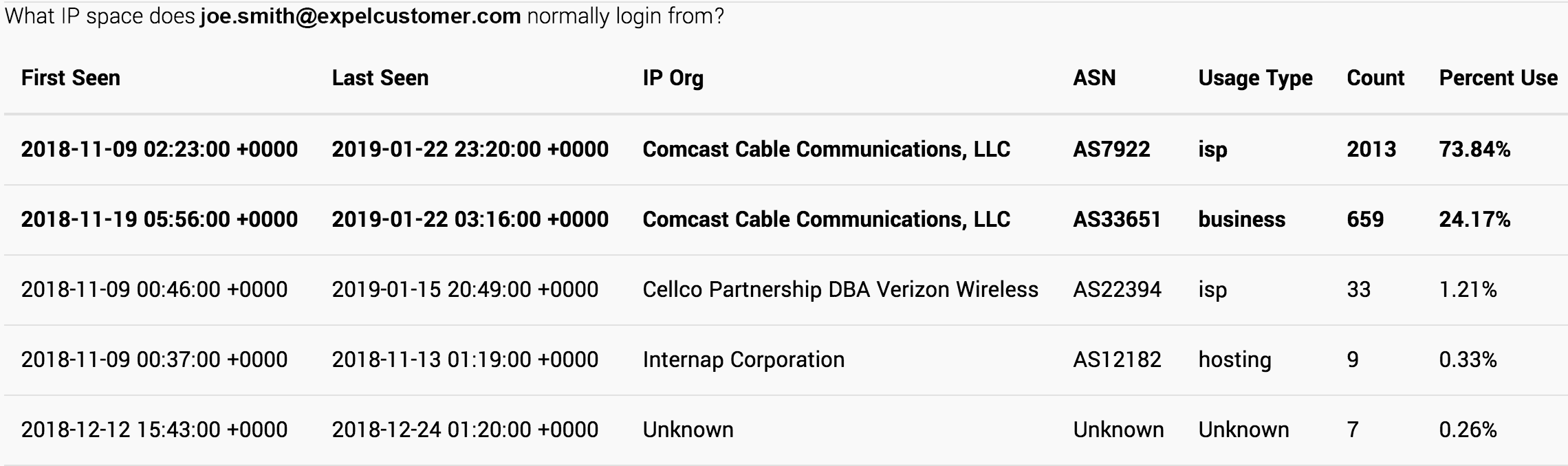
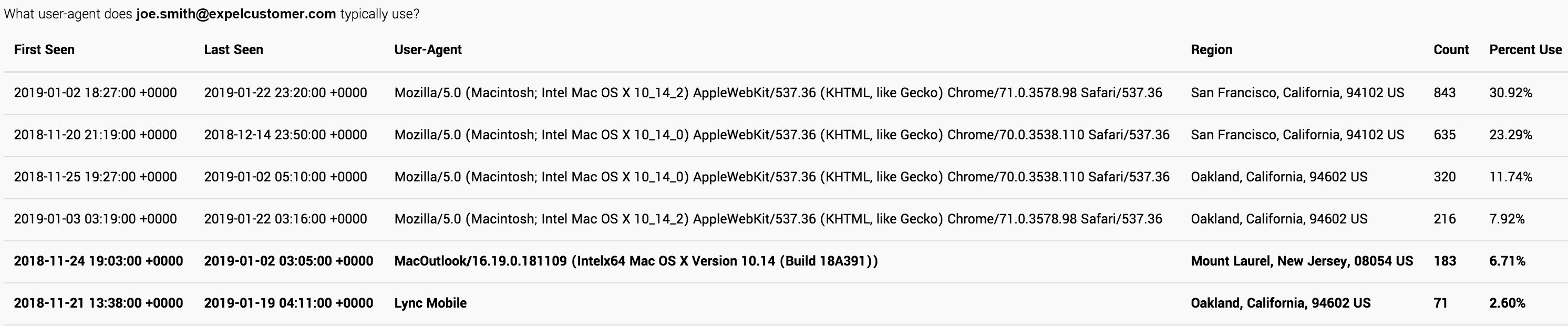
Automate the repetitive tasks so the team can focus their efforts on making important decisions versus clicking buttons.
The AI-era update: That 30-day login review used to be the automation win. Now it’s table stakes, and it happens before an analyst ever opens the alert.
Today, Ruxie attaches live telemetry, asset data, user history, prior decisions, and outside intelligence to every alert automatically. When something needs investigating, she builds the timeline, gathers the evidence, and assembles it into one story in minutes instead of hours. Analysts start with the picture, not the puzzle pieces.
The capability model and consistent investigative process are what made this possible. A capability model is exactly what an AI agent needs to know which questions it can ask which tools. Ruxie collects telemetry from every connected tool and normalizes it before detection even runs. And a consistent investigative process is what AI can reliably execute at scale. The “process, not prescription” rule still holds: AI runs the process, and humans handle the alerts that break it.
That changes the question. The better question now is what AI should be allowed to decide on its own.
5. Use a capacity model
Understand your available capacity (AKA analyst hours) and utilization. Are you consistently exceeding your available capacity? Is there always way more work to do than your people can handle?
If so, cue the burnout.
If capacity modeling is new to you, that’s okay. There are plenty of resources available to help get you started.
Bottom line: Know your capacity utilization. If you discover that your team is oversubscribed, you’ll need to act fast.
The AI-era update: Capacity now has two sides: AI throughput and human judgment hours. AI can scale the first almost indefinitely. The second is still finite, and it’s the one that burns out.
Watch for the new failure modes. Alert volume can drop while escalation volume climbs. Review queues can quietly become the new triage queues. And the worst one doesn’t show up in utilization at all: analysts rubber-stamping AI decisions because there are too many to check.
Track the ratio of alerts AI closes to alerts it escalates. When that ratio moves, your human capacity moves with it.
6. Perform time series analysis
I agree with Yanek’s philosophy here. Effective managers are able to look out into the future and, with reasonable certainty, predict what needs to change today.
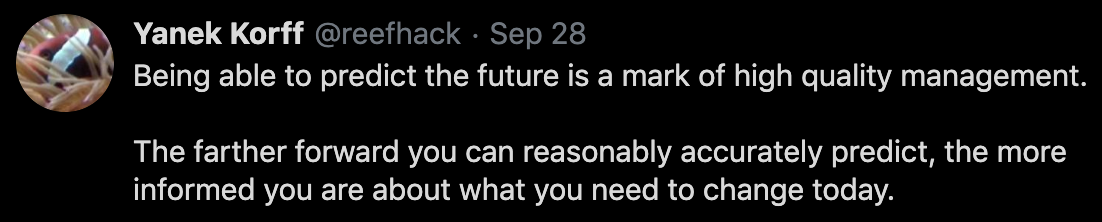
I think effective management is centered around asking the right questions and using data to answer them.
You already know that alert fatigue leads to burnout. As a manager, I ask a ton of questions about the alert management process:
- How many alerts did we send to the team last month?
- How many alerts will we send to the team next month?
- What day of the week is the busiest?
- Do we get more alerts during the day or at night?
- How many alerts will we send to the team next year?
All of these questions are centered around time. Time series analysis allows you to analyze data to learn what happened in the past, and to inform you on what things will likely look like in the future. By performing time series analysis you can forecast how things will change and react before it’s too late. We perform time series analysis on the historical volume of alerts sent to our team for triage. From this data, we pull out different components including trend, seasonality, and the noise (AKA the residual), so that we can use patterns from historical behavior to help us predict future behavior, so that we can use patterns from historical behavior to help us predict future behavior.
The AI-era update: Add two questions to the list:
- How many alerts will AI escalate to the team next month?
- Are AI decisions drifting over time?
Escalation rate is the new alert volume for human capacity planning, so forecast it the same way. And watch AI decisions for drift. If AI closed 90% of a given alert type last quarter and 97% this quarter, something changed, either in your environment or in the model. Both are worth knowing.
Attackers use AI too, which compresses timelines and scrambles volume patterns. Last year’s trends may not hold this year. That’s exactly why you keep forecasting.
7. Measure quality
I love this tweet.

Quality control doesn’t get in the way. It pushes you forward.
At Expel, we use a quality control (QC) standard, acceptable quality limits (AQL), to tell us how many alerts and incidents we should review each day. We then randomly select a number (based on AQL) of alerts, investigations, and incidents and review them using a check sheet.
QC allows us to spot problems, understand them, and then fix them. And fast.
The AI-era update: If AI is closing alerts, AI’s work gets QC’d. Same AQL standard, same check sheets, same random sampling. An AI closure nobody reviews is just a very fast guess.
This is where transparency matters. In Workbench, every step analysts and bots take comes with an explanation, so reviewers can check the reasoning, not just the outcome. When QC catches a bad call, it becomes feedback that makes the next call better.
Parting words
I’ll be candid. At one point I thought about rebranding our SOC as a Computer Incident Response Team (CIRT) to distance ourselves from all the general negativity associated with a SOC.
But a SOC can be a great place to work if you solve problems the right way and empower your teams.
If building all seven habits into your team feels overwhelming, start small. Pick one and get good at it. If you’ve got a retention problem because the work feels repetitive or analysts aren’t learning, start with training. Find small ways to keep your security nerds happy, and the rest gets easier.
Seven years later, there’s a new phrase carrying baggage: AI SOC. For a lot of vendors, it means a SOC with fewer humans, or none. We think that gets it backwards. Clear principles, constant learning, empowered analysts, honest capacity math, forecasting, and relentless QC are the same habits that make AI trustworthy in a SOC. Humans and AI working together isn’t a compromise. It’s the point.
As an industry, let’s SOC the right way and reshape everyone’s thinking about SOCs.
Frequently asked questions
What makes a SOC effective?
Effective SOCs share a small number of operating habits: a written mission that analysts can recite, deliberate time set aside for learning, automation of repetitive triage, a capacity model that prevents overload, and a defined way of measuring investigation quality.
How do you prevent SOC analyst burnout?
Use a capacity model so alert volume per analyst is a number someone owns rather than a surprise, automate the repetitive triage that produces no learning, and protect dedicated time for training and exercises. Burnout is usually a workload design problem.
How should a SOC measure quality?
Measure the quality of the investigation, not just its speed. Sampling closed investigations against a written checklist gives you a defensible quality signal that mean time to respond will never surface on its own. Expel uses check sheets for exactly this, because a fast investigation that missed something is not a good investigation.