

Session hijacking is an attack where someone steals or reuses a valid session token or cookie to take over a user’s already-authenticated session. Because the session is already trusted, the attacker skips the password and MFA, and the activity looks like the real user continuing their work.
Key takeaways
- Session hijacking happens after sign-in, so MFA alone doesn’t stop it.
- The most common ways to steal a token are infostealer malware, AiTM phishing pages, and cross-site scripting flaws.
- Detection depends on session behavior: a token used from a new IP, network, or device without a matching new sign-in.
- Response means revoking sessions and refresh tokens, then checking the endpoint for infostealers.
- Resetting a password won’t help if the device keeps leaking new cookies.
Most people think of account compromise as a stolen password, but session hijacking skips that step. After a user signs in, the application hands their browser a token that says “this person is already verified.” Steal that token and you don’t need the password or an MFA code, because the app treats you as the user. This page explains how tokens get stolen, how session hijacking compares with related attacks, and how to detect and stop it. It’s one of several identity-based attacks security teams need to cover.
How does session hijacking work?
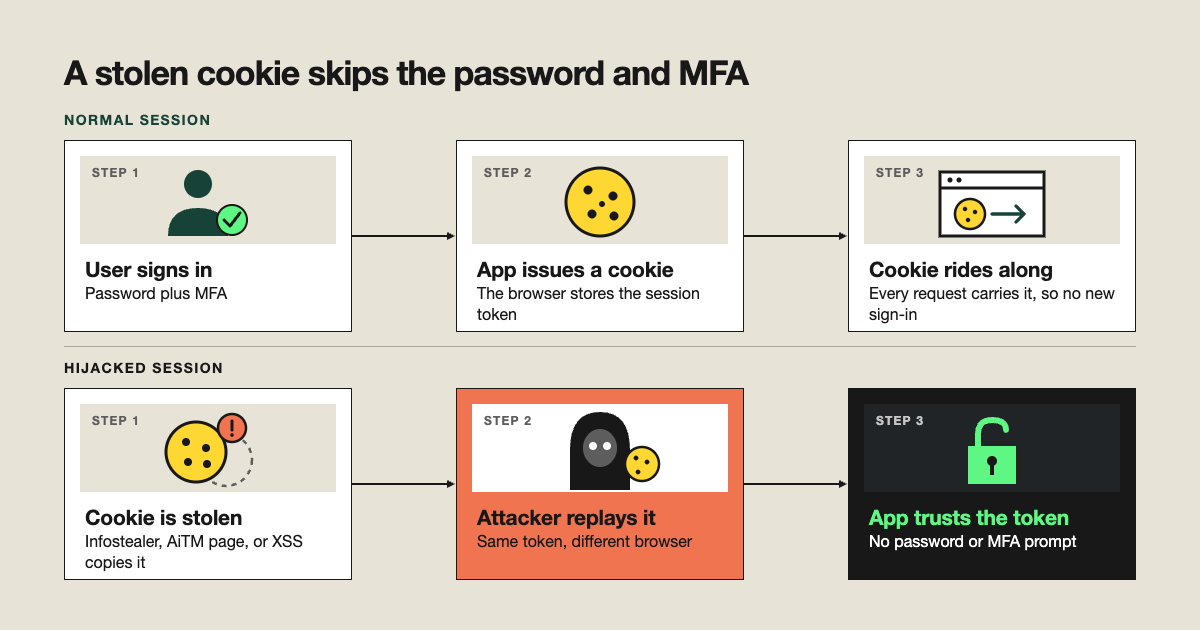
A session starts when a user signs in and the service issues a token or cookie. Every later request carries that token, so the user isn’t asked to sign in again. An attacker who copies the token can replay it from their own browser or tool.
The common ways to steal one:
- Infostealer malware. Malware on the endpoint copies cookies and tokens straight out of the browser.
- Adversary-in-the-middle (AiTM) phishing. A proxy page relays the real sign-in and captures the token on the way through.
- Cross-site scripting (XSS). A flaw in a web app lets an attacker’s script read session data.
- Unsecured networks. Once a major path, but widespread HTTPS has made network sniffing far less common.
A related technique, session fixation, tricks a user into using a session ID the attacker already knows. It’s less common but follows the same logic.
How is session hijacking different from MFA bypass and account takeover?
| Session hijacking | MFA bypass | Account takeover | |
|---|---|---|---|
|
What it is |
Reusing a stolen token | Getting past the MFA step | Controlling the account |
|
When it happens |
After sign-in | During sign in | The outcome of either |
|
If a password is needed |
No | Often, yes | Not necessarily |
Session hijacking is one way to reach account takeover, and it can happen without MFA ever being in play, for example with infostealers. For the outcome side, see our account takeover page.
How do you detect session hijacking?
Look at how a session behaves, not just how it started.
| Signal | Why it matters |
|---|---|
|
Token used from a new IP, network, or device with no matching new sign-in |
The session moved without the user authenticating |
|
Same session active in two distant locations |
One copy belongs to the attacker |
|
Sudden change in browser or user agent |
A different client is using the token |
Compare each session against that user’s normal behavior. That separates hijacking from routine travel or a switch to a new laptop.
How do you stop and prevent session hijacking?
If you suspect a hijacked session, revoke the user’s active sessions and refresh tokens right away so the stolen token stops working. Then reset credentials. Check the user’s device for infostealer malware, because a reset won’t help if the endpoint keeps leaking new cookies. Endpoint tooling helps here.
For prevention:
- Use token binding or token protection where your identity provider supports it.
- Turn on continuous access evaluation so access is re-checked during a session.
- Keep session lifetimes short for sensitive apps.
- App owners should set HttpOnly and Secure flags on cookies. You can find more details in the OWASP session management cheat sheet.
Best practices
- Revoke sessions and refresh tokens before any credential reset.
- Always check the endpoint for infostealers after a suspected hijack.
- Alert on token reuse from new IPs, networks, or devices.
- Shorten token lifetimes for admin and finance apps.
- Correlate identity and endpoint signals rather than reviewing each in isolation.
Expel’s take
Session hijacking defeats monitoring that only watches sign-in events, because there’s no new sign-in to flag. Catching it means correlating identity and endpoint signals: where the token came from, where it’s being used, and what’s on the device. Expel Workbench™ brings those signals together so our analysts—not a black-box tool—decide what’s a hijack and what’s a user on a new laptop.
Frequently asked questions
What is session hijacking in cybersecurity?
Session hijacking is when an attacker takes over a user’s active, already-authenticated session by stealing or reusing its session token or cookie. The attacker doesn’t need the password or an MFA code, because the application treats the stolen token as proof that the user already signed in.
How do attackers steal session cookies?
The most common methods are infostealer malware that copies cookies from the browser, adversary-in-the-middle phishing pages that capture the token during sign-in, and cross-site scripting flaws in web apps. Unencrypted networks were once a major path, but widespread HTTPS has made network sniffing far less common.
Can MFA stop session hijacking?
Not by itself. MFA protects the sign-in, but session hijacking happens after sign-in is complete, so a stolen token works without another MFA prompt. Controls that bind tokens to a device, shorten token lifetimes, or re-evaluate access continuously reduce the risk, and detection catches what gets through.
How do you detect a hijacked session?
Look for a session or token used from a new IP address, network, or device without a matching new sign-in, the same session active in two distant locations at once, or a sudden change in browser or user agent. Comparing each session against the user’s normal behavior separates hijacking from routine travel.
What should you do if a session is hijacked?
Revoke the user’s active sessions and refresh tokens immediately so the stolen token stops working, then reset credentials. Check the user’s device for infostealer malware, since a reset won’t help if the endpoint keeps leaking new cookies, and review what the attacker accessed while the session was active.