

Account takeover (ATO) is when an attacker gains control of a legitimate user’s account and uses it as if they were that user. They get in with stolen credentials, MFA bypass, session hijacking, or a malicious OAuth app, so the activity often looks like a normal sign-in.
Key takeaways
- Account takeover is control of a real account, not just a leaked password. Every takeover starts with compromised access, but not every leaked credential becomes a takeover.
- Attackers use many paths in: credential stuffing, phishing, MFA bypass, session hijacking, consent phishing, device code phishing, and SIM swapping.
- Takeovers rarely trip login-failure alerts. They’re caught through behavioral signals like new inbox rules, MFA method changes, and unfamiliar sign-ins.
- Response starts with containment: revoke active sessions and refresh tokens before you reset the password.
- MFA helps but doesn’t end the problem. Phishing-resistant MFA, consent controls, and behavioral detection work together.
Account takeover is one of the most common outcomes of an identity-based attack. Once an attacker is in, they don’t need malware or an exploit. They have a valid account, and they use it to read mail, steal files, or move deeper into the environment. That’s why ATO is hard to spot with log review alone. Security teams have to compare what an account is doing with what that user normally does. This page covers how takeovers happen, the signs to watch for, and how to respond. For the full taxonomy of these attacks, see our identity-based attacks page.
How do attackers take over accounts?
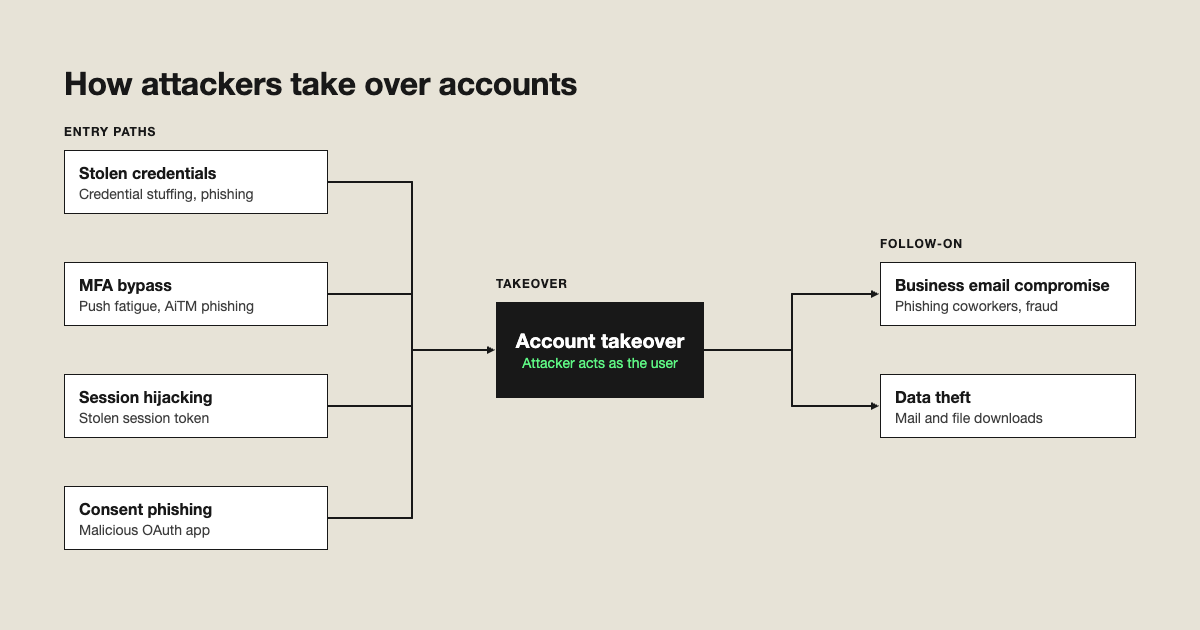
There’s no single entry point. Attackers pick whichever path is cheapest for the target.
- Credential stuffing. Attackers replay passwords leaked in earlier breaches against new services and count on reuse.
- Phishing. A fake sign-in page captures the password, and sometimes the MFA code too.
- MFA bypass. Push fatigue and adversary-in-the-middle (AiTM) phishing get around common MFA methods.
- Session hijacking. A stolen session token skips the sign-in entirely.
- Consent phishing. A user approves a malicious OAuth app that keeps access after a password reset.
- Device code phishing. A victim enters an attacker-supplied code on a real sign-in page.
- SIM swapping. An attacker moves a phone number to their own SIM and intercepts SMS codes.
Each path ends in the same place: someone else is using a real account.
What are the signs of a compromised account?
No single signal proves a takeover. Look for combinations, and compare them against that user’s normal behavior.
| Signal | What it means | Where to look |
|---|---|---|
|
New inbox rules or forwarding |
Attacker is hiding replies or copying mail out | Mailbox rules and forward settings |
|
MFA method change |
Attacker is locking in persistent access | Identity provider audit logs |
|
Impossible travel or new network |
Sign in from somewhere a user can’t physically be | Sign-in logs |
|
New OAuth consent |
A malicious app may have standing access | Enterprise app and consent audit events |
|
Burst of internal email |
Compromised account is phishing coworkers | Mail flow and sent items |
|
Unusual file downloads |
Data theft in progress | File and cloud storage activity logs |
How do you respond to account takeover?
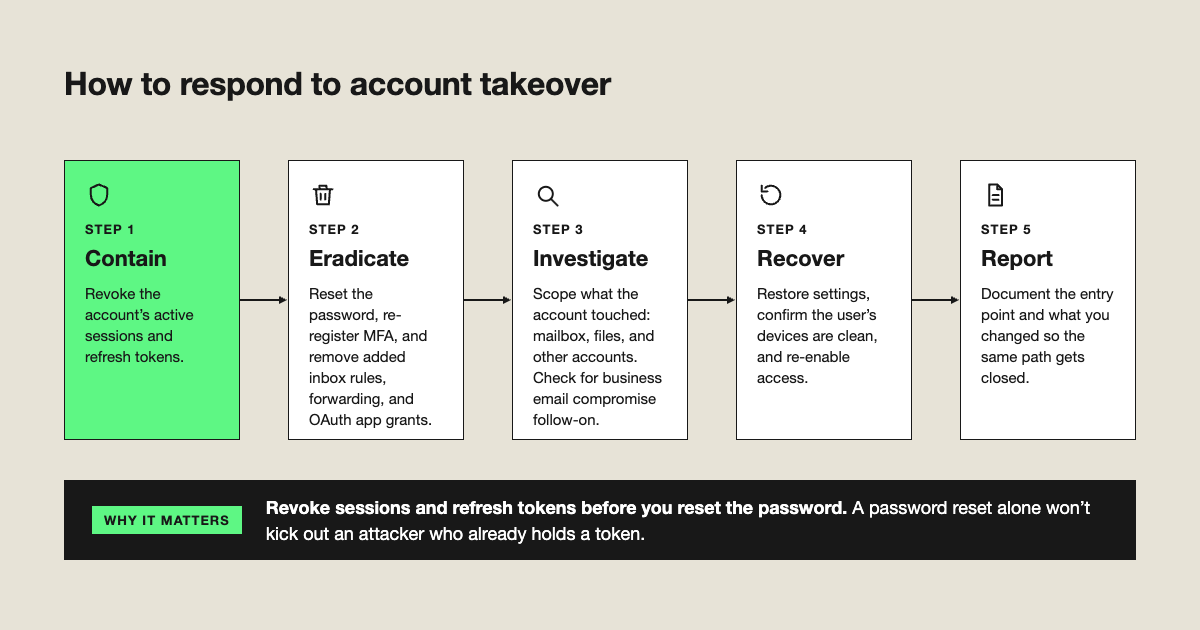
- Contain. Revoke the account’s active sessions and refresh tokens. A password reset alone won’t kick out an attacker who already holds a token.
- Eradicate. Reset the password, re-register MFA, and remove any inbox rules, forwarding, and OAuth app grants the attacker added.
- Investigate. Scope what the account touched: mailbox, files, and other accounts. Check for business email compromise follow-on.
- Recover. Restore settings, confirm the user’s devices are clean, and re-enable access.
- Report. Document the entry point and what you changed so the same path gets closed.
Microsoft publishes a step-by-step walkthrough for mailbox cleanup: Responding to a compromised email account.
How do you prevent account takeover?
Prevention is layers, because no single control covers every entry path.
- Use phishing-resistant MFA such as FIDO2 for high-risk users and admins.
- Limit user consent to verified publishers and low-risk permissions.
- Apply Conditional Access policies that check device and location.
- Add behavioral detection for the takeovers that get through. Identity threat detection catches (ITDR) what prevention misses.
Best practices
- Revoke sessions and refresh tokens first, then reset credentials.
- Treat any new MFA method as a high-signal event and alert on it.
- Audit inbox rules and forwarding for every account involved in an incident.
- Review OAuth grants after any phishing incident, since they survive password resets.
- Baseline normal behavior per user so unusual sign-ins stand out.
- Run a tabletop on your response steps so containment is fast when it matters.
Expel’s take
At Expel, takeovers don’t announce themselves with failed logins. Our SOC looks at what an account does after sign-in and compares it with that user’s normal behavior. That’s why behavioral signals—not log review—are how we catch ATO. Expel Workbench™ brings identity activity together so analysts can see the whole chain from entry to follow-on actions, and our analysts make the call on what’s real and what to do about it.
Frequently asked questions
What is account takeover in cybersecurity?
Account takeover (ATO) is an attack in which a criminal gains control of a legitimate user’s account and uses it to steal data, commit fraud, or move deeper into the environment. Attackers get in with stolen passwords, phishing, MFA bypass, hijacked sessions, or malicious OAuth apps, so the activity often looks like a normal sign-in.
What are the signs that an account has been taken over?
Common signs include new inbox rules that forward or delete mail, changes to MFA methods, sign-ins from unfamiliar locations or networks, newly approved OAuth apps, unusual file downloads, and a burst of internal emails. No single signal is conclusive, so security teams compare activity against that user’s normal behavior.
What should you do first when an account is compromised?
Contain it first. Revoke the account’s active sessions and refresh tokens, then reset the password and re-register MFA. Next, remove inbox rules, forwarding, and OAuth app grants the attacker added, and review what the account accessed so you know whether data was taken or other accounts were targeted.
Does MFA prevent account takeover?
MFA blocks many password-based attacks, but it doesn’t stop all account takeover. Push fatigue, adversary-in-the-middle phishing, session token theft, and consent phishing all get around common MFA methods. Phishing-resistant MFA such as FIDO2 helps against credential phishing, but behavioral detection is still needed to catch takeovers that succeed.
What is the difference between account takeover and a compromised credential?
A compromised credential is a password or token that has been exposed, for example in a breach or phishing attack. Account takeover is what happens when an attacker actually uses that access to control the account. Not every leaked credential leads to takeover, but every takeover starts with some form of compromised access.