

EXPEL MANAGED RESPONSE & AUTO REMEDIATION
We stop threats before they stop you.
When threats hit, every second counts. Expel stops attackers before they can cause damage, disrupt business, or interrupt your sleep cycles.
STOP LIVING ON HIGH ALERT
We respond so you don’t have to.
Imagine sleeping through the night knowing if an attacker tries to encrypt your files or steal your data, they'll be stopped by our team—no midnight phone calls required.

No more 3 a.m. wake-ups
We auto remediate incidents so you can finally get some sleep without worrying about getting the dreaded phone call.

Stay in control
We’ll press the “respond” button for you, or you can decide what, how, and when we eliminate threats on your behalf.

Scale without the pain
Expand capabilities without hiring more people or letting business grind to a halt every time script kiddies try their luck.
HOW IT WORKS
What’s in Expel’s managed response?
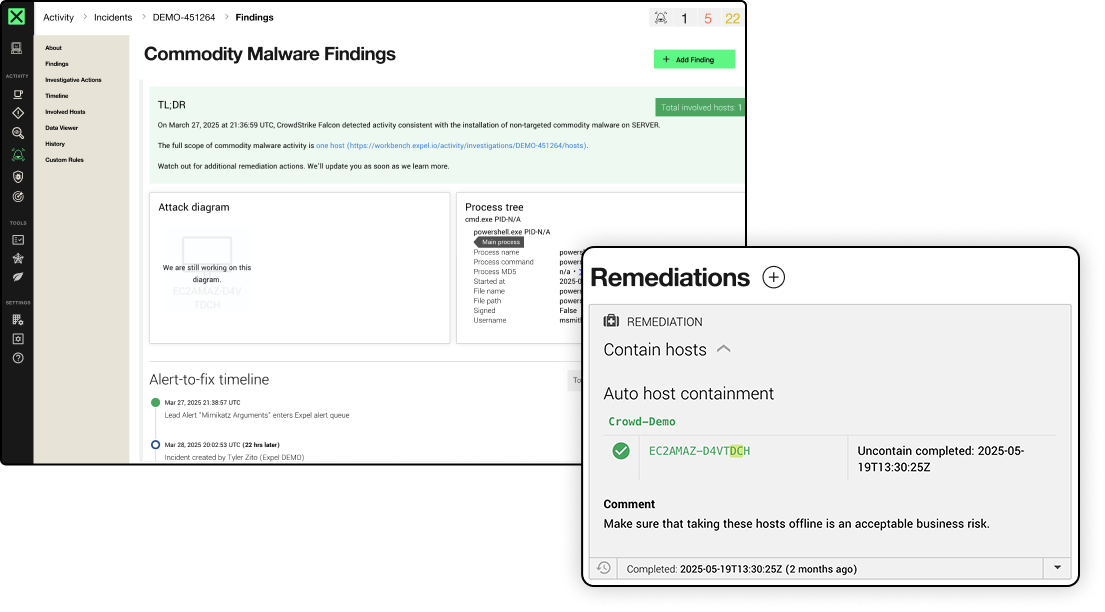
Once our SOC validates a threat, our analysts take auto remediation actions to respond on your behalf. Security disasters like malware, infected machines, and compromised credentials are fixed in a flash, without your team lifting a finger.
THE SCOREBOARD
Talk is cheap. Here are the receipts.
It all comes down to speed and accuracy. And when it comes to auto remediation, the data speaks for itself.
14
minute MTTR
on critical/high incidents with auto-remediation
87%
MTTR reduction
with auto-remediation
8
attack surfaces
covered by Expel auto remediations
18
integrated tools
with response workflows
HOW WE’RE DIFFERENT
Expel auto remediation
vs. other MSSPs and MDRs
Most MDRs will give you homework, like still making you push the response button. At Expel, we act for you. That way, your team can get work done, instead of chasing all the fires.
Expel MDR
Other MSSPs & MDRs
Tailored response
Flexible control
Take it or leave it
Endpoint
Network
Identity & Users
Cloud
SaaS apps
AUTOMATION THAT WORKS
Response so fast, you’ll think we’re cheating
When it comes to the bad guys, we’ve got your back. With 24×7 response, you have time to plan your next move (even if that means waiting until Monday morning).

Having Expel allowed us to beat our mean time to remediate (MTTR) by more than 60%. And more importantly, since Expel has eyes on these alerts, our team had the flexibility to get out of the alert queue and focus on maturing our security capabilities.

Expel allows us to target and resolve issues before they can take out our IT infrastructure, with automated tools and expert human advisors that point us in the right direction, regardless of the situation.
THE LINEUP
All the auto remediation actions that put the bad guys in a bind
We present to you our library of auto remediation actions. This is how we kick out attackers and lock the door behind them.

Kill process
Terminate malicious processes across endpoints before they make trouble

Contain host
Isolate hosts from your network and sever all communication with other business applications

Block bad hash
Block potentially malicious processes and files based on their hash values

Delete malicious file
Permanently delete confirmed malicious threat artifacts—no trace left behind
Delete registry key
Remove malicious persistence entries from Windows Registry

Disable user account
Prevent compromised identities from authenticating, with lockdown tighter than maximum security

Disable access key
Deactivate specific cloud access keys suspected of compromise

Reset credentials
Invalidate user passwords and terminates active sessions

Remove malicious email
Hunt down and purge confirmed malicious emails from inboxes
YOUR RULES, OUR EXECUTION
We’ll respond, but you’re calling the shots.
Our response is tailored to your environment. You decide what, when, and how actions get taken based on your tech stack, risk tolerance, policies, processes, and comfort level.


Resources about auto remediation

How Expel does automated security remediation
Curious how Expel does automated security remediation? Learn how our process works and what you can expect analysts utilizing this method.

Automated remediation: Benefits and customization for security operations
Automated remediation represents substantial benefits, including cost savings and faster response times, but one size doesn’t fit all.

Why cybersecurity automation is critical for threat response | Very Important Questions
Exploring how cybersecurity automation can reduce analyst burden while improving response times and consistency in security operations.

Ready to stop playing defense?
See what happens when an MDR actually works.
Frequently asked questions
Expel tailors auto remediation workflows to your environment based on the specific rules you configure in Expel Workbench, including permissions for automatic execution based on asset types, tools, and under what conditions. While Expel automates the execution with your vendor technologies, Expel SOC analysts only initiate actions after validating an incident in accordance with the criteria and settings you specify. Actions are adjustable at any time through Workbench.
Expel can automatically isolate compromised hosts, disable or suspend suspicious user accounts, reset credentials, delete malicious files and registry keys, revoke active sessions, quarantine malicious emails, and block malicious IP addresses. The specific actions available depend on the technologies in your environment and the response actions you have pre-approved.
Yes. Expel’s auto remediation is fully configurable at the asset, environment, security tool, and action-type level. You can exclude production systems, critical infrastructure, or specific user accounts from automated containment while still enabling it elsewhere. All exclusions are documented in Expel Workbench and can be updated at any time.
Expel auto remediations are designed to take targeted, scoped actions rather than broad interventions. For example, Expel can isolate a single compromised endpoint rather than a network segment, or suspend one user account rather than disabling a group. Scope is defined in your pre-approved playbook and can be adjusted at any time in Expel Workbench™.
Expel auto remediation is available for endpoint isolation, user account suspension, session revocation, email quarantine, and IP blocking across the technologies you have deployed. Coverage depends on the tools in your environment and which actions you have pre-approved. Expel Workbench™ shows every automated action taken, and by which rule.