

Table of Contents
When you’re investing in a managed detection and response (MDR) service, you need more than just protection—you need visibility. You need to see what’s happening in your environment, understand what the MDR team is doing on your behalf, and have the data to justify your security investments to leadership. But what exactly does MDR reporting look like? How often will you receive updates? Can you access information in real time?
The right MDR provider treats reporting and visibility as essential features, not afterthoughts. Modern MDR services typically include regular reporting on security events, threats detected, response actions taken, and overall security posture. These reports help leadership understand the value of the service and identify areas for improvement.
Let’s break down exactly what reporting capabilities you should expect from your MDR provider.
MDR reporting capabilities
Quality MDR providers deliver reporting at multiple levels, from real-time operational visibility to strategic executive summaries. The breadth of reporting capabilities separates premium providers from those offering basic monitoring services.
At its core, MDR reporting should answer three fundamental questions: What threats are you facing? How is the MDR team responding? How is your security posture improving over time? The best providers address all three through layered reporting approaches that serve different stakeholders.
Expel achieved the highest possible score (5/5) in the Forrester Wave evaluation for both dashboards and reporting and metrics, demonstrating that comprehensive visibility into MDR activities has become a defining characteristic of leading services. This recognition reflects the reality that transparent, accessible reporting builds trust and enables informed decision-making.
Modern MDR platforms serve different types of users with distinct information needs. Executives can access high-level views that translate security metrics like MTTR into business impacts. Security analysts can dive deeper into investigation and incident trends. Administrators can monitor integration health and performance. This tailored approach ensures everyone can access the information most relevant to their role.
The reporting infrastructure typically includes several components working together. Interactive dashboards provide at-a-glance visibility into current security status. Automated incident reports document individual threats and response actions. Trend analysis reports track patterns over time. Executive summaries distill complex security data into business-relevant insights.
What reports does MDR provide?
MDR providers typically offer several standard report types, each serving a specific purpose in your security operations. Understanding these report categories helps you know what to expect and how to use the information effectively.
Incident reports
Every confirmed security incident generates a detailed report documenting what happened, how it was detected, and what actions were taken. Expert written incident reports provide a clear picture of what occurred and what was done to remediate the threat. These reports typically include:
- Timeline of attacker activity from initial access through containment
- Indicators of compromise (IOCs) discovered during investigation
- Affected systems and user accounts
- Response actions taken by the MDR team
- Recommended remediation steps to prevent recurrence
- Assessment of business impact
The level of detail in incident reports varies by severity. Critical incidents receive comprehensive write-ups including forensic analysis, while lower-severity events get streamlined documentation focused on key facts and remediation guidance.
Investigation updates
Not every alert becomes an incident, but quality MDR providers keep you informed throughout the investigation process. MDR analysts update customers throughout the investigation process, not just at the end. You’re never left wondering what’s happening with a potential threat.
These real-time updates typically flow through your preferred communication channel—Slack, email, or the MDR platform itself—ensuring stakeholders stay informed as investigations unfold.
Monthly service reports
Most MDR providers deliver monthly summaries that provide context about threat detection and incident response activities over the preceding period. These reports should include metrics and context about threat detection and incident response activities conducted in the previous month, along with information about the health of detection and response controls in your environment.
Monthly reports typically cover:
- Total alerts investigated and their disposition (benign, suspicious, malicious)
- Incidents by type and severity
- Mean time to detect (MTTD) and mean time to respond (MTTR)
- Top threat types targeting your environment
- Coverage assessment showing monitored assets and any gaps
- Recommendations for security posture improvements
Executive summaries
For leadership audiences, MDR providers create condensed reports that translate technical security metrics into business impact. One regional bank customer noted, “We pay a lot of attention to the dashboard in Expel Workbench™; it’s clear and easy to understand, and we even report that data to our CISO and board.”
Executive summaries focus on outcomes rather than technical details—threats prevented, business risk reduced, security investments validated. These reports often include industry benchmarking to contextualize your security posture against peers.
Trend analysis reports
Beyond point-in-time snapshots, quality MDR reporting includes longitudinal analysis showing how your security posture evolves. Trend reports might cover quarterly or annual timeframes, highlighting patterns like:
- Seasonal variations in attack types
- Effectiveness of security improvements over time
- Alert volume trends and false positive rates
- Shifts in attacker tactics targeting your organization
Custom reports
Expel provides options for both out-of-the-box (OOTB) and custom reports and dashboards. For custom requests, providers can deliver customized dashboard views, specific parameters or timeframes, and work with customer success teams for one-off data questions.
MDR dashboard features
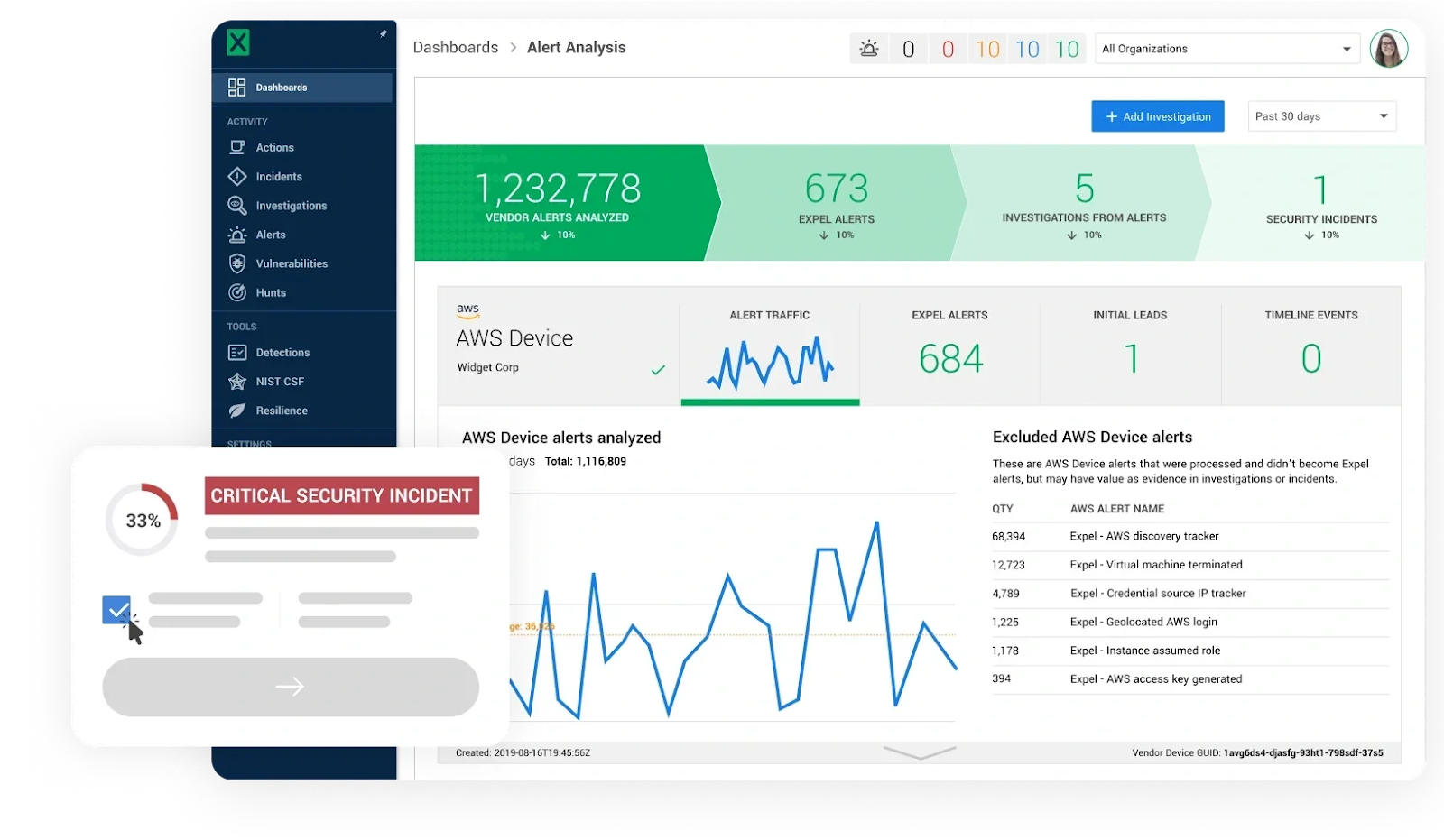
While scheduled reports provide retrospective analysis, interactive dashboards offer real-time visibility into your security operations. The dashboard serves as your window into what the MDR team sees and does.
Modern MDR platforms provide comprehensive dashboard capabilities designed for transparency and actionability. In the spirit of transparency, dashboards and reporting aim to clearly show customers what MDR providers are doing for them, whether the metrics are good or bad.
Real-time alert status
Your dashboard should show active alerts and investigations as they happen. You can log into the platform anytime to see active investigations, review past incidents, track metrics, and understand your security posture. This includes:
- Alerts currently under investigation with severity levels
- Recently closed investigations with outcomes
- Critical incidents requiring customer action
- Queue status showing how quickly new alerts are being triaged
Security metrics at a glance
Key performance indicators should be prominently displayed and easily understood. The dashboard includes a set of activity metrics that summarize everything going on in the platform for the past month (or week or quarter). Common dashboard metrics include:
- Total events ingested versus alerts generated (noise reduction)
- Investigation status breakdown
- Mean time metrics (MTTD, MTTR, MTTC)
- Alert volume by severity
- Integration health status
According to external cybersecurity experts, real-time dashboards provide convenient access to summary visualizations with drill-down features to interact with detailed data. This easily accessible information enables organizations to quickly understand the state of their environment and prioritize the riskiest security events.
Investigation details
Quality MDR dashboards let you drill into specific investigations to understand what happened. Workbench’s History presents every analyst investigative action in a single thread, from the moment it was triaged through an incident’s closure. You can see clear descriptions of each action, making it easy to follow what was done to reach a conclusion.
This level of detail answers the question security teams always ask: “What exactly did the MDR team do during this investigation?”
Threat intelligence integration
Advanced dashboards incorporate threat intelligence feeds to provide context about detected threats. You might see attack attribution to known threat actor groups, mapping of observed tactics to MITRE ATT&CK framework, or intelligence about campaigns currently targeting your industry.
Customizable views
Different roles need different information. MDR dashboards have been made more flexible to accommodate different perspectives. Operators want granular technical details. Executives need high-level status. Administrators focus on system health. The best platforms let users customize their view or switch between role-specific dashboards.
Integration monitoring
Your dashboard should also show the health of integrations with your security tools. One of Expel’s guiding principles is “Show me metrics or it didn’t happen”—for each customer, there are automatically-generated dashboards for each customer’s security devices. This gives an easy, comprehensive way to look at a device’s performance over time.
How do I see what MDR is doing?
Transparency separates excellent MDR providers from average ones. You should never wonder what your MDR team is doing or question whether they’re delivering value. The best providers build transparency into every aspect of their service.
Platform access
First and foremost, you should have direct access to the MDR platform. “Every provider makes big claims but they can’t back them up. With Expel, I have access to Expel Workbench and can log in any time I want to see what analysts are working on, how they’re handling a particular alert, and what’s in the queue,” explained one customer.
This 24×7 access means you’re never in the dark. During business hours or at 2am, you can see exactly what’s happening in your environment and what the MDR team is actively investigating.
Real-time notifications
Beyond logging into the platform, quality MDR services push important information to you. You’ll be alerted immediately via email when the MDR provider has identified a new security incident or launched an investigation in your organization. You’ll also know when a remediation action or investigative action has been assigned to you.
These notifications contain enough detail to help you quickly decide if any action is necessary and what action to take.
Investigation transparency
For any alert or investigation, you should be able to see the complete analysis. Event Search answers the question, “Did the MDR provider see that alert?” It allows you to fully understand the detection strategy and how all events are handled, even ones that don’t rise to the level of an alert.
This means you can go into the platform and find information quickly and easily, without needing to ask the MDR team for more details.
Direct communication channels
Reporting isn’t just about dashboards and automated reports. The best MDR providers maintain open communication channels. Some providers go above and beyond standard email or help desk tickets, and provide a Slack, Teams, or similar avenue for instant communication with key stakeholders.
This direct line to MDR analysts means you can ask questions, provide context, and collaborate on investigations in real time.
Proactive updates
Quality MDR teams don’t wait for you to check the dashboard or ask questions. Once the analyst uncovers the threat and its root cause, the information goes into a findings report. The platform then notifies you through Slack, Microsoft Teams, or via email of the investigation and presents you with the report that includes all the relevant info along with remediation recommendations.
Audit trail
Complete transparency includes maintaining a comprehensive audit trail. You should be able to see not just what was done, but who did it and when. This level of documentation supports compliance requirements and builds confidence in the MDR service.
MDR visibility tools
Beyond standard dashboards and reports, advanced MDR providers offer specialized tools that enhance visibility into specific aspects of your security operations.
Security posture scoring
Some providers offer quantitative assessments of your overall security posture. These scores aggregate multiple factors—coverage breadth, response times, remediation speed, recurring issue resolution—into a single metric that tracks improvement over time.
Benchmark comparisons
Understanding your security performance in isolation is useful, but understanding it relative to peers is even more valuable. Copious industry standard metrics are provided to customers by default, and providers also publish benchmarks and targets to help customers develop a deep understanding of their security posture, and compare themselves to industry standards.
These comparisons help you answer questions like: “Are we seeing more phishing attempts than typical organizations in our industry?” or “How does our mean time to respond compare to similar-sized companies?”
Threat intelligence feeds
Advanced MDR services incorporate threat intelligence directly into their reporting. This might include alerts about threats actively targeting your industry, emerging attack techniques relevant to your technology stack, or intelligence about threat actors known to target organizations like yours.
Coverage mapping
Visibility tools should also show you where you’re protected and where gaps exist. Coverage maps display which assets are monitored, which security tools are integrated, and where blind spots might exist in your environment.
Customizable metrics
While standard metrics cover most needs, you might have specific KPIs relevant to your organization. Quality providers let you define custom metrics and tracking. For instance, if your compliance framework requires specific measurements, your MDR provider should accommodate those reporting needs.
Export capabilities
Sometimes you need raw data for your own analysis or to import into other systems. Look for MDR platforms that allow data export in standard formats—CSV, JSON, or API access—so you can integrate security data into broader business intelligence or GRC platforms.
Key takeaways
MDR reporting and visibility tools transform security from a black box into a transparent, measurable function. You’ll receive incident reports documenting every threat and response action, monthly summaries showing trends and patterns, executive dashboards translating technical metrics into business impact, and real-time access to investigations as they unfold.
The frequency of reporting varies by type—incident reports arrive immediately when threats are detected, monthly summaries provide regular operational updates, and executive reports can be generated on-demand for board meetings or stakeholder presentations. You’ll also have 24×7 access to interactive dashboards showing current security status.
Quality MDR providers treat transparency as a core value, not an afterthought. They give you complete visibility into what they’re doing on your behalf, provide metrics that prove value, and deliver reporting tailored to different audiences from security analysts to C-suite executives.
When evaluating MDR providers, ask about their reporting capabilities. Request sample reports, view their dashboard interfaces, and confirm they offer the visibility tools you need to manage your security operations effectively and demonstrate value to leadership.