

Ransomware incident response follows the standard incident response lifecycle with playbook-specific steps: isolate immediately to stop encryption from spreading, identify the ransomware family, decide between backup recovery and negotiation, and meet notification obligations.
Key takeaways
- Ransomware response follows the same lifecycle as any incident, but containment speed dominates every other consideration.
- Isolate first, investigate second. Encryption can spread across a network faster than you can scope it.
- Don’t shut affected machines down—isolate them from the network instead. Powering off can destroy recoverable keys and memory-resident evidence.
- Most ransomware is now double extortion, which means data was stolen before encryption. That makes it a data breach with notification obligations, not just an availability problem.
- Tested, isolated backups are the single biggest predictor of recovery speed.
- Recovering files isn’t remediation. If you don’t remove the entry point, you’ll do this again.
Ransomware is the incident most organizations plan for and the one where plans most often fail on timing. The lifecycle is familiar, but the compression is what catches teams out—decisions that would take a day in a normal incident have to happen in the first hour, and one of them determines whether you can recover at all. If you need the underlying framework first, start with incident response (IR) and the phases it defines. What follows is what changes when the incident is ransomware.
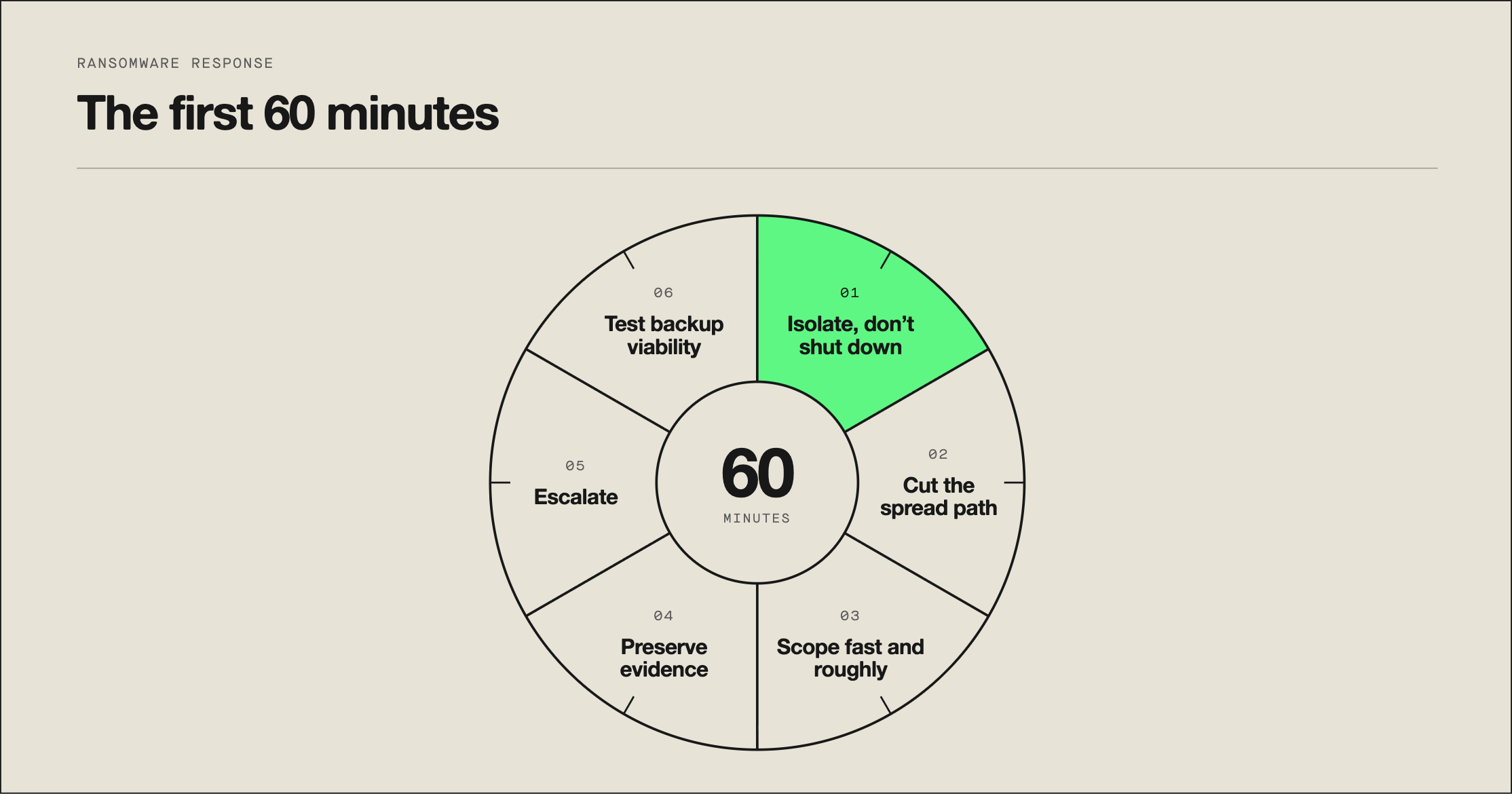
What are the first 60 minutes of ransomware response?
Do these in order, because later steps depend on earlier ones being done fast.
- Isolate, don’t shut down. Disconnect affected systems from the network—pull the cable, disable the switch port, or use your endpoint tooling’s isolation function. Do not power the machines off. Encryption keys and forensic artifacts can live in memory, and shutting down can destroy both. This distinction is regularly the difference between a recoverable incident and an unrecoverable one.
- Cut the spread path. Ransomware moves laterally through credentials and file shares. Disable the compromised accounts, revoke active sessions, and restrict access to network shares and backup systems. Attackers target backups deliberately, so protecting them is a containment action, not a recovery one.
- Scope fast and roughly. How many hosts show encryption, which shares are affected, which accounts were used. You need a rough answer in minutes, not a precise one in hours.
- Preserve evidence. Capture the ransom note, a sample encrypted file, and relevant logs before anyone starts remediating. You’ll need these to identify the family and to support any filing.
- Escalate. Incident commander, legal counsel, leadership, and your cyber insurer. Insurance policies frequently carry notification windows tighter than any regulation, and many require you to use approved vendors—calling late can affect coverage.
- Check whether your backups are actually viable. Not whether they exist. Whether they’re intact, isolated from the compromised environment, and restorable. This answer shapes every decision that follows, and finding out on day three is a bad outcome.
How does ransomware response differ from general incident response?
| General incident response | Ransomware incident response | |
|---|---|---|
|
Containment urgency |
Fast, but investigation can lead | Immediate—encryption spreads in minutes |
|
Investigation timing |
Often before containment | After containment, always |
|
Recovery question |
Restore affected systems | Backups, decryption, or negotation |
|
Notification |
Depends on data involved | Nearly always triggered—double extortion means exfiltration |
|
Third parties |
Sometimes | Usually—insurer, counsel, or often law enforcement |
|
Business decisions |
Technical team can lead | Executive-level from the first hour |
The pattern: ransomware collapses the normal sequence. In most incidents you can scope before you contain. In ransomware, you contain on partial information and accept that you’ll be wrong about scope at first, because the alternative is watching the encryption expand while you investigate.
Attacker speed is why. Automated correlation and pre-authorized containment matter far more here than in a slower incident, which is one reason ransomware response is a common trigger for organizations to reassess their security operations center (SOC) incident response coverage.
What are your recovery options after ransomware?
Three paths, and the choice is usually made for you by how good your backups are.
Restore from backups. This is the preferred path. It requires backups that are recent enough to limit data loss, isolated from the compromised environment, and verified restorable. The failure mode here is discovering that your backups were on a domain-joined server the attacker also encrypted. Restore into a clean environment, and don’t restore into an environment where the attacker still has access.
Decryption without paying. Sometimes possible. Free decryptors exist for some older or broken ransomware families, which is one practical reason to identify the family early. Don’t count on it, but check.
Negotiation and payment. Both CISA and the FBI recommend against paying. Payment doesn’t guarantee recovery, funds further attacks, and in some cases carries sanctions exposure depending on the group involved. Organizations that pay generally do so because backups failed and the business impact is existential—it’s a business decision made by executives with counsel and the insurer at the table, not a technical one. If you’re in that position, professional negotiators exist and your insurer likely requires one.
It’s worth being clear about the double extortion reality: paying may stop the leak, but it doesn’t undo the exfiltration. The data was already taken. Your notification obligations don’t disappear because you paid.
What are your notification obligations after ransomware?
Ransomware is usually a data breach, not just an outage, and that catches teams out.
Most modern ransomware operations exfiltrate data before encrypting it, then threaten to publish it. That means the incident typically involves both a confidentiality failure and an availability failure, which triggers notification requirements that a pure encryption event might not.
What your plan should have pre-built:
- The determination owner. Whether a reportable breach occurred is a legal call. Name who makes it.
- The applicable clocks. Sector regulators, data protection law, contractual obligations to enterprise customers, and your insurance policy each carry their own timeline. The insurer’s is often the shortest.
- Evidence standards. What was accessed versus what was encrypted is the question regulators ask, and it’s hard to answer retroactively without the right logs.
- Draft templates, reviewed by counsel in advance.
Specifics vary too much by jurisdiction and sector to generalize, so this belongs with your counsel. What belongs in your plan is the process, the owner, and the clocks.
How do you remediate the root cause and prevent reinfection?
This is the step organizations skip, and it’s why repeat incidents are common.
Restoring encrypted files is recovery. It is not remediation. If the attacker got in through a phishing-compromised account, an unpatched VPN appliance, or an exposed RDP port, all of those still exist after your restore completes. Recovering into an environment where the entry point is still open means doing this again, sometimes within weeks.
Remediation after ransomware means:
- Closing the entry point. Patch the virtual private network (VPN) appliance, disable the exposed remote desktop protocol (RDP) service, fix the misconfiguration, or remediate the identity weakness that allowed the initial access.
- Removing persistence. Scheduled tasks, service accounts the attacker created, modified startup items, and any remote access tooling they installed.
- Rotating credentials broadly. Assume every credential in the compromised scope is known to the attacker, including service accounts and any credentials cached on affected hosts.
- Fixing the backup gap the incident revealed, if there was one.
- Building detections for the technique used, so the next attempt alerts instead of encrypting.
The distinction between stopping the damage and removing the cause is worth internalizing generally—see remediation vs. mitigation for the fuller version. In ransomware it’s the difference between a bad quarter and a recurring one.
Ransomware response best practices
- Write and rehearse the isolation decision. “Isolate, don’t power off” needs to be reflex, not something looked up.
- Keep at least one backup copy offline or immutable, and verify restores on a schedule. An untested backup is a hope.
- Pre-authorize host isolation at defined severity levels. Approval chains cost you subnets.
- Know your insurer’s notification window and approved-vendor list before you need them.
- Maintain out-of-band communications. If your domain is compromised, so is your email and chat.
- Rehearse with a ransomware tabletop exercise scenario so the executive decisions get made once in a room rather than for the first time under pressure.
- Track remediation separately from recovery, with owners and dates. Restored is not fixed.
- Harden the prevention side too—see ransomware protection for the controls that reduce the chance of getting here.
Expel’s take
The ransomware incidents that end well are the ones where containment happened before anyone fully understood what they were containing.
That sounds reckless, but it isn’t. Attacker breakout time—the interval between the first compromised host and the second—is now routinely measured in minutes, which means the traditional sequence of scope, then decide, then act loses to the clock. In Expel’s 24×7 SOC, containment actions at defined severity levels are pre-authorized and often automated, so isolation happens on the strength of the detection rather than after a scoping exercise.
Ruxie, our AI SOC manager, assembles the surrounding context—related activity, affected accounts, lateral movement indicators—while the analyst is already containing, rather than as a prerequisite to it. Human-led, AI-powered. The analyst makes the isolation call and the customer sees the reasoning.
The other pattern worth naming is that the organizations that recover fastest aren’t the ones with the best detection. They’re the ones whose backups were isolated and tested, and whose executives had already decided in advance how they’d handle a payment demand. Both of those get settled in a tabletop exercise, not during the incident. Detection speed limits the damage. Preparation determines the recovery.
Frequently asked questions
What are the first steps in ransomware incident response?
Isolate affected systems from the network to stop encryption from spreading, identify the scope of impacted devices, and preserve evidence before remediation begins. Isolate rather than power off—shutting a machine down can destroy encryption keys and evidence held in memory. Speed matters more than precision in this initial phase.
Should you pay a ransomware demand?
Most incident response guidance, including from CISA and the FBI, recommends against paying ransom demands, since payment doesn’t guarantee data recovery and can fund further attacks. Organizations with tested, isolated backups can typically recover without paying. Paying also doesn’t undo data exfiltration, so notification obligations remain.
How is ransomware incident response different from general incident response?
Ransomware follows the same lifecycle but with time-critical containment, since encryption can spread across a network in minutes, specific recovery decision points around backups versus negotiation, and near-universal breach notification obligations, since ransomware typically involves both availability loss and data exfiltration.
What is incident remediation after a ransomware attack?
Incident remediation after ransomware means removing the attacker’s actual entry point and persistence—the phishing-compromised account, the unpatched VPN, or the exposed RDP port—not just restoring encrypted files from backup. Skipping remediation is why many organizations suffer repeat incidents.
How long does ransomware recovery typically take?
Recovery time varies widely based on backup readiness. Organizations with tested, isolated backups can often restore critical systems within days, while those relying on negotiation or rebuilding can take weeks. Tested backups are the single biggest predictor of recovery speed.