

Product · 3 MIN READ · JAKE GODGART, CLAIRE HOGAN, DAVID CASAGRANDE, LAUREN HORAIST, DR. XENIA MOUNTROUIDOU, BROCK WRIGHT, MATTHEW KAY AND SUSAN CORBETT · MAR 2, 2026 · TAGS: AI & automation / Ruxie
TL;DR
- We’ve added a new natural language summary feature to Expel Workbench™, powered by Ruxie, our AI and automation engine.
- Instead of hunting through raw logs, your team gets immediate insight into the context, impact, key observables, and recommended next steps for your most critical alerts.
- We’re cutting out the noise so you can understand the “so what” the moment a threat is detected.
In the SOC, time and attention are the most valuable resources. Forcing Expel’s MDR analysts—or your own team—to manually parse JSON or dig through raw log fields just to understand the basic context of an alert burns both.
Navigating security alerts like this is a lot like trying to drive across the country using only a topographical map and raw latitude/longitude coordinates. Sure, all the information is technically there, but interpreting it takes time, deep expertise, and a ton of manual effort.
What you actually need is a GPS that simply tells you where you are, what’s ahead, and when to turn. Without one, it’s harder to answer the only question that matters: so what?
Getting to the “so what” of lead alerts
When an incident kicks off in your environment, it almost always starts with an Expel-authored lead alert. Lead alerts are generated from our detections, created by correlating vendor alerts (from your tech stack) and other raw telemetry data. This is the initial, primary signal that triggers an investigation for our SOC team. In fact, if a lead alert is associated with a novel attack, we find it fires an average of 3.4 other Expel alerts alongside it.
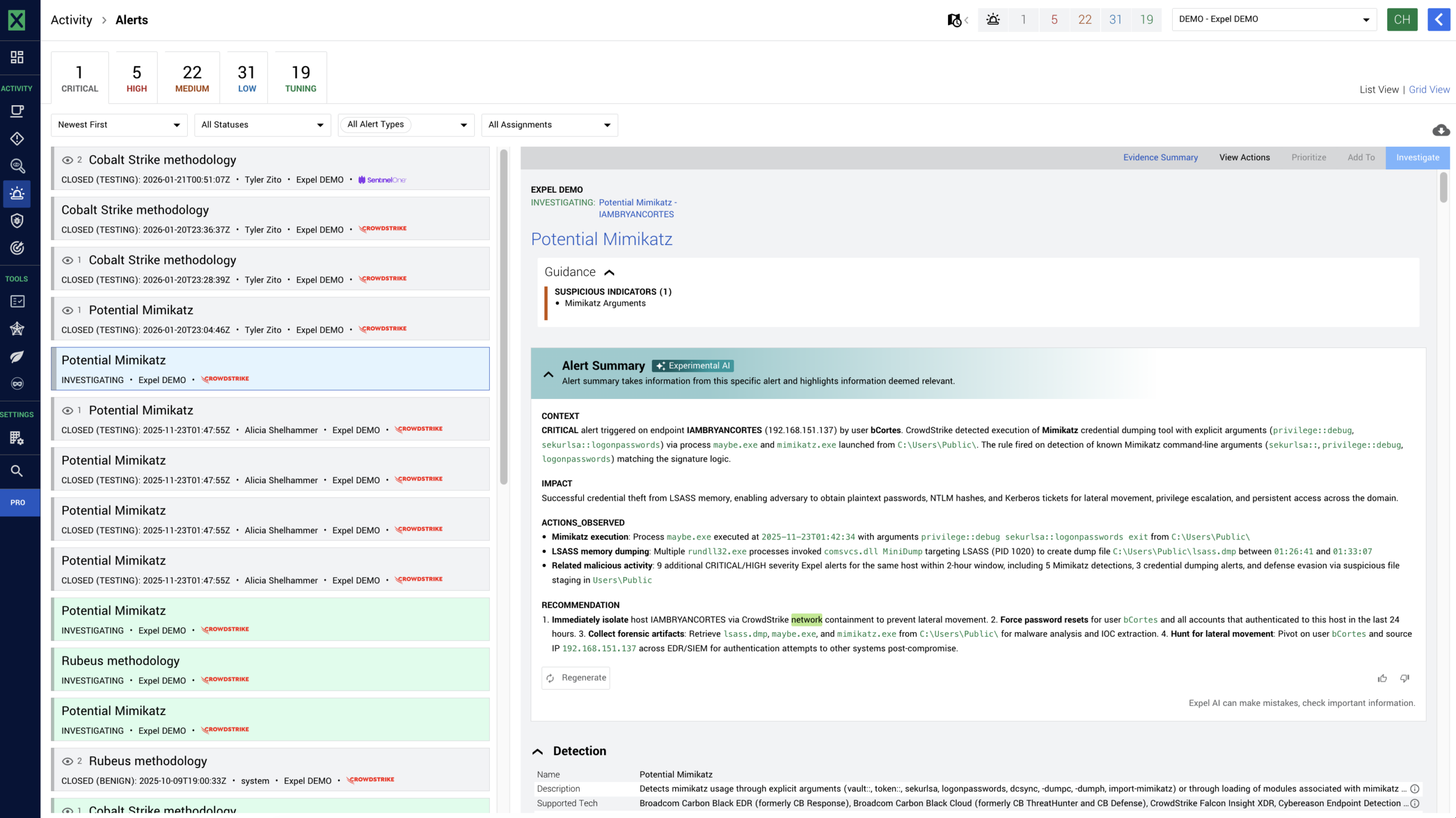
We built the lead alert summaries feature—the latest addition to Ruxie’s growing toolkit—to act as your security GPS for these exact moments. Now, when a lead alert fires in Workbench, a single click leverages Ruxie to translate the noise of raw logs into clear, actionable, plain English using large language models (LLMs).
Here’s what lead alert summaries highlights:
- Context and impact: A clear explanation of what we already know about the activity and how much it actually matters to your specific environment.
- Key observables: A breakdown of the most important indicators involved, complete with context on why they look suspicious so you don’t have to guess.
- Recommendations: Suggested next steps derived directly from the alert data, so your team knows exactly how to investigate or remediate the threat and get back to their day.
Why this matters
In security operations, transparency and speed are everything. Because the lead alert is the tip of the spear for the Expel MDR investigation, understanding it instantly is critical for our SOC analysts to deliver fast outcomes. We built this feature to tackle two massive operational realities:
- Transparency and trust: Our team and yours shouldn’t have to hunt through alert details to figure out what’s going on. We want to give you clearer insight into Expel alerts immediately. This feature gives you the “so what” when an alert fires, plain and simple.
- Faster triage times: Reviewing individual fields and raw logs is tedious and burns cognitive cycles. Natural language summaries help our analysts—and your team—orient on alerts significantly faster. By delivering summarized content, we’re cutting out the manual toil so you can make decisions and move on.
How it works under the hood
When a lead alert fires, Ruxie uses LLMs to automatically generate a summary packing the essential context, the potential impact, and the actions you need to care about.
Here’s what happens behind the scenes:
- Targeted generation: The LLMs ingest the raw data from the lead alert to synthesize the narrative.
- Data-driven recommendations: The LLM looks at the specific information found within that alert and attempts to provide concrete recommendations for next steps. It’s grounded entirely in the reality of the alert data (no information present in the investigative actions).
- Active monitoring: Behind the scenes, we’re actively monitoring the feature using tools like Langsmith to keep a close eye on drift, accuracy, and bias. If the model starts missing the mark, we know about it.
- Continuous Improvement: We want to make this as relentlessly useful for your team as possible, which means we want your input. See a summary that hits the nail on the head? Give it a thumbs up in the Workbench UI. See one that missed? Thumbs down. That direct in-product feedback helps our team continuously sharpen the summaries.
Clearer insights, faster triage
You shouldn’t have to be a forensic log expert just to understand what these lead alerts mean and why our SOC is investigating them. By summarizing the noise into actionable intelligence, this new Ruxie power-up helps our team get their bearings faster, prioritize the threat, and stop it before they stop you. It’s also one of the features we built for you to use, so you’re always in the know.
Let’s get to the “so what” together.