

A security incident response platform is software that centralizes alert triage, investigation, playbook automation, and case management so security teams can respond to incidents faster and more consistently. The category spans security orchestration, automation, and response (SOAR) tools, dedicated incident response (IR) case management software, and the operations platforms behind managed services.
Key takeaways
- “Incident response platform” is a category, not one kind of tool. It covers SOAR, case management software, and the platforms managed detection and response (MDR) providers run their own operations on.
- Evaluate four things: how it ingests and correlates alerts, how much triage and containment it automates, how it integrates with your existing stack, and whether its case management holds up during a real high-severity incident.
- The real decision is usually build versus buy—licensing software your team operates, or buying a service where someone else operates the platform.
- Integration maintenance is the hidden cost. Playbook logic and connectors need ongoing engineering, and that work doesn’t stop.
- Demo environments hide the thing you need to know. Ask how the platform behaves at your actual alert volume during a multi-system incident.
- Expel Workbench™ is Expel’s own operations platform, not something sold as a separate license. It’s useful here as an architecture reference, not a purchase option.
If you’re researching this category, you’re probably somewhere between “our current tooling can’t keep up” and “we’re not sure what we’re actually shopping for.” That’s a reasonable place to be, because the category label covers genuinely different things—automation engines, ticketing systems built for security work, and the internal platforms that power managed services. The right starting question isn’t which vendor, it’s whether you’re buying software your team will run or a service where operating the platform is someone else’s job. That answer depends less on features than on whether you have the engineering capacity to keep an incident response workflow tuned over time.
What does an incident response platform actually do?
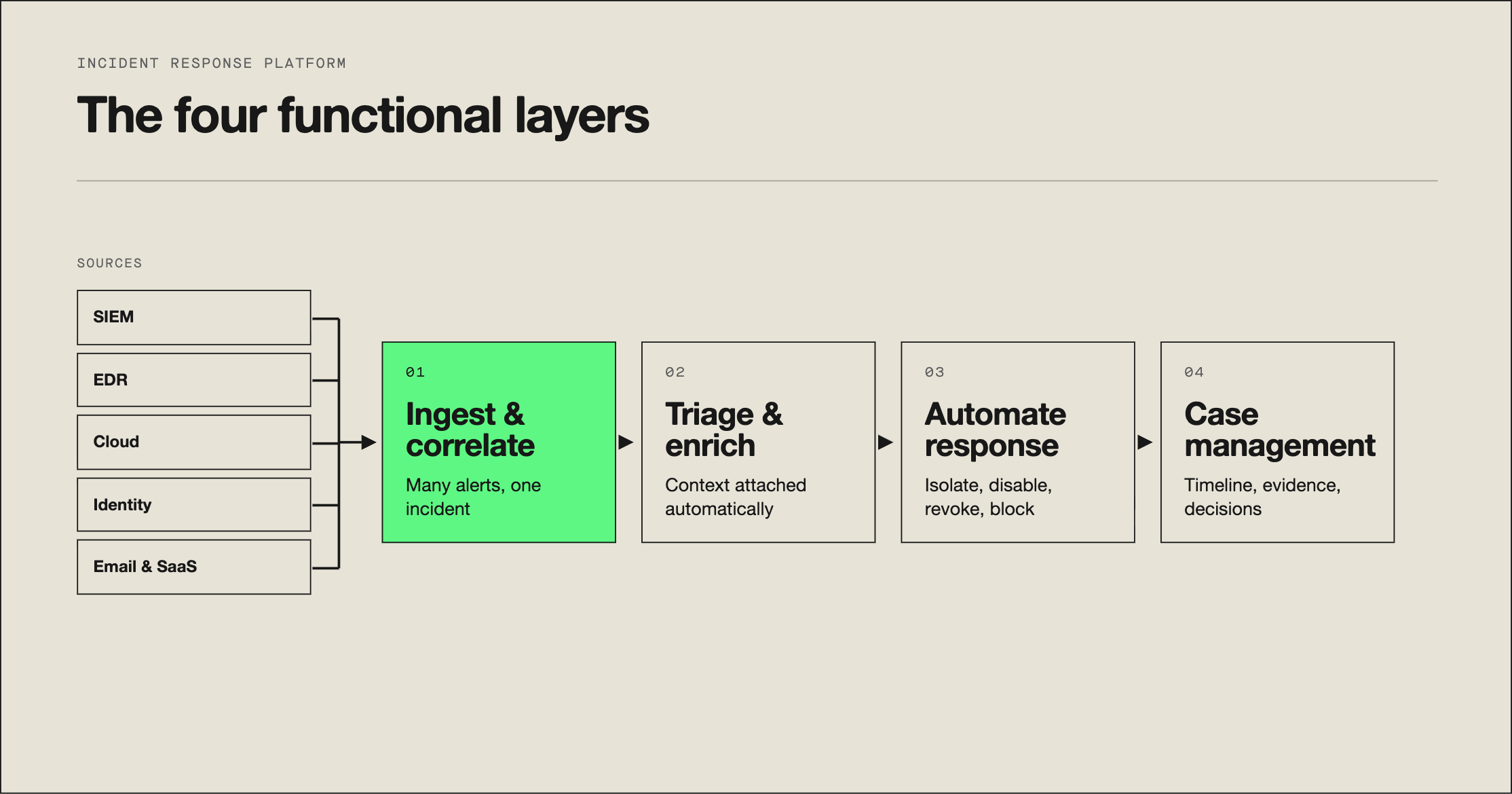
Four functions, and most products in the category emphasize one or two of them heavily:
Alert ingestion and correlation. Pull signals from your endpoint detection and response (EDR) tooling, security information and event management (SIEM) platform, cloud providers, identity provider, and email security, then group related alerts into a single incident. This is where the biggest volume reduction happens, and it’s the least visible capability in a demo.
Triage and enrichment. Automatically attach the context an analyst would otherwise gather by hand—asset criticality, user role, threat intelligence on an indicator, related activity on the same host. Enrichment is what collapses the front end of an investigation, and it’s usually where the largest time savings sit.
Playbook automation. Execute predefined response sequences: isolate a host, disable an account, revoke sessions, block a domain, open a ticket. The value depends entirely on how much you’re willing to let run without human approval.
Case management. Track the incident as a record—timeline, evidence, actions taken, decisions and their rationale, and the artifacts you’ll need for an after-action report or a regulatory filing.
A tool that’s excellent at automation and mediocre at case management will fail you during a long, complex incident. One that’s great at case management and weak at correlation won’t reduce your alert volume at all. Know which problem you’re actually solving.
How is a SOAR tool different from an incident response platform?
SOAR is a subset of the category, focused heavily on automated playbooks and integrations between tools.
| SOAR | IR case management | MDR operations platform | |
|---|---|---|---|
|
Primary strength |
Playbook automation across tools | Incident record and workflow | Running detection and response as a service |
|
You operate it |
Yes | Yes | No–the provider does |
|
Needs in-house engineering |
Significant and ongoing | Moderate | None |
|
Detection content |
You write it | Not applicable | Provider builds and tunes it |
|
Best fit |
Teams with security engineering capacity | Teams needing rigor and auditability | Teams needing 24×7 coverage without building it |
The distinction matters mostly because SOAR carries an assumption people miss: it’s an engineering platform. It assumes someone on your team writes, tests, versions, and maintains playbook logic and connectors indefinitely. When an API changes or a tool gets replaced, that’s your engineer’s week. Organizations that bought SOAR without that capacity usually end up with a handful of working playbooks and a large licensing bill.
What should you evaluate when choosing an incident response platform?
Six questions, in rough order of how much they’ll matter a year in:
- How does it correlate, not just collect? Any platform can ingest alerts. Ask specifically how it groups related alerts into one incident, and what the reduction ratio looks like at volume comparable to yours.
- What percentage of triage runs without a human? Get a concrete answer with examples, not a capability claim. “Supports automated enrichment” and “enriches 90% of alerts without analyst action” are different claims entirely.
- What does the integration list cost to maintain? A long connector list is a maintenance surface. Ask who owns updates when a vendor changes an API, and what happens to your playbooks when you swap EDR tools.
- How does case management behave in a bad incident? Not a single-alert demo—a multi-day incident touching 40 hosts, three cloud accounts, and an identity provider. Ask to see a real anonymized case record.
- What’s the containment authority model? Which actions can execute automatically, which require approval, and how granular is that by asset class? This is where response time is won or lost, and where a platform can create real operational risk if it’s too blunt.
- What does it need from your team, permanently? Detection tuning, playbook maintenance, integration upkeep, and platform administration are ongoing jobs. Total cost is the license plus the fraction of an engineer it consumes.
Should you build with a platform or buy a managed service?
This is the decision most people in this research actually face, and the honest framing is about engineering capacity rather than platform quality.
Licensing a platform makes sense when you have dedicated security engineering capacity, you need custom automation that reflects unusual internal processes, you have staff coverage across the hours incidents happen, and you want direct control over detection logic.
A platform-backed managed service makes sense when 24×7 coverage is the actual requirement, you don’t have engineers to spare for playbook and integration maintenance, you want detection content built and tuned by someone who sees many environments, and you’d rather buy the outcome than operate the machinery.
The trap in the middle is buying software to solve a staffing problem. A platform doesn’t add analysts. If your gap is that nobody is watching between 11pm and 7am, better tooling makes that gap more efficient rather than closing it. Conversely, if you have a strong team drowning in manual correlation, a platform genuinely helps and a service may be more than you need.
There’s also a hybrid pattern worth knowing: many organizations run their own case management for internal workflow while getting detection, triage, and initial containment from an MDR provider. That keeps the record in-house while outsourcing the round-the-clock function.
How does Expel Workbench map to those four functions?
Worth being direct about what this section is and isn’t. Expel Workbench is the proprietary operations platform that powers Expel’s own 24×7 SOC and managed detection and response service. It is not sold as a standalone, independently licensed incident response platform. It’s here because a first-hand architecture walkthrough is more useful than a generic category description, not as something you can license separately.
The architecture maps to the four functions above:
- Ingestion. Workbench pulls telemetry across 160+ coverage areas—endpoint, cloud, identity, network, SaaS, and email—and normalizes it so a detection can reason across sources rather than one tool at a time. Correlating an identity anomaly with endpoint activity is where a lot of real detection value lives.
- Detection. Roughly 2,450 proprietary detections run against that telemetry, written and tuned by our detection engineers rather than by each customer. When a technique surfaces in one environment, the resulting detection covers every environment we monitor.
- Triage and enrichment. Automated triage narrows alert volume, and Ruxie, our AI SOC manager, assembles investigative context so an analyst opens a working picture instead of a raw alert. AI in the human loop—human-led, AI-powered, with a named analyst making the call and the reasoning visible to the customer.
- Response and case management. Pre-authorized containment actions execute immediately at defined severity levels, which is what produces a 14-minute mean time to remediate (MTTR) on fully automated high- and critical-severity incidents. Customers see the same case record our analysts work in, including the decisions and why they were made.
The architectural point transfers regardless of what you buy: the platforms that compress response time do it by removing analyst work from the front of the process—correlation and enrichment—rather than by automating the response actions at the end.
Best practices for evaluating and running an IR platform
- Score vendors against your own capability list before demos, not after. Demos reset your priorities to whatever the product does well.
- Test at your real alert volume. A platform that behaves well with 50 alerts a day may not at 3,000.
- Ask to see an anonymized record from a genuinely messy multi-day incident.
- Budget the engineering time, not just the license. A platform nobody maintains degrades within a year.
- Start automation narrow and expand. Two reliable playbooks beat 20 that analysts have learned to distrust.
- Define containment authority by asset class up front. “Isolate any host automatically” is fine until it’s a domain controller.
- Reassess after a real incident. That’s the only honest evaluation you’ll get.
Expel’s take
The uncomfortable thing about this category is that most of its value comes from work the platform doesn’t do.
Correlation and enrichment are what compress response time, and both depend on detection content—rules written by people who understand attacker behavior, tuned against real environments, and updated as techniques change. A platform ships the engine. Someone still has to write and maintain what runs on it. Organizations that buy platform capability without that content or the engineers to build it end up with fast tooling pointed at unreliable signals.
That’s the reasoning behind how Expel is structured. We built Workbench as our own operations platform rather than something to license, because the platform and the detection content and the analysts who use them improve together. Our detection engineers tune against every environment we cover, so a technique we see at one organization sharpens detection everywhere within days. That feedback loop is the actual asset, and it isn’t something you can buy as software.
So the practical advice is if you have security engineers and want control, license a platform and staff it properly. If your gap is coverage and content rather than tooling, buy the service. Just don’t buy software expecting it to close a staffing gap. That’s the most common and most expensive mistake in this category.
Frequently asked questions
What is a security incident response platform?
A security incident response platform is software that centralizes the tasks of investigating and resolving security incidents—alert triage, evidence gathering, automated playbooks, and case tracking—in one system. The category spans dedicated SOAR tools, case management software, and the operations platforms that power MDR providers.
What’s the difference between a SOAR tool and an incident response platform?
Security orchestration, automation, and response (SOAR) is one category of incident response platform, focused heavily on automated playbooks. “Incident response platform” is a broader term that also includes case-management-first tools and the proprietary platforms MDR providers use to run detection and response.
Should we build our own incident response platform or buy one?
Most organizations without a dedicated security engineering team get more value buying a platform or a platform-backed managed service than building one, since maintaining integrations and playbook logic in-house requires ongoing engineering investment.
Does Expel sell a standalone incident response platform?
No. Expel Workbench™ is a proprietary operations platform that powers Expel’s own 24×7 SOC and MDR service. It isn’t sold as a standalone, independently licensed IR platform. Organizations can compare Workbench’s architecture as a reference point, then evaluate Expel’s MDR service for platform-backed managed response.
What should you evaluate when choosing an incident response platform?
Evaluate how the platform ingests and correlates alerts, how much of triage and containment it automates versus requiring manual work, how it integrates with your existing SIEM, EDR, and cloud tooling, and how its case management and reporting hold up during a real high-severity incident.